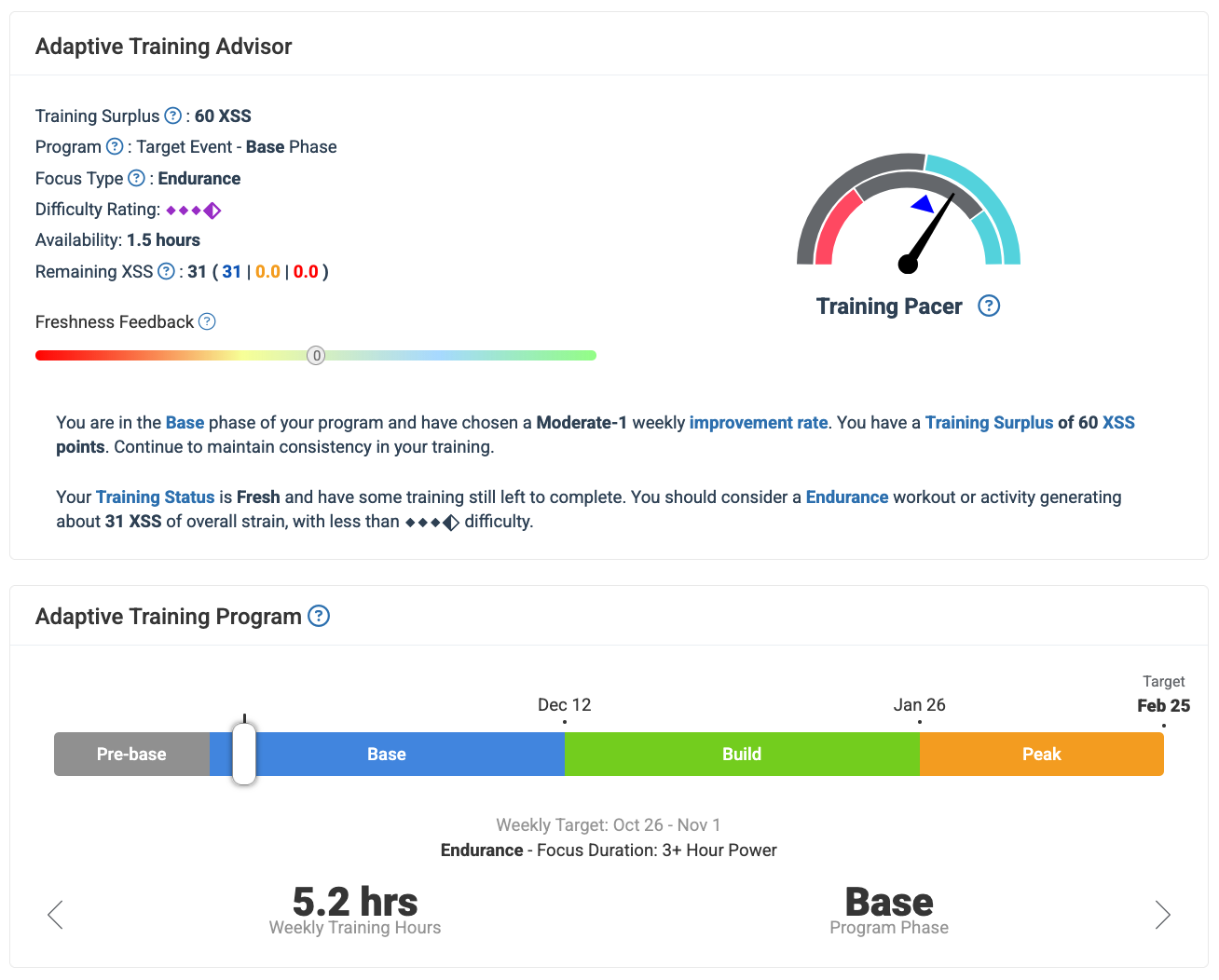
I just signed up today and configured my program for a 120-day Base-Build-Peak. I also setup the days of the week that I am available and usually train.
When I go to the planner view, it’s empty (aside for historical rides/ workouts imported from Strava). Is it supposed to be empty?
Looking forward to exploring Xert and using it on my Garmin for the first time tomorrow!
Yes. XATA programs operate with a blank calendar. XFAI plans pre-populate the calendar.
With XATA Base-Buiild-Peak a periodized progression operates in background as you follow daily guidelines and make day-to-day decisions.
Both program types are adaptive in nature and subject to change along the way as you approach your target date.
Thanks! Started reading and watching some videos. Where would you recommend I look to understand the results of my first ride using Xert? I don’t understand why it’s saying it was a tough ride haha
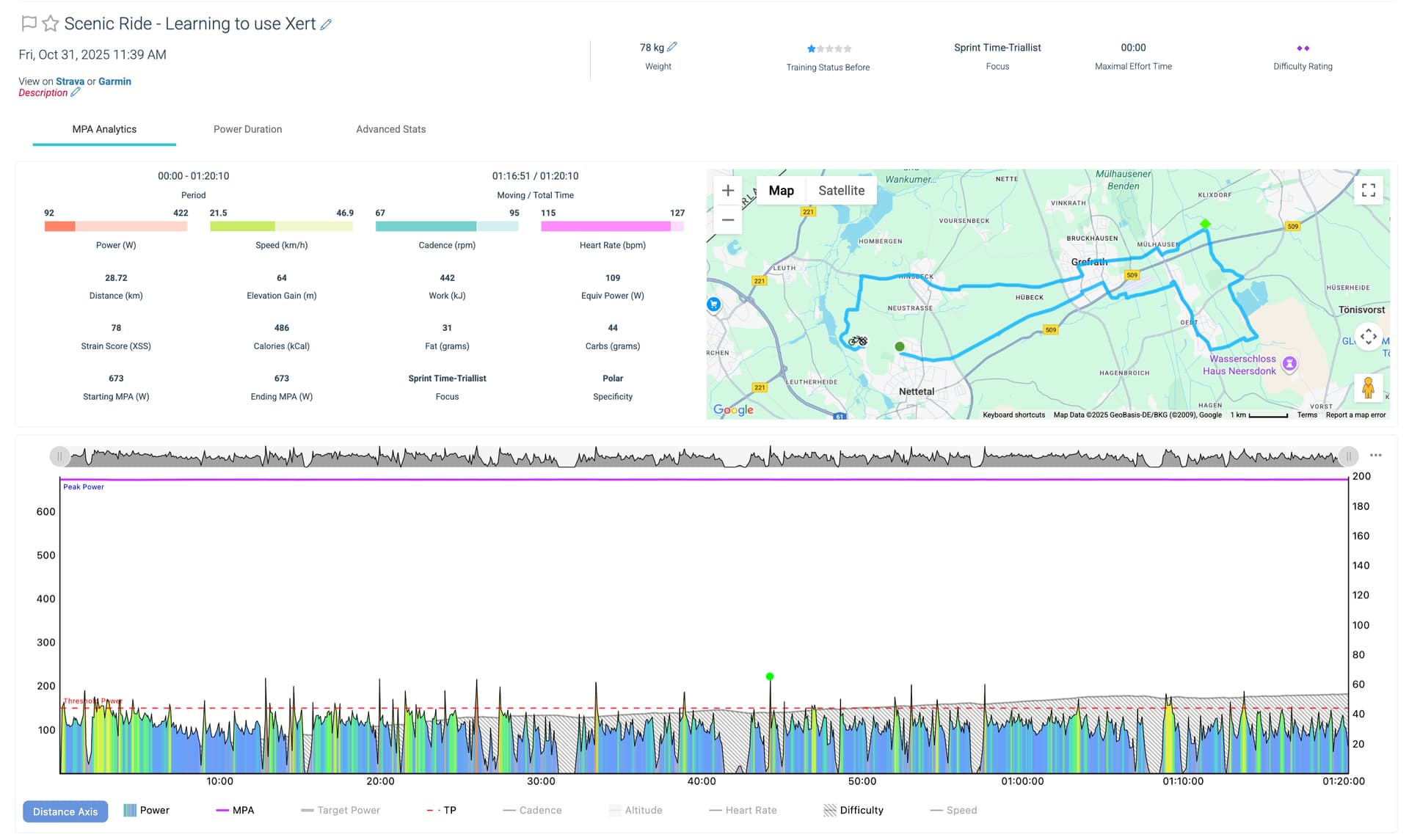
Post a screenshot of the power chart as that will provide visual clues to the rating and scoring.
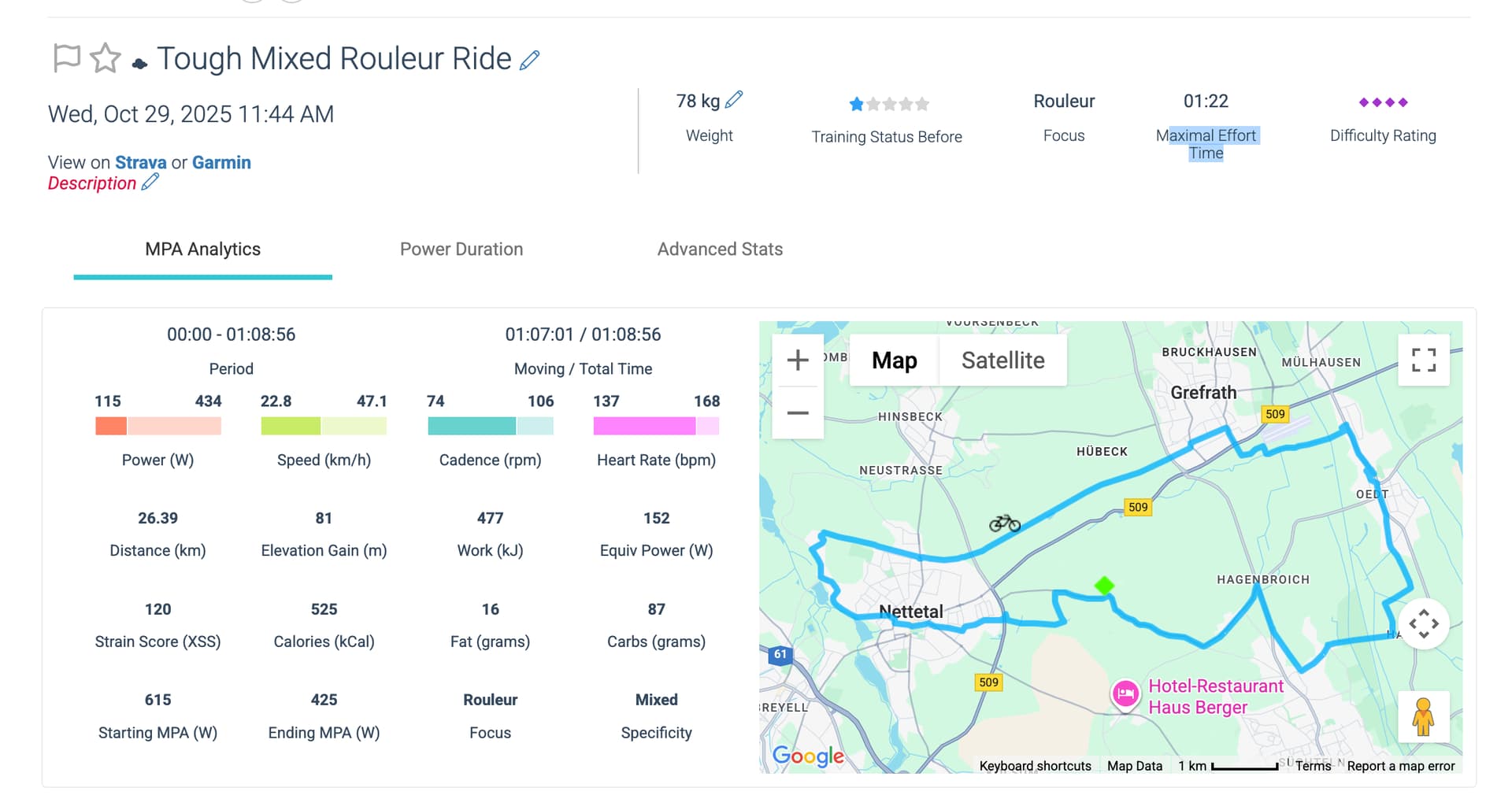
Status Stars count – current Training Load is 1 star (25-50) Specificity – Mixed (majority of time at endurance (<TP) with efforts above Focus Duration (Rouleur/6 min power)
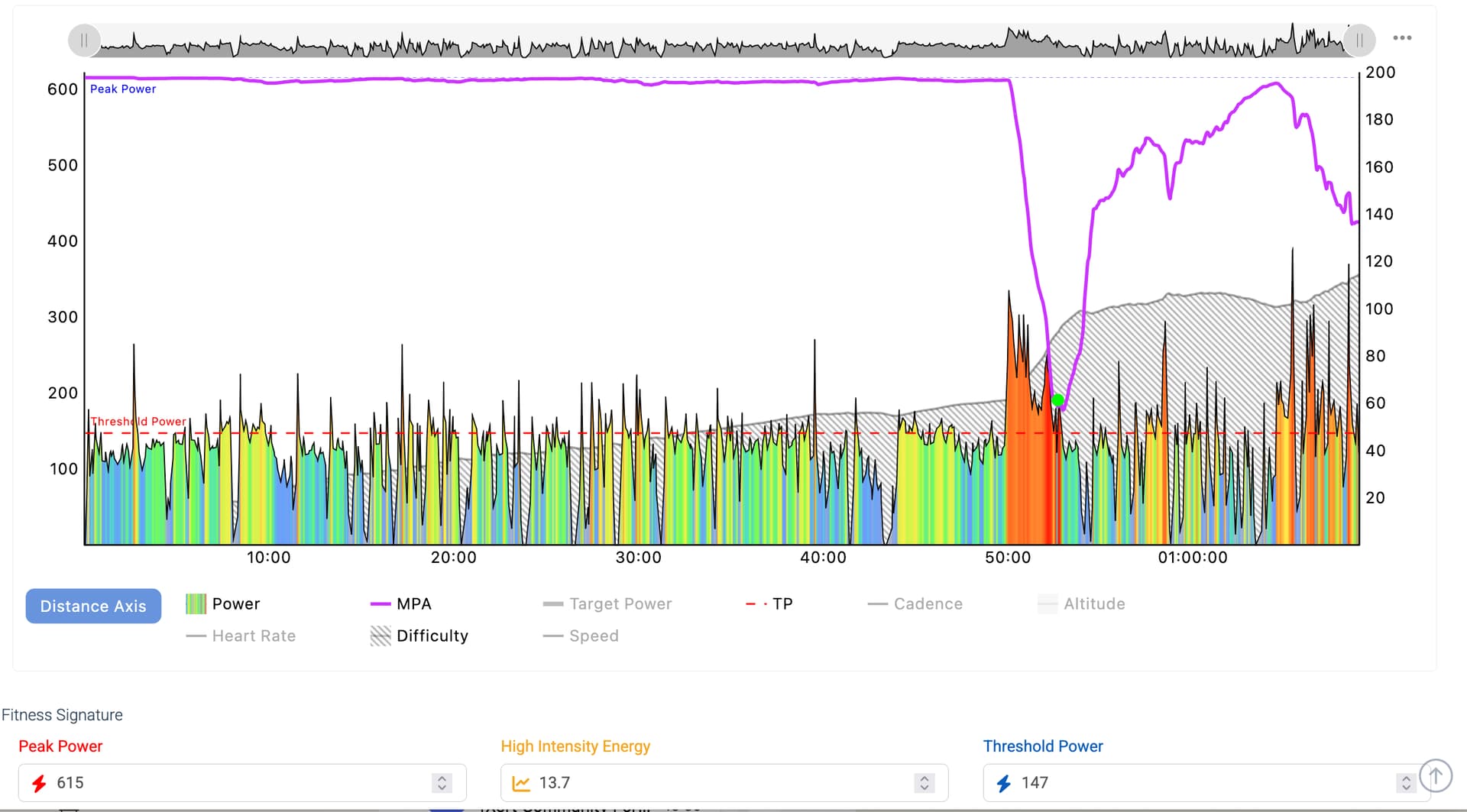
Difficulty Rating (diamond count) – reflects highest Difficulty Score (DS) reached during the activity as shown in shaded portion of the chart
XSS Rate per hour:
Easy: <45-50 (1 to 1.5 diamonds)
Moderate: 50-75 (2 to 2.5 diamonds)
Difficult: 75-110 (3 to 3.5 diamonds)
Tough: 110-150 (4 to 4.5 diamonds)
Hard: >150 (5 diamonds)
Cool! Lots to learn .
It wasn’t meant to be a difficult ride. According to my schedule, today is a rest day. But I had time and I wanted to get out for a ride (especially to try Xert and Magic Buckets!!). I tried to stay in my Zone 2 HR which up to 137bpm. I just recently found out that what Garmin was estimating (max 126bpm) was way too low.
So the ride wasn’t meant to be tough. I pushed it on the climb just for fun and at the end I was following a car at about 30km/h and I tried to sustain it (and draft hehe). Here’s my power chart (my non-impressive power chart)!
The power chart we need to view is the one below the data table that shows second by second power output along with magenta MPA line above and shaded portion indicating Difficulty Score.
How much history has been imported into Xert?
When was last BT (breakthrough) detected? (indicated at top of Training page)
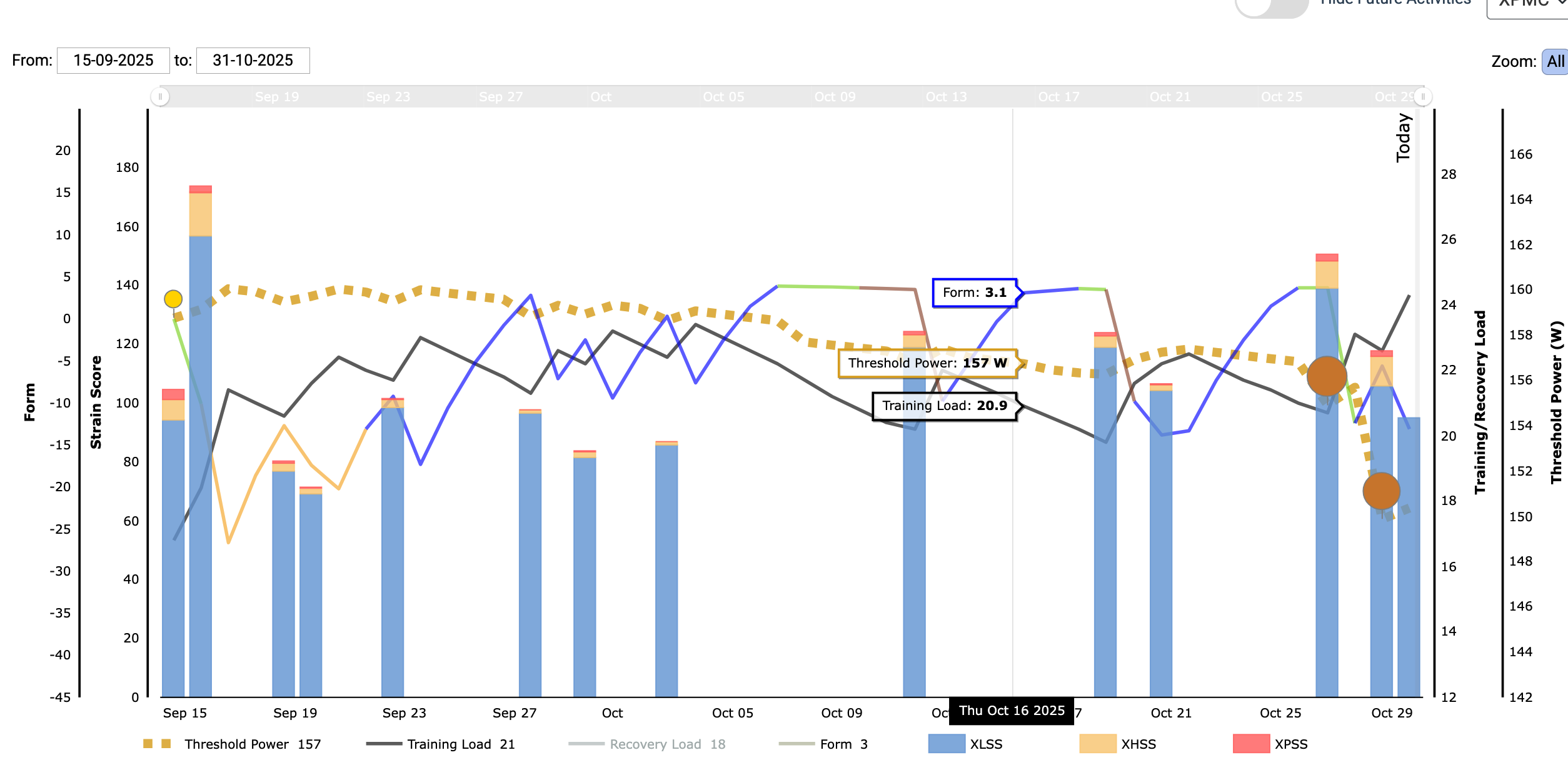
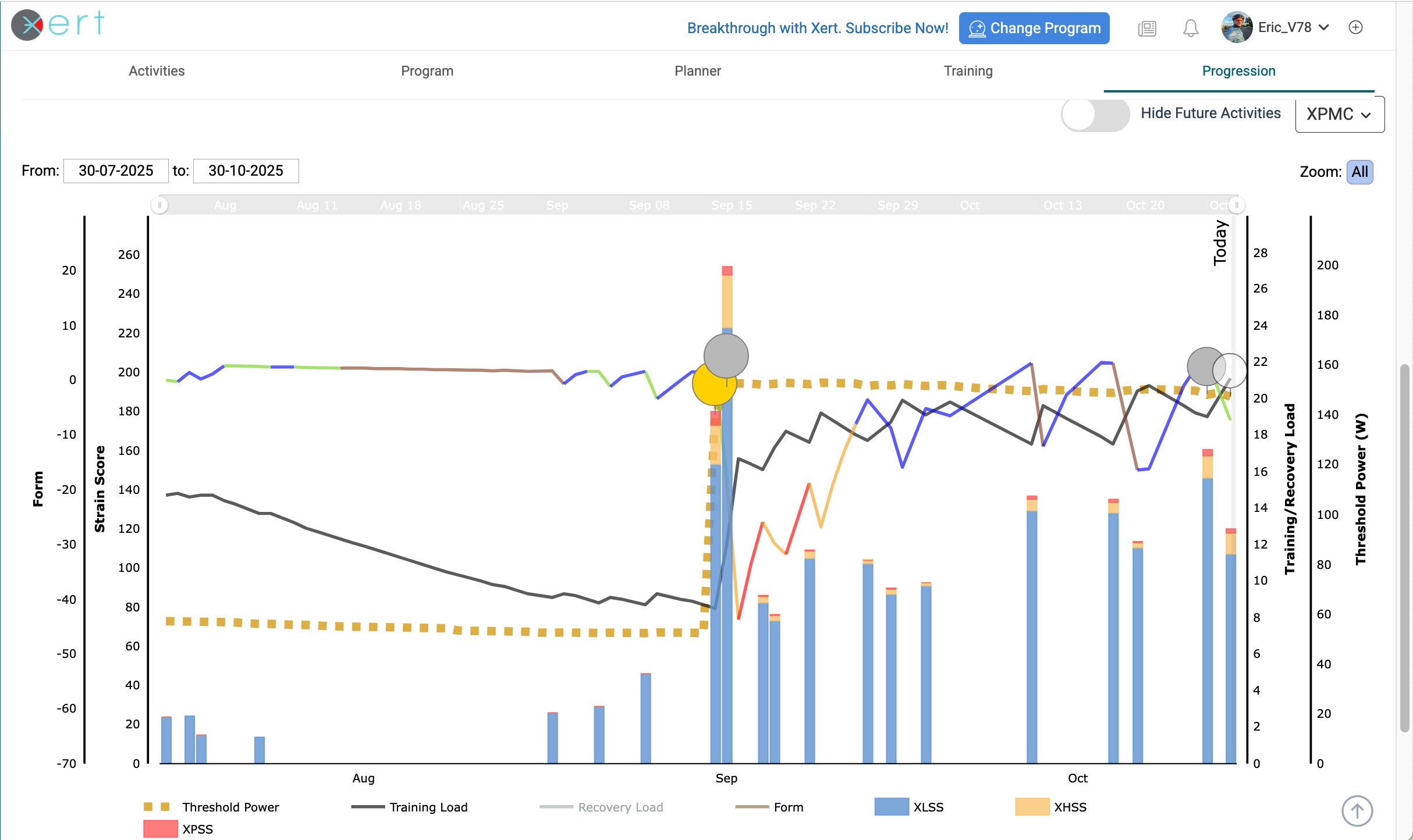
Select the Progression tab, select 3 months in dropdown, scroll down to the XPMC and all your BT circles are shown during that period. You don’t need lots of them but you do need a few to establish an accurate fitness signature.
Thanks again. Btw, should we start a different thread since we are no longer talking about the empty planner? I really do appreciate all your support!
I got my bike in September so I’m quite new. There would be 2 days in July over which I did 195km but it was rented bike with no power meter. So I would only have the HR data from my Garmin watch.
Off Topic is the norm when it comes to forums. The search box will locate the appropriate content when needed.
A few things to unpack –
Go to Garmin Connect Sync, Edit Activities, enable only Cycling and Virtual Cycling, then Save. Otherwise non-cycling activities with HR or power will generate XSS that can affect training recommendations and throw off you cycling fitness signature. If you have a secondary activity such as rowing or running that you want to track, you can create a separate profile for that activity and sync that data to the profile. Each profile can have different settings. Up to three profiles are supported.
Your TL is low at the moment with a limited history to work with. As you add more activities XATA will learn more about you plus workout library suggestions expand as you reach two stars. You don’t need to reach 4-5 stars to train effectly with Xert but you want some wiggle room to establish a progression during a training block with a seasonal or event goal in mind.
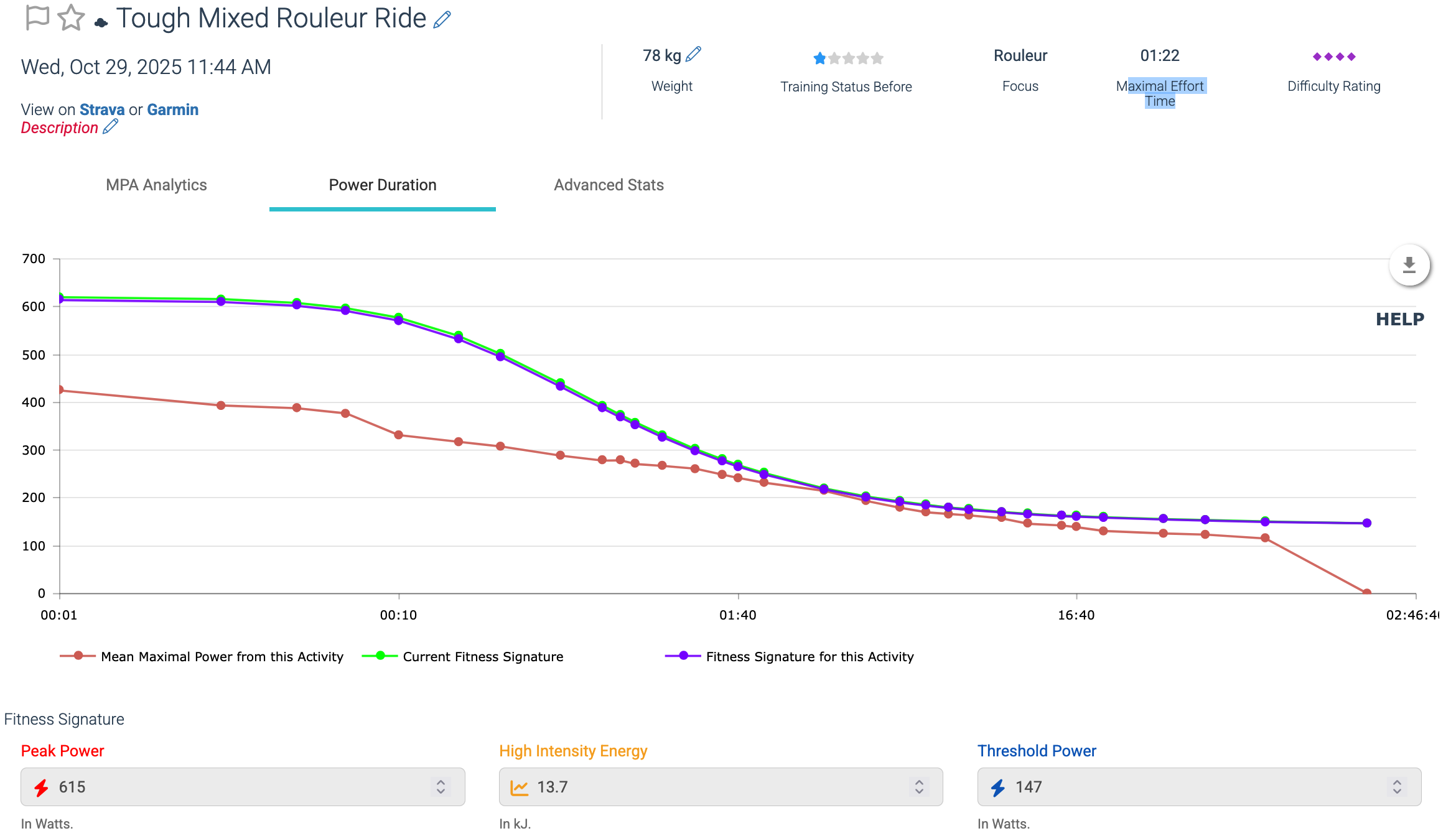
It’s likely your signature is understated if that ride was not 4-diamond Tough at the end. You did draw down MPA enough to trigger a BT and kept it down till the end of the ride. But unless you were really suffering during that section the Difficulty Score >110 was not warranted.
The next step would be to validate your current signature by riding the standard Fitness Test in Slope mode indoors or perform a similar effort outdoors. Before doing that you can play a what-if scenario with that last BT activity. View the power chart, raise TP a few points, select Refresh, and watch what happens to the power colors, XSS value, MPA drawdown line, and Difficulty Score (shaded portion). A sufficient rise in TP entered will cause the rating to drop to 3-diamond Difficult rating. As a newbie you may not want to Save the results but experienced Xerters can use this method to tweak their signature when they feel the numbers aren’t correct for them. Saving the result locks the changes as a new reference point so future adjustments apply to that signature benchmark.
The difference in Extract versus Refresh is Refresh only affects the current activity and is useful if you want to tweak a signature value.
Extract will apply the recalculation algorithm across your history. Extract is useful to correct an errant signature as long as the activity includes sufficient maximal effort points to failure or MPA breakthrough events occurred.
If you aren’t comfortable using either option the alternative is to validate your signature with a Fitness Test of some sort. Or execute more maximal efforts to failure on your outdoor rides including 7-10+ sec sprint efforts now and then to confirm your PP (peak power).
A combination of maximal efforts to failure across your power curve feeds the signature algorithm.
The ability to repeatedly pull down MPA with partial recoveries reflects your HIE. If you can pull off multiple BTs on XMB that’s a good indicator bumps in HIE and TP are due.
Once you establish enough history with cycling power data (preferably with cadence) you can enable HRDM (Heart Rate Derived Metrics). This feature will estimate the metrics on your rides without power such as a rental while traveling.
Calculations will be more accurate if you attach a cadence sensor to the left crank and capture rpm on rides.
Note: HRDM will also calculate metrics for non-cycling activities without power. You want to remove those activities from your cycling profile if you don’t want those metrics to affect training advice on your cycling profile.
Awesome! Everything was synchronizing from Strava. Updated the settings there and manually deleted what was not cycling related. Left 3 indoor stationary workouts from the hotel gym a few weeks ago. My new graph looks like this:
Also, usually I try to ride on Thursday morning but instead I’ll go tomorrow. I see that there was a workout in the planner today which is great! I am using Magic Buckets on my Garmin so I guess it will simply estimate and adjust when I go out for my ride tomorrow? I didn’t plan on choosing a workout from the list: simply get on my bike for a 26km ride that I will have chosen and start Magic Buckets - does that make sense?
Yes, that will work fine.
When a workout is not assigned to the Planner XMB picks up the top-level advice for XSS ratio (low/high/peak). I.e. the general advice you see on the Training page.
When a workout is scheduled on the Planner XMB picks up the XSS target from that workout’s specs instead.
Usually the two are very close or moreso close enough to match the Focus Duration and XSS goal for the day.
You likely have Automatically Schedule enabled under the Planner settings which randomly selects a workout after midnight each day from the top list of suitable workouts for that day.
When I get around to it I’m going to post a topic on how to use XMB to shoot for a BT whenever you feel up for one.
The simplest approach is to heed the pop-up message that appears when you are close to a BT. The message will say “30 secs until Breakthrough”. If you have enough in the tank just keep going at the current strain level for at least 30 secs. If you start to fail try going even harder to raise watts which willl shorten the seconds required.
I got a BT a couple days ago riding indoors with my Garmin 830 by counting 30 breaths as soon as I saw the pop-up. I didn’t watch the screen at that point but concentrated on pedal stroke until failure. You might also want to stand up when you start to fail.
Even when you don’t acheive a BT with a max effort to failure the fact that it hurt confirms your signature is dialed in.
Also be aware a BT on the Garmin doesn’t necessarily qualify as a BT when you upload the activity. The XO server performs a more accurate second-by-second analysis online.
Again if you got close that’s a good way to confirm your signature is dialed in.
So, did my ride today using XMB. What I think I understood based on the program I chose and my fitness level, is that until Dec I will be building base. That is why today’s ride was… scenic! haha. Target power was 103W.. It was hard for me to stay that low. My HR was under 120 which is zone 1 for me. But trust the process I guess . I had selected a 29km ride. In the end XMB wanted me to ride another 30min to achieve my goals but I was already home and couldn’t keep going since I had to get back to work.
Target power is just a recommendation. Any power below TP counts towards your Low XSS. Closer to TP you ride, the higher the XSS rate. Today’s target power of 103w is relative to your Availability for the day. What was your Low XSS goal for today? If XMB wanted you to ride for another 30min, it was likely in the 110 range (30 min of endurance is roughly 30 XSS)? Reiterating an important note, Low Intensity days can be done at any power you want up to TP! XMB is just trying to get you the right amount of strain in the available time. Have less time like today? Ride a little harder. This is where XDB is useful. You can see your XSSR (rate of XSS accumulation). 60 XSSR is 1 XSS per minute. Hope this helps.
When you select XATA Base-Build-Peak the default target date is 120 days out.
The phases consist of 45 days Base, 45 days Build, and 30 days Peak with a Taper warning appearing during the last week (manually scale back if target date is an event).
During Base phase XATA will only recommend endurance level workouts and the daily XSS ratio will default to xxx|0|0 (low/high/peak).
The XMB Endurance screen willl display a Low bucket field plus a middle target “Zone” data field that represents time (not watts) spent between 75-100% LTP.
For most users LTP (a calculated value) is close to LT1 (a physiological marker).
The target watts shown is midway between (87.5% LTP) and serves as a reference point.
As @kc2738 mentions are you are not tied to that target. Any pedaling within 75-100% LTP will contribute to the Zone data field (Z2-ish). OTOH any watts <TP are also considered endurance points in Xert so riding above LTP but below TP will count towards filling the Low bucket. Riding in that range (tempo/sweetspot) increases XSS per hour and fills the Low bucket faster than riding “in Zone”.
You’ll also likely see some high and peak points accrue due to surges at traffic lights, short climbs, etc. That’s unavoidable depending on the route you ride. Unless you have a closed flat course loop or similar your endurance rides willl include a mixture of XSS rates.
While XATA is only going to recommend endurance level activity during Base, that doesn’t mean you can’t sprinkle in some HIT when you want to (ignoring the day’s advice).
In your case you want to because your signature may be understated. That would also explain why you felt the ride was more Z1 than traditional Z2.
To confirm that you’ll want to execute a Fitness Test level effort on your next ride when feeling fresh. I suspect a latent BT which will adjust your signature numbers and calculated LTP.
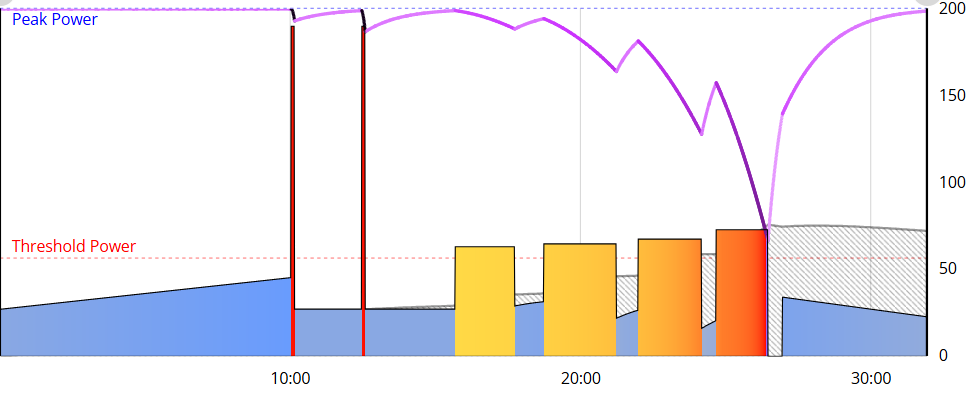
Here’s what the standard Fitness Test looks like indoors. To execute outdoors ride this pattern (doesn’t need to be exact) –
Warm up for ~10 min or longer
Perform two 7-10 sec all-out sprints with ~5 minutes easy pedaling after
Start a series of escalating intervals >TP with short recoveries and make sure to ride to failure on the last one.
For example, first interval ~2+ minutes just above TP, ~one minute rest, next interval a little higher watts followed by ~45 sec rest, next a bit higher and likely shorter, ~30 sec rest, then a final interval around a minute or so (feel the burn) until failure. Then ride easy however long you want to finish out your ride. Let us know if that results in a BT.
 ) –
) –
 .
.
 The search box will locate the appropriate content when needed.