I am new to Xert, started a few days ago. I synced my data fro Strava. The TP estimated seems to be much lower than FTP that the last time I did test it on Jan 11 was 269W. What’s funny is Xert has show that as breakthrough in decreasing my power from my previous max on Jan 1 - 279W, that was also unrealistic and just 10 days before my test. I am pretty sure I put more effort in my testing than Jan 1 ride. I tried flagging my test on Jan 11 and my TP went up to 264W, which I think is still unrealistic given that I did a lot of training since Jan 11 until now. Without testing I would think my FTP now should be around 273W. I noticed that people here usually have their TP overestimated, but it is opposite here, and the breakthrough points don’t make sense. That is my first post here so let me know what else you need from me.
Select Progression tab, set to Year, and post a screenshot of your XPMC.
By testing do you mean you rode one of the Xert fitness test workouts in Slope mode or some other type of test?
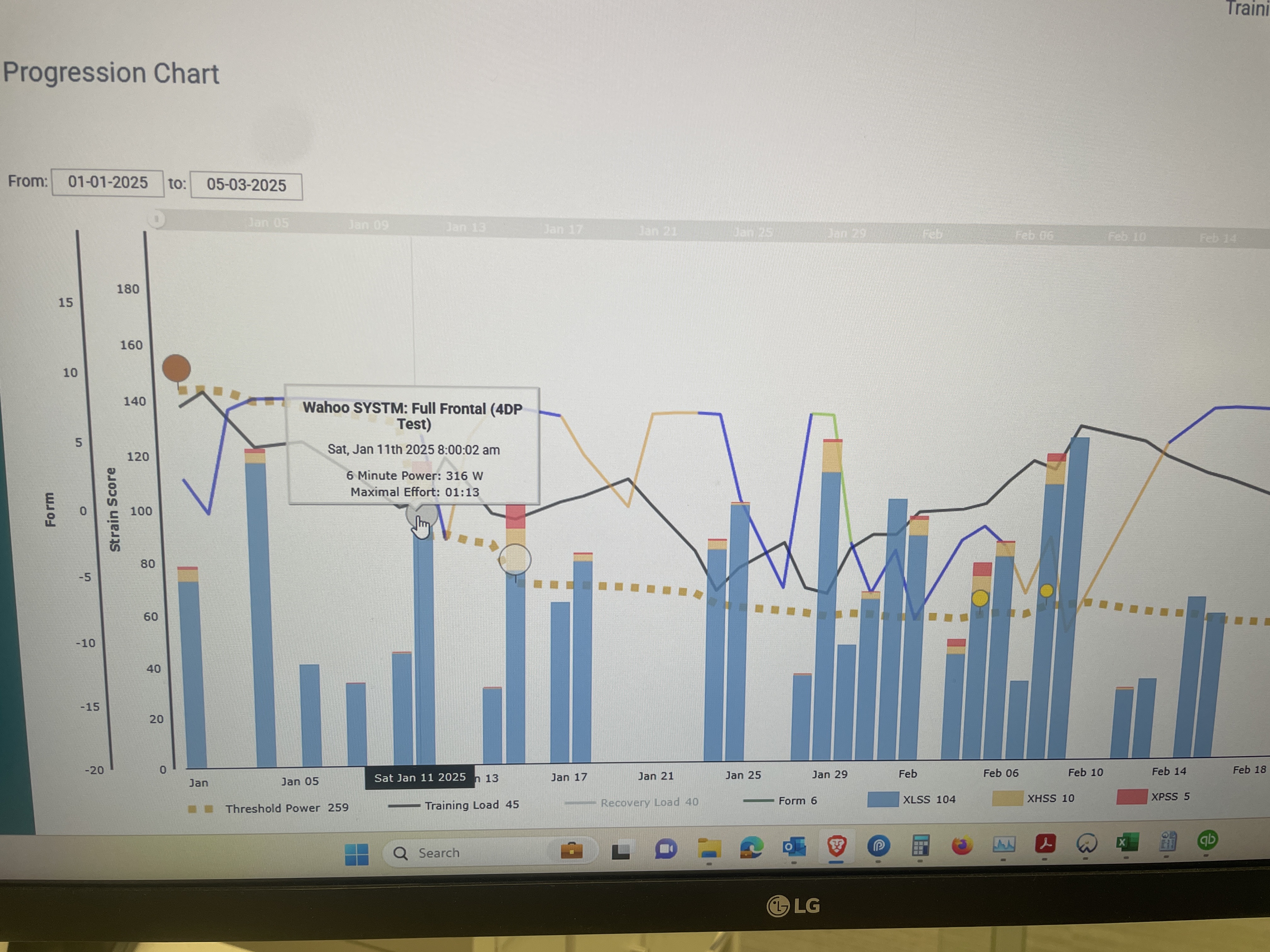
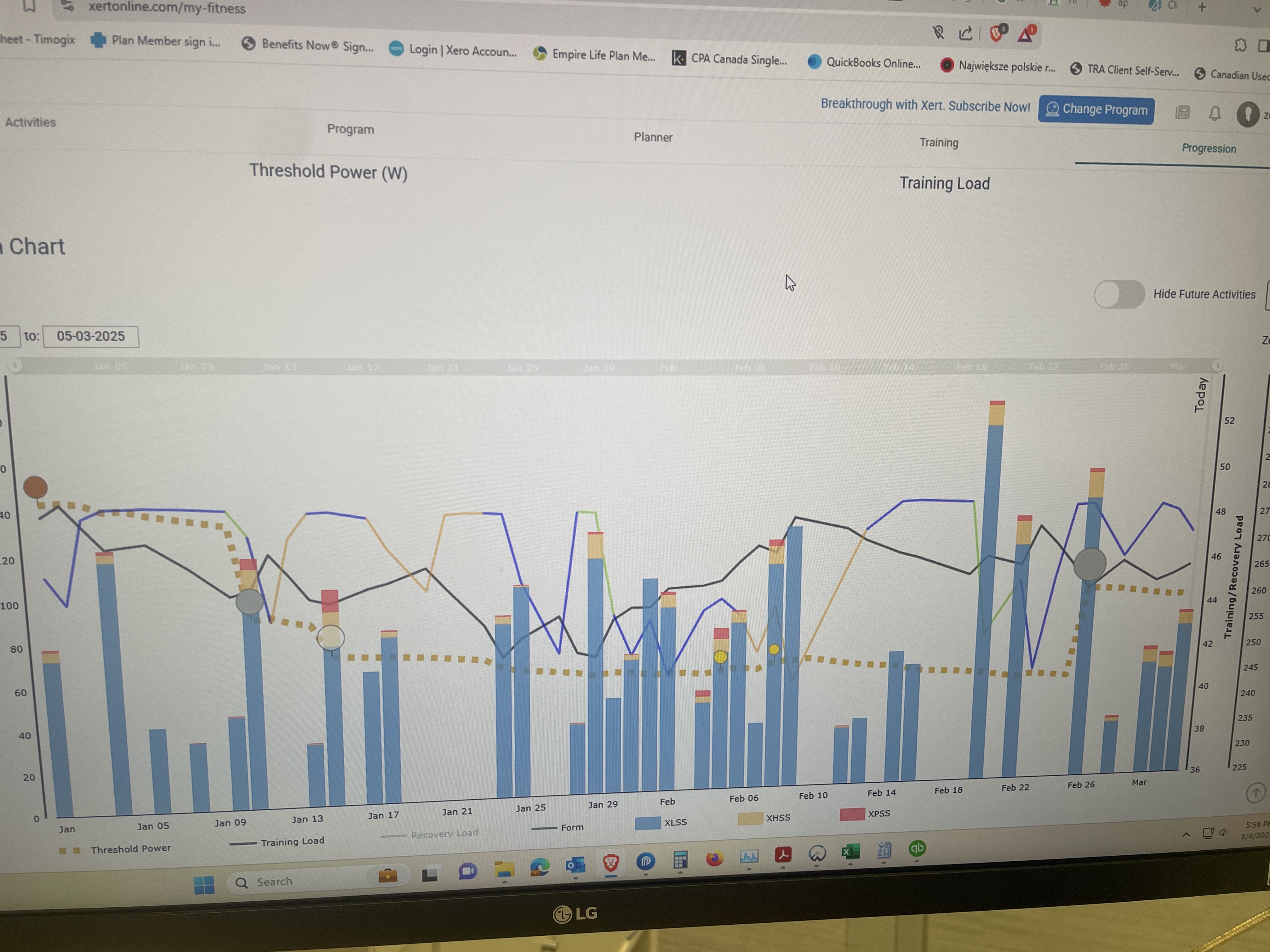
No, the test was done in Wahoo Systm (formerly Sufferfest). 10 days before that test Xert estimated my TP to be 279W.
Couple of things
- You need took at all parts of signature rather than TP alone. Did HIE and / or PP go up when Xert lowered TP from your test? Was the BT from a shorter or longer effort in the test? Did 6 minute power increase? In general I would ensure you have some max efforts in your data from across the curve including PP. Does not need to be formal MMP tests, but some BT from 5 seconds, ca 4 min, and 10 to 15 min plus
- Depending on decay setting, your signature will reduce over time, until you get another BT. If you don’t plan to go after many BT’s, it’s best to use ‘no decay’ or ‘slow’. Easy to change, also retrospectively
Thanks for taking time to respond. I am fairly new to Xert, but as I understood your response to best way to update my fitness signature to the most up to date metrics would be to do really hard effort that would hit all the major points. And if I am not planning to do many of those I should change my decay settings. Is that right? Also, can you explain what is the a difference between traditional FTP metric and TP in Xert? I was trying to find out, but I think I read somewhere that for most riders there are similar, so there must be some difference I think, but what is it?
TP serves a similar purpose as FTP of course, but it isn’t derived in the same manner.
The numbers closely align for many users, but not always.
The critical point is whether you can successfully train with your current signature values.
Threshold Power is a parameter of your Fitness Signature that represents the highest power that can be sustained without accumulating short-term fatigue – e.g. without MPA decreasing.
FTP is typically derived (estimated) from a 20-minute, RAMP, or KM test.
TP is derived by analyzing your activities including actual power measured and theoretical power as determined by your maximal efforts under fatigue (MPA drawn down).
To validate your fitness signature using Xert’s methodology you can select one of the fitness test workouts from the library and ride it in Slope mode (if indoors) exceeding targets if able plus ride to failure pts where indicated.
See Xert Fitness Tests: From old trainer to smart trainer. Set FTP - Training - Xert Community Forum
Fitness signature values float up and down day to day. You can see this in action by viewing your Activities Table. Bumps will occur if BTs are detected. Decline will occur (due to decay) if there are long periods between BTs without increases in TL. A Near BT will also lower values a bit on purpose.
See: Breaking Through the Xert Way! – Xert
While some content is outdated you should find my newbie tips of value –
Onboarding steps for Xert trial users and newbies - General - Xert Community Forum
Thanks so much for everything more clear now!
Yes, though it doesn’t need to be just one hard effort… sprint power / PP I would do separately… and it’s probably even good to have short-ish BT and a longer one… on separate days so you are fresh for each effort
Thank you! I appreciate all the help.
After 4 weeks of trying Xert I got nowhere. My TP is down even though I trained fairly consistently. I did one of the Xert tests it bumped up my TP by a few Watts that went down over time. Today I did hardness test level 16 that according to the description should be extremely difficult, but it feels like I wouldn’t have too much problem completing the next one right after that. Before the workout I tried to change manually my TP, but it just went back to the estimated by Xert TP. I am done with trying Xert, but it feels like whatever algorithm Xert uses it just doesn’t applies to me.
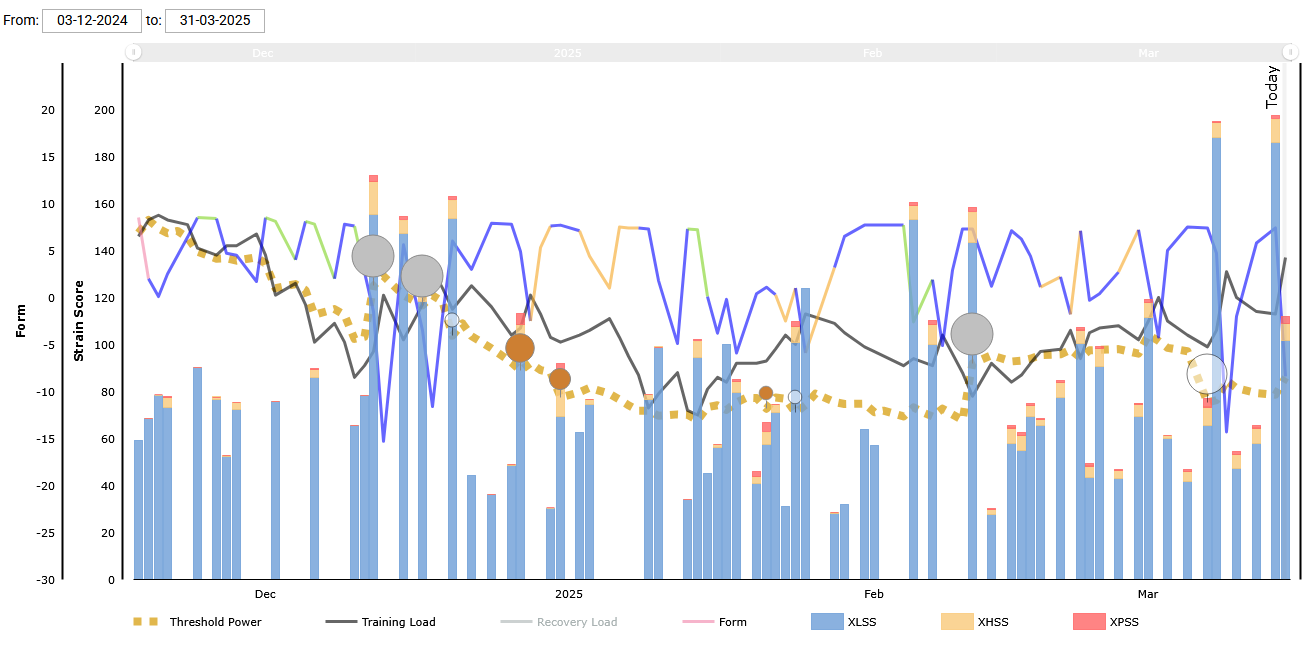
Post your XPMC again. Most everything can be explained by viewing that.
What steps did you follow to manually adjust your signature?
TP must be understated if you successfully completed Hardness Test 16 without extreme difficulty.
What are your three signature values?
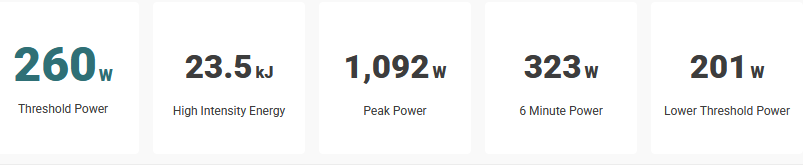
I think I went to Profile settings, fitness signature, but I can’t adjust anything there now, so maybe I went different way.
What Program type are you currently using and what is your cycling goal for the season?
It appears your TL back in December was close to 50 then trended downward and started moving back up in March.
What is the maximum hours per week you can realistically expect to attain as a peak?
Unless TL is increasing in hours and/or intensity (indicating a progression) your signature is subject to float and decay.
You can disable Decay under Profile settings, Fitness Signature tab and changes will track by TL alone.
Your recent Near BT would also have reduced your numbers. This is by design so you can more easily prove changes are warranted on your next BT.
It appears you are objecting to the floating nature of TP in Xert but your TL numbers do explain what’s happening.
Your signature is recalculated on a daily basis. Compare that to the traditional method of estimating FTP by a periodic test between training blocks. For example, a 3/1 block, test, increase TL, and repeat.
With Xert you can “test” at any time by executing a few maximal efforts under fatigue whether that’s by executing a fitness test from the Library in Slope mode or pushing yourself at the top of the hill to a failure point or a couple max sprint efforts now and then.
To manually adjust your signature values view details for your most recent activity (or last BT), enter new values at the bottom of the chart, select Refresh to see how the change affects the chart, then click Save (lock).
Future adjustments will apply to that new starting point (called Locked Signature under Profile Settings).
Thanks for getting back to me. I understand that the main reason for my FTP being stuck is just because I don’t meet my training load, but still I would think the program should estimate my metrics based on easiness of me completing workouts taken, especially that hardness level 16 test. I have adjusted my TP based on your instruction by 15 Watts to 275W. I am curious if I could complete now the same hardness test.
The Hardness Tests are designed to be ridden in series as you move up the ladder (levels) and test your toughness.
If they don’t feel very difficult at any level that is an indicator your signature is understated especially if you can complete one.with a lower TL (stars count) than the expected difficulty level (diamond count). For example, if you’re at two stars and can push through a 4+ diamond workout without suffering much.
The quickest way to assess your signature is the standard fitness test ridden in Slope mode.
Ideally you want to be fresh but you can ride this workout anytime to determine where you’re at.
You could even use it as a tough warmup session before a ride. It’s two all-out sprints followed by four escalating intervals to draw down MPA and force you to a failure point. Or you ride to a failure point on your own if target watts and duration don’t drive you there. With less than 10 minutes of high/peak strain you’ve got an assesstment.
Even if you don’t acheive a BT you’ll know how close your signature is dialed in by how hard it is at the end before you surrender.
Is this true? Are your training status stars and workout difficulty diamonds supposed to match up?
I’ve been doing workouts like this recommended in Xert recently:

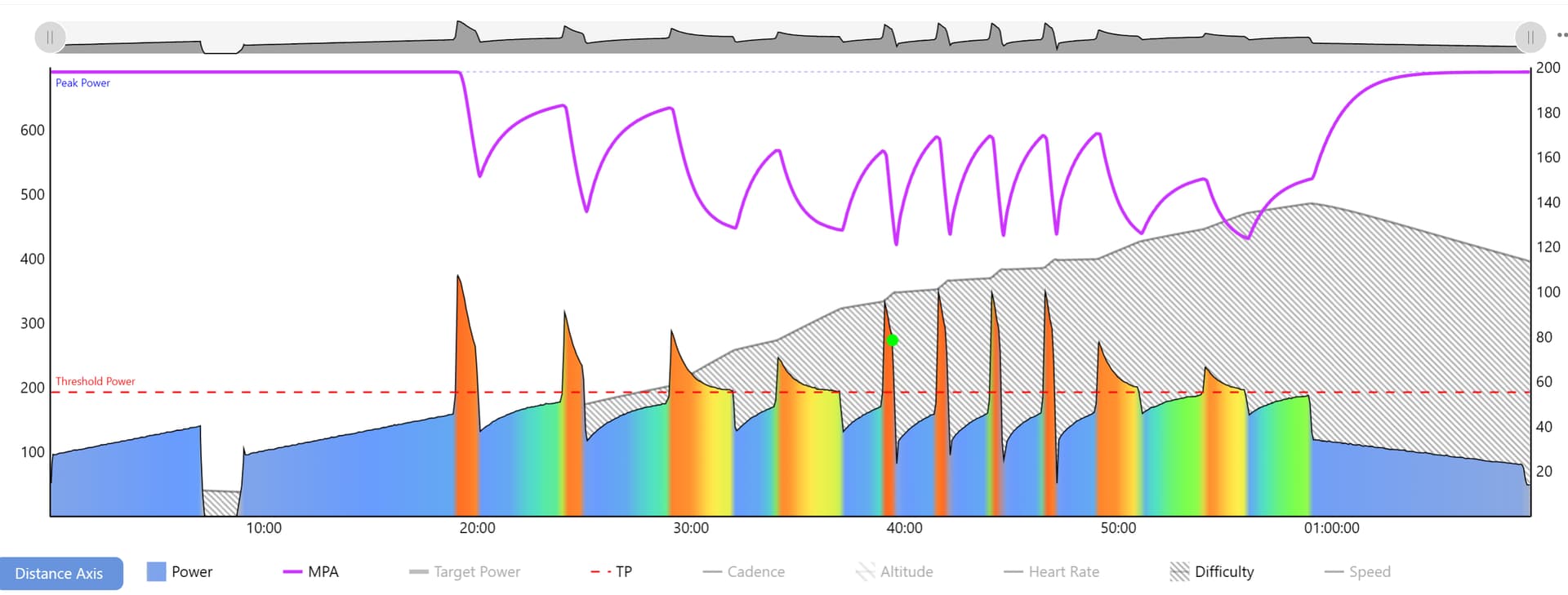
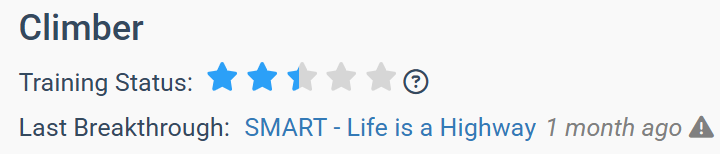
Current training status:
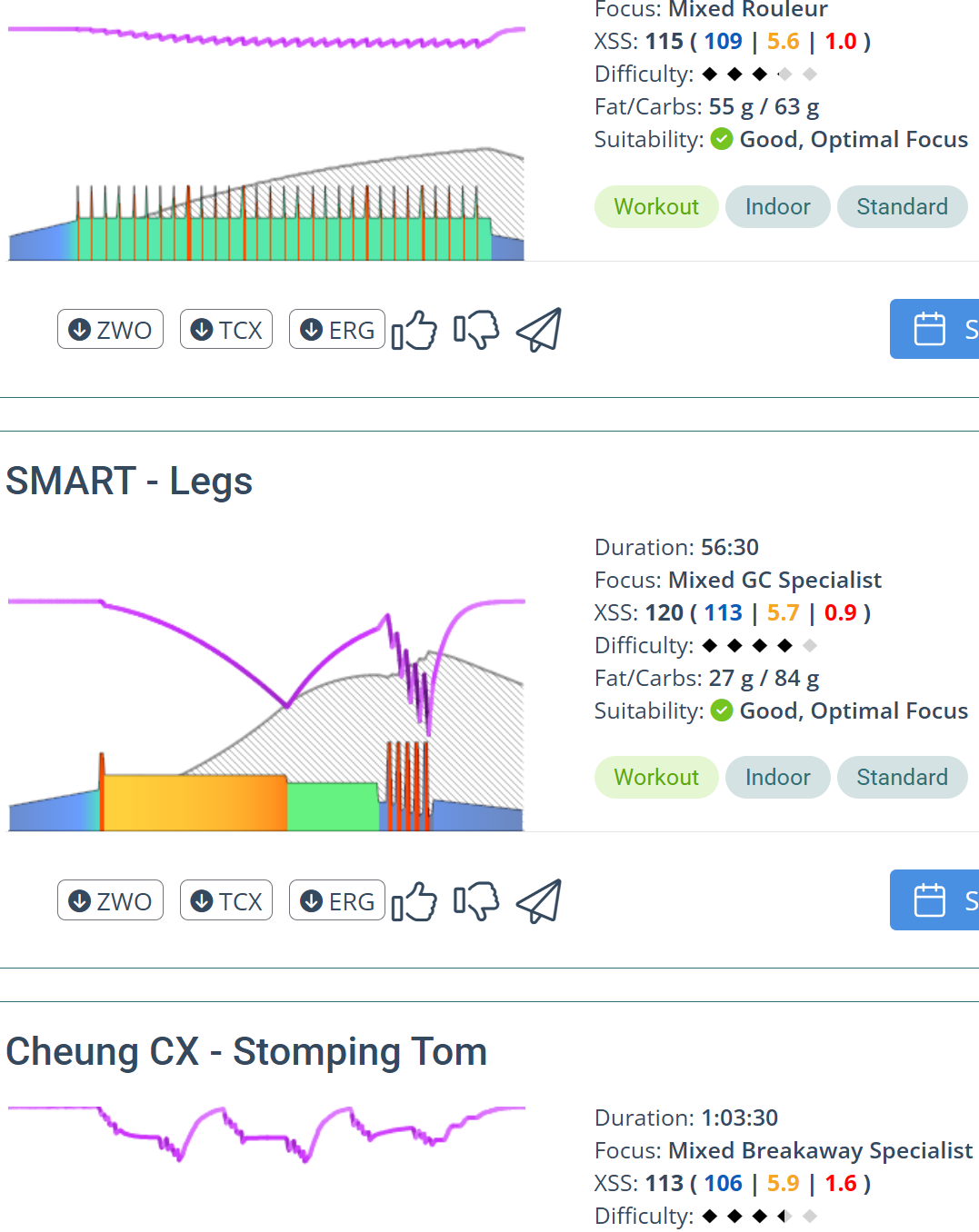
Recommended workouts for tomorrow:
Nothing prevents you from tackling a 4-diamond difficulty workout when your status stars count is 2 stars, but it should be harder to complete at 100% compliance.
If I complete a Hardness Test above my current pay grade (stars count versus diamond count) and feel “that wasn’t very hard”, I’d consider whether my signature was a bit low and I’m due for a BT effort to confirm that.
Was that workout as hard as you expected?
When was your last BT?
In your example XFAI is looking for close matches in the Library to the XSS ratio HIT target.
Your “tomorrow” choices include an easier 3-diamond workout HOP - 140% and 80% (115 XSS in 1:15) and the harder 4-diamond SMART Legs (120 XSS in 56:30) with significant MPA drawdown. If I wasn’t feeling up for that I’d choose the easier option or Stomping Tom in the middle. I’d make my choice based on the MPA line and Difficulty (shaded portion).
The other option is a simple workout using the Magic Buckets tab or Autogen option.
Great question! Matching your training status stars to the workout difficulty diamonds is how XATA used to function, and I still find it a helpful rule-of-thumb. If you’re cruising through workouts rated well above your current star level, it might be worth checking if your signature is understated or try and push for a breakthrough. Some athletes are also able to mentally suffer more than others…. I’m not the most mentally resilient rider myself. I think I quit on myself the last time I tried Hardness Test 11.
In addition to the actual XFAI programs themselves, our development & refining of Forecast AI resulted in some great improvements to how XATA works as well, IMO. Rather than assigning workouts based solely on Focus and Difficulty Rating, the system now builds recommendations based on XSS targets for each energy system (Low, High, and Peak), which are aligned with your:
- Current training load (L/H/P)
- Athlete type (e.g. Rouleur)
- Periodization settings (e.g. 4:1 vs 2:1)
- And importantly, your XSSR preference
The XSSR (XSS Rate) preference determines how much strain gets packed into the time you have available. The default is 100 XSS/hour, which typically translates to a max difficulty of about 3.5 - 4.0 diamonds. But you can scale this up or down depending on how hard you want your sessions to feel or how much time you have.