Sorry for my English, I’m using Google Translate.
Yesterday I decided to do the Xert structured training outdoors with my Edge 1040. I used the 1040’s default training page, as I always have with TrainerIrad, and the Xert Magic Buckets page to compare the results.
I completed the Xert “Welcome to the Jungle 45” workout, which I extended slightly to get home. The workout was done on a slope, and I tried to maintain my average power output for each block. I think I could have been a bit more focused My first observation is that the default training page on the 1040 doesn’t work like TrainerRoad. The red bar on the 1040 indicates each block on the Time Trial (TR), while Xert configures this red bar to show the power output to maintain for 1 or 3 seconds. This data is only useful uphill or downhill. It would be much more helpful if Xert displayed the average power output for the block. The 3-second power value could be shown in a separate field, preventing the gauge from constantly switching between red and green every second. Seeing it regularly green for the average block would indicate that you’re performing the structured outdoor exercise quite well. TrainerRoad works this way; Xert should be able to do the same when Xert sends the workout to Garmin Connect.
Secondly, though this probably needs to be retested more precisely on HomeTrainer, I found that the MagicBuckets page didn’t match the XHSS and XPSS values. I finished filling in MB well before completing the structured workout, which had the same values initially.
This makes me wonder about the reliability of MB. Does MB overestimate the XHSS and XPSS values?
version française si la traduction n’est pas bonne
problème entrainement xert structuré envoyé vers garmin 1040
Bonjour,
Désolé pour mon anglais j’utilise google traduction
Hier j’ai décidé de faire l’entrainement structuré de xert à l’exterieur avec mon edge 1040, j’ai utilisé la page d’entrainement par défaut du 1040 comme je l’ai toujours fait avec Trainerirad et la page Magic Buckets de xert afin de comparer un peu les chiffres.
J’ai réalisé l’entrainement xert “welcome to the jungle 45”, que j’ai un peu ralongé pour rentrer à la maison, l’entrainement a été réalisé dans une pente et j’ai essayé d’être au mieux dans la puissance moyenne à chaque bloc, je pense que j’aurai pu être un peu plus appliqué
Premier constat, la page d’entrainement par defaut du 1040 ne fonctionne pas comme avec Trainerroad, la barre rouge du 1040 indique chaque bloc sur TR, tandis que Xert conifgure ce bloc rouge sur la puissance à tenir sur 1 ou 3 seconde, cette donnée fait que montée ou descendre, elle serait bien plus utilise si xert indiquait la moyenne du bloc à réaliser, la valeur de puissance 3s pouvant être affiché sur un autre champ, ça eviterait de voir passer du rouge au vert cette jauge toutes les secondes, tandis que la voir verte regulièrement pour la moyenne du bloc, indiquerait qu’on réalise assez bien l’exercice structuré en exterieur. Trainerroad fonctionne ainsi, xert devrait pouvoir faire la même chose quand xert envoie l’entrainement à garmin connect.
Deuxième constat, mais problament à refaire un test plus précis sur hometrainer, j’ai trouvé que la page MagicBuckets n’étais pas en accord avec les valeurs XHSS et XPSS, j’ai fini de remplir MB bien avant de finir l’entrainement structuré qui avait les mêmes valeurs au départ.
Du coup je me pose la question sur la fiabilité des MB, MB sur-estime-il les valeurs XHSS et XPSS?
Post screenshots if you can as I don’t understand your reference to colors and average power blocks, but I am not familiar with Garmin’s workout player.
With Xert there is no need to precisely execute intervals to achieve the target goal for the day especially when riding outdoors.
If I want to perform a structured workout precisely, I’ll ride INDOORS under ERG control (AUTO mode on EBC). This is especially true for SMART dynamic power intervals based on %Reserve MPA or XSSR like Welcome to the Jungle.
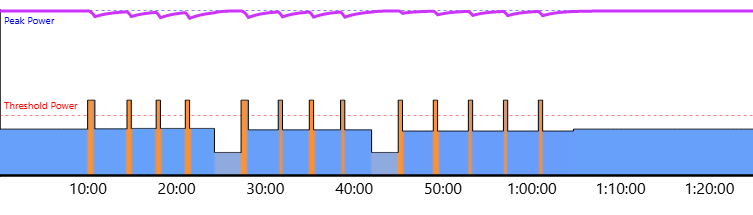
If you push this type of SMART workout to your Garmin using Send the dynamic intervals will be converted to %FTP blocks which may be harder or easier than intended.
Instead of doing that consider two other options for outdoor workouts.
The first option is to send a simplified workout to your Garmin unit that meets today’s goal (see below).
The second option is to use Magic Buckets. XMB is dynamic SMART intervals for the road.
You can execute XMB intervals as you’re able when terrain and traffic permit.
No need to find an uninterrupted road segment to perform the workout portion of a ride.
XMB dynamically adjusts the interval guidelines as you complete the workout. Those intervals can be executed at any time whether you choose to do them at the beginning, middle, or end of a ride.
XMB allows you to meet your strain goal for the day while free riding outdoors or indoors.
With Xert there are multiple workout options to reach the HIT strain goal for the day.
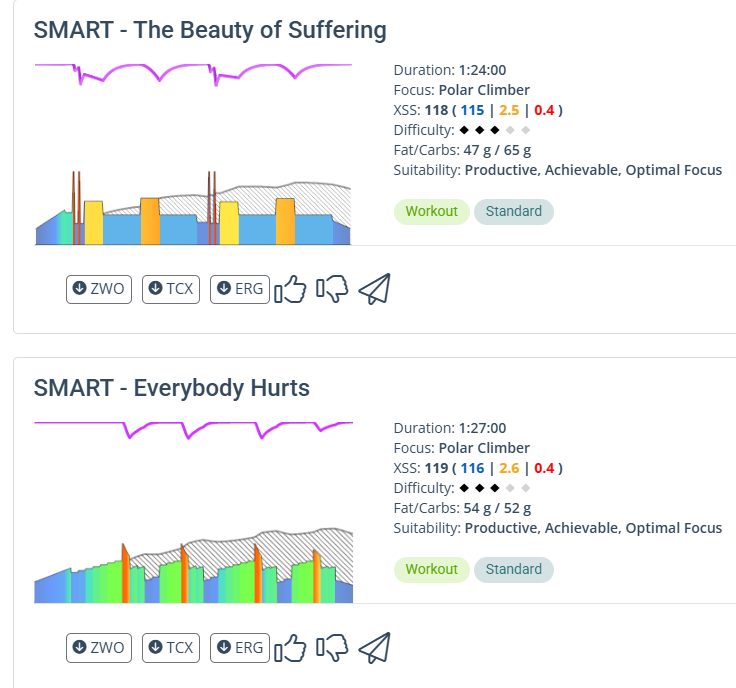
For example, let’s say today’s target is Climber Focus, 1.5 hours, 3 diamond Difficulty.
Here’s the top two recommended SMART entries from the Library –
All of these workouts are Productive with Optimal Focus and Achievable based on the corresponding status stars count and freshness form.
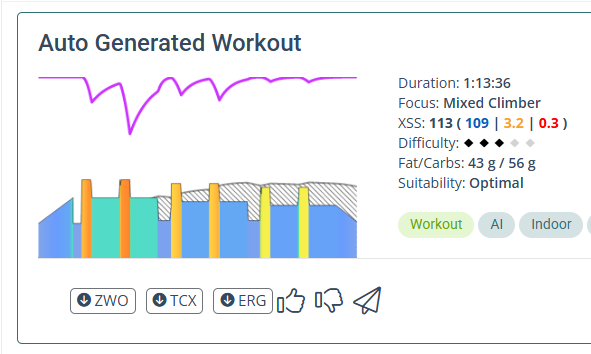
Outdoors I’d go with the MB generated workout if I wanted to use Garmin’s native player.
However, XMB takes things one step further. XMB which doesn’t require any workout to be selected. Instead, it will fetch the XSS goal for the day (low/high/peak equivalent to Climber Focus) and guide you along to fill those buckets in the most efficient manner.
Target watts during the work and rest intervals fall within +/- range. It’s not an exact number you must maintain. If you’re over or under or go longer or shorter, the app adjusts accordingly. Try to keep your power circle in close proximity to the target circle. No need for an average power indicator.
As you become accustomed to riding XMB you’ll also understand how to control Difficulty using the Challenge Level gauge. You’ll see how that affects interval count and duration along with estimated time to complete the workout.
You’ll be learning how to free ride with structure. That is a HUGE difference from what you have been doing on other platforms. I don’t think you’ll want to do outdoor workouts the “old way” once you’ve adapted.
XMB provides structure but without a rigid pattern to try and execute outdoors. It’s an effective and flexible tool to get the job done.
If you do prefer to ride some workouts using Garmin’s native player and would like to monitor your buckets while you do, consider installing the Xert Dashboard (XDB) for Garmin. Besides displaying buckets XDB allows you to define power smoothing for the rainbow gauge and define rolling average power as a separate data field.
 My first observation is that the default training page on the 1040 doesn’t work like TrainerRoad. The red bar on the 1040 indicates each block on the Time Trial (TR), while Xert configures this red bar to show the power output to maintain for 1 or 3 seconds. This data is only useful uphill or downhill. It would be much more helpful if Xert displayed the average power output for the block. The 3-second power value could be shown in a separate field, preventing the gauge from constantly switching between red and green every second. Seeing it regularly green for the average block would indicate that you’re performing the structured outdoor exercise quite well. TrainerRoad works this way; Xert should be able to do the same when Xert sends the workout to Garmin Connect.
 the dynamic intervals will be converted to %FTP blocks which may be harder or easier than intended.