Hi,
I’m trying to configure XFAI for my event on June 20, but I don’t fully understand what the individual values mean. To be honest, I find the setup a bit confusing.
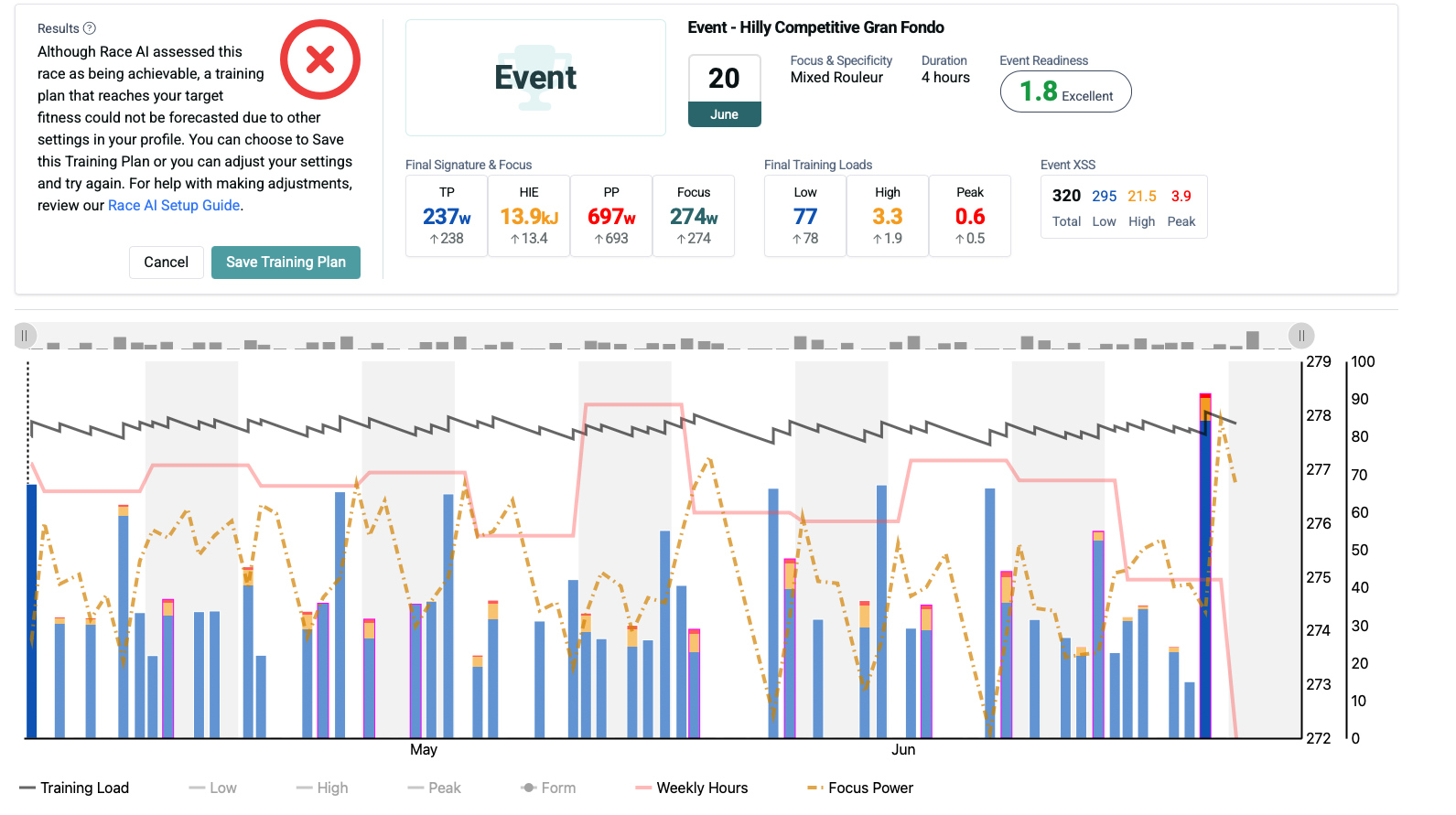
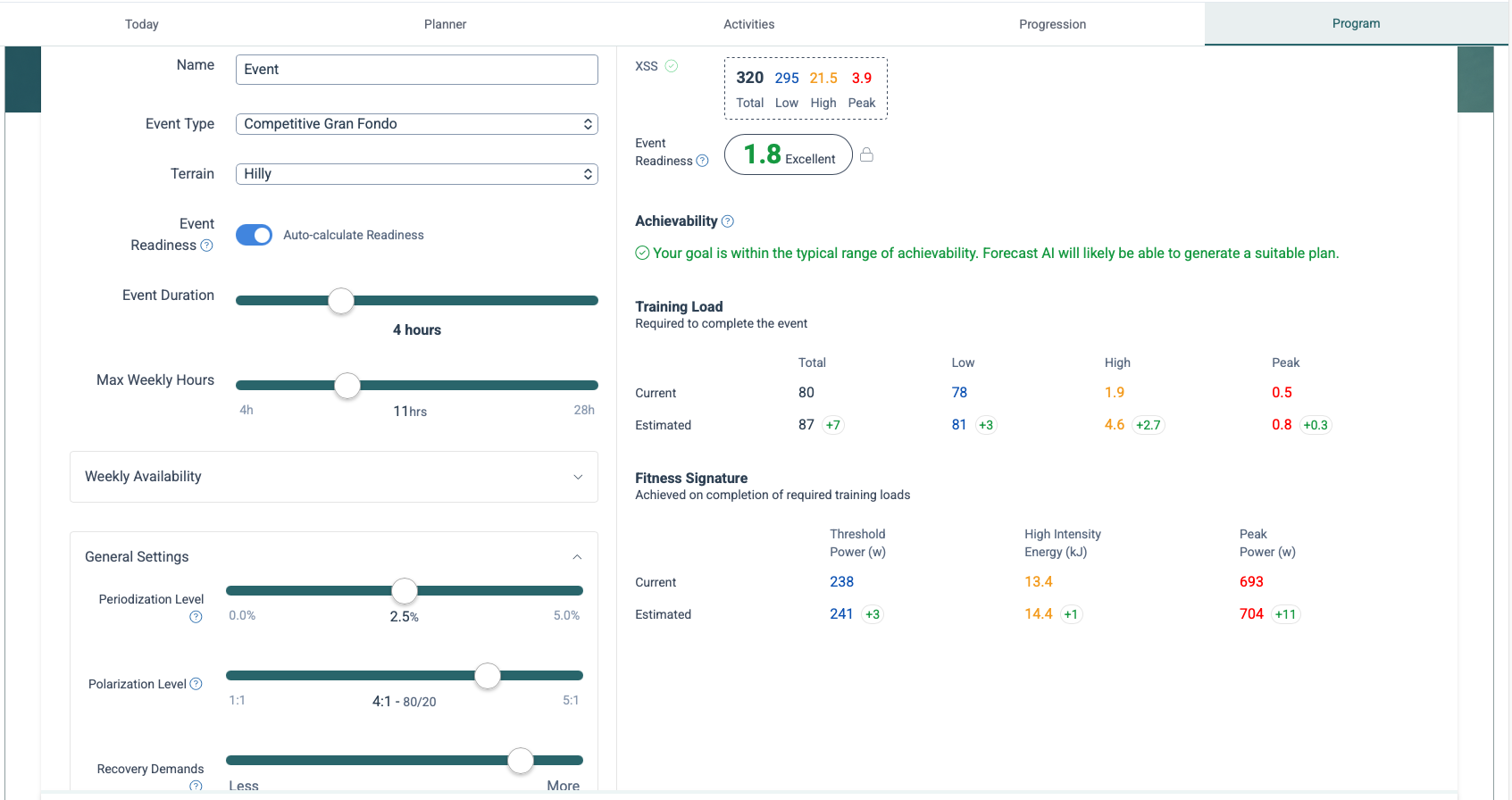
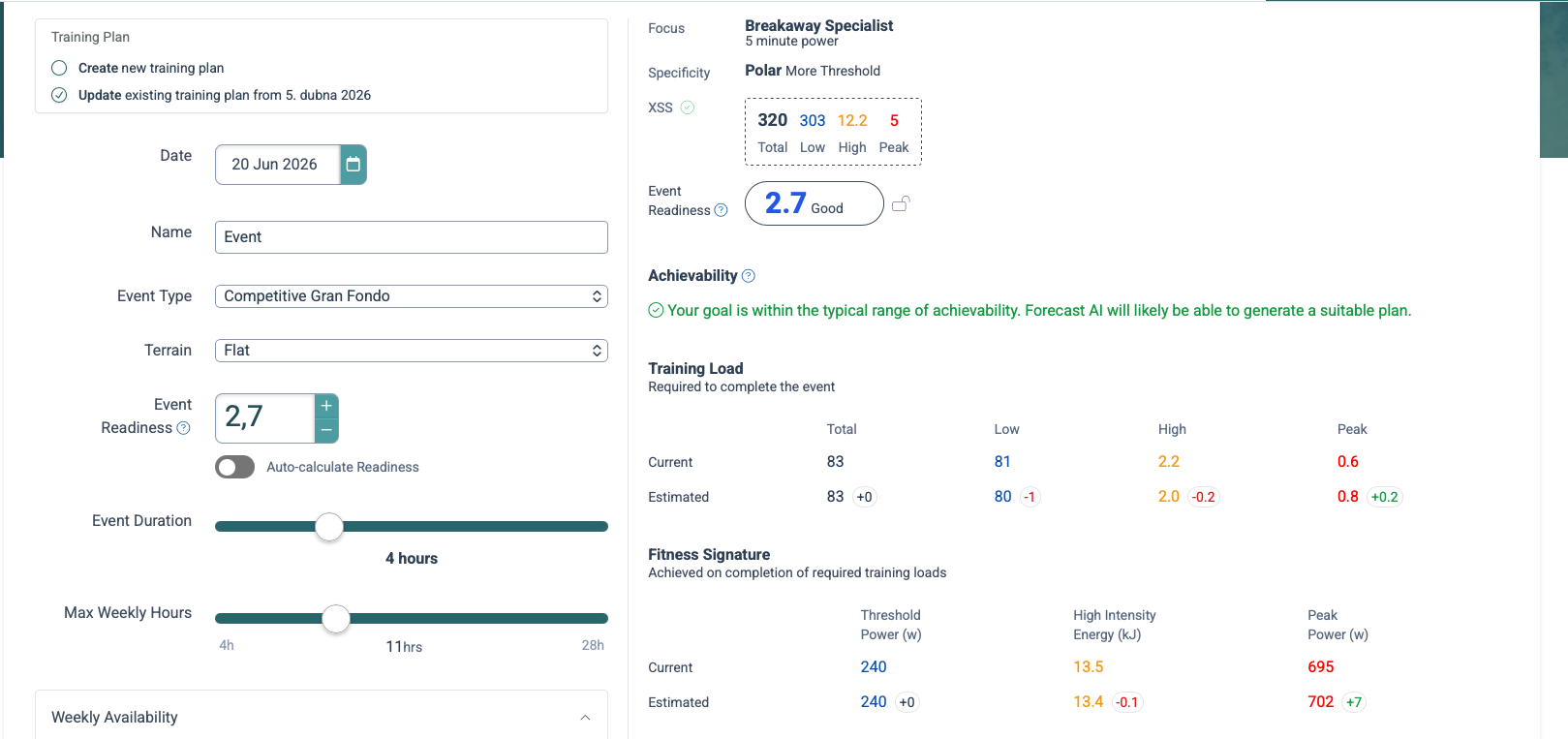
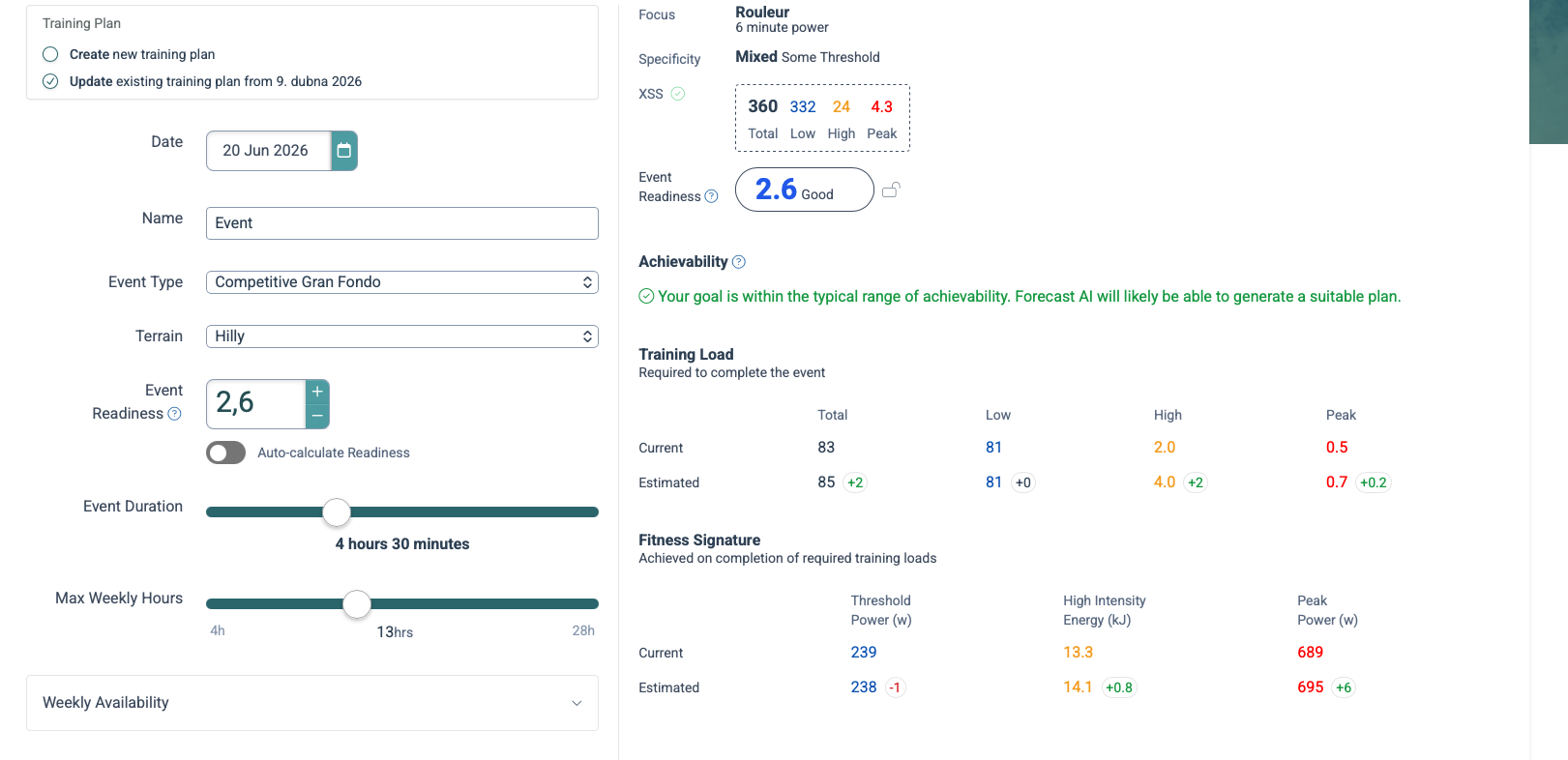
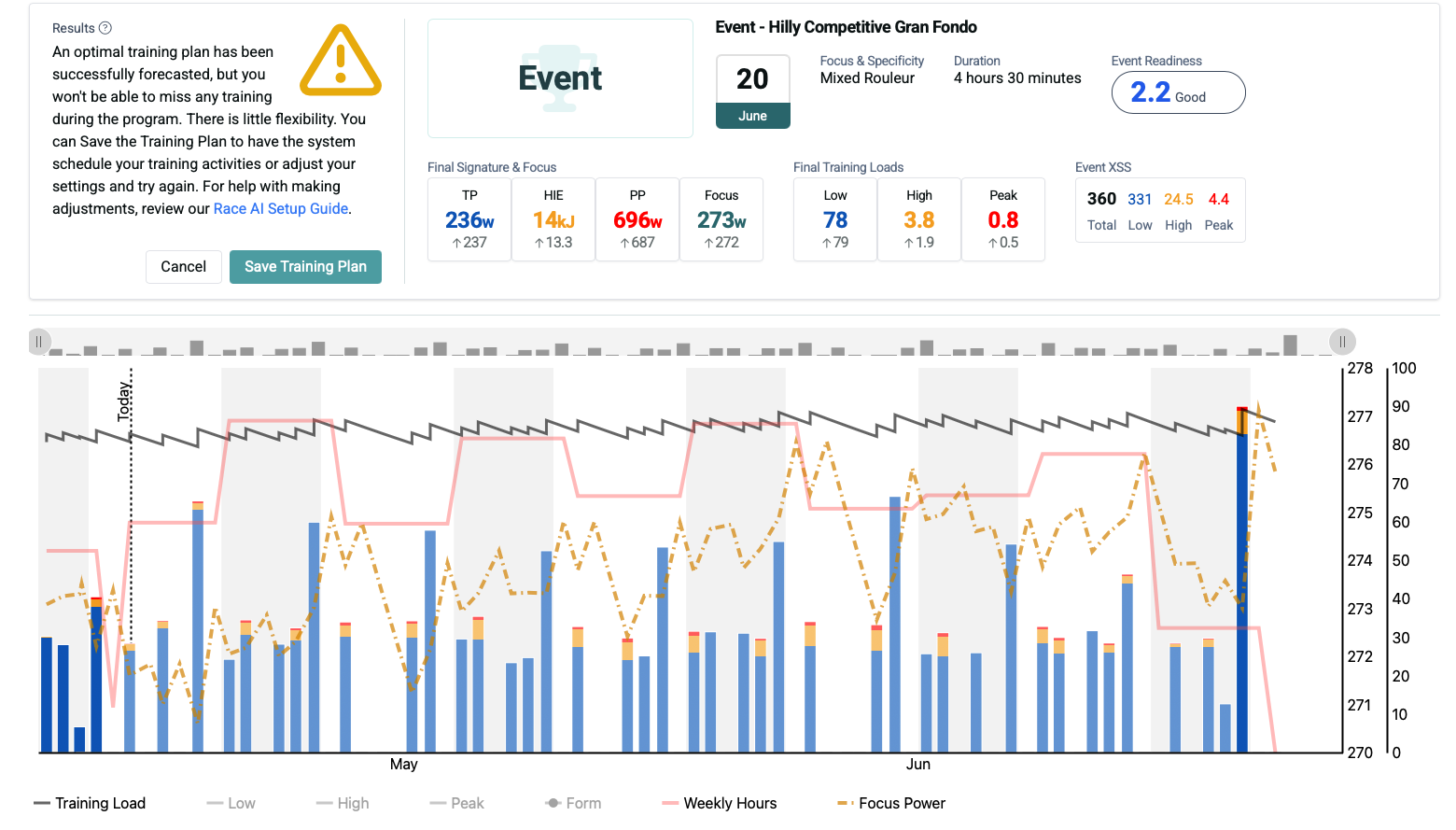
Here is my configuration. As shown, when Auto-calculate Readiness is enabled, it gives me a value of 1.8 along with the message: “Your goal is within the typical range of achievability. Forecast AI will likely be able to generate a suitable plan.”
However, when I actually try to generate the plan, I get a message saying that the plan cannot be generated.
So my question is: how should I set up Xert correctly, and is it actually possible for Xert to prepare me for this event?
Thanks, but I already tried lowering Recovery Demands to the minimum and I’m still getting the same result, so that doesn’t seem to be the limiting factor in my case.
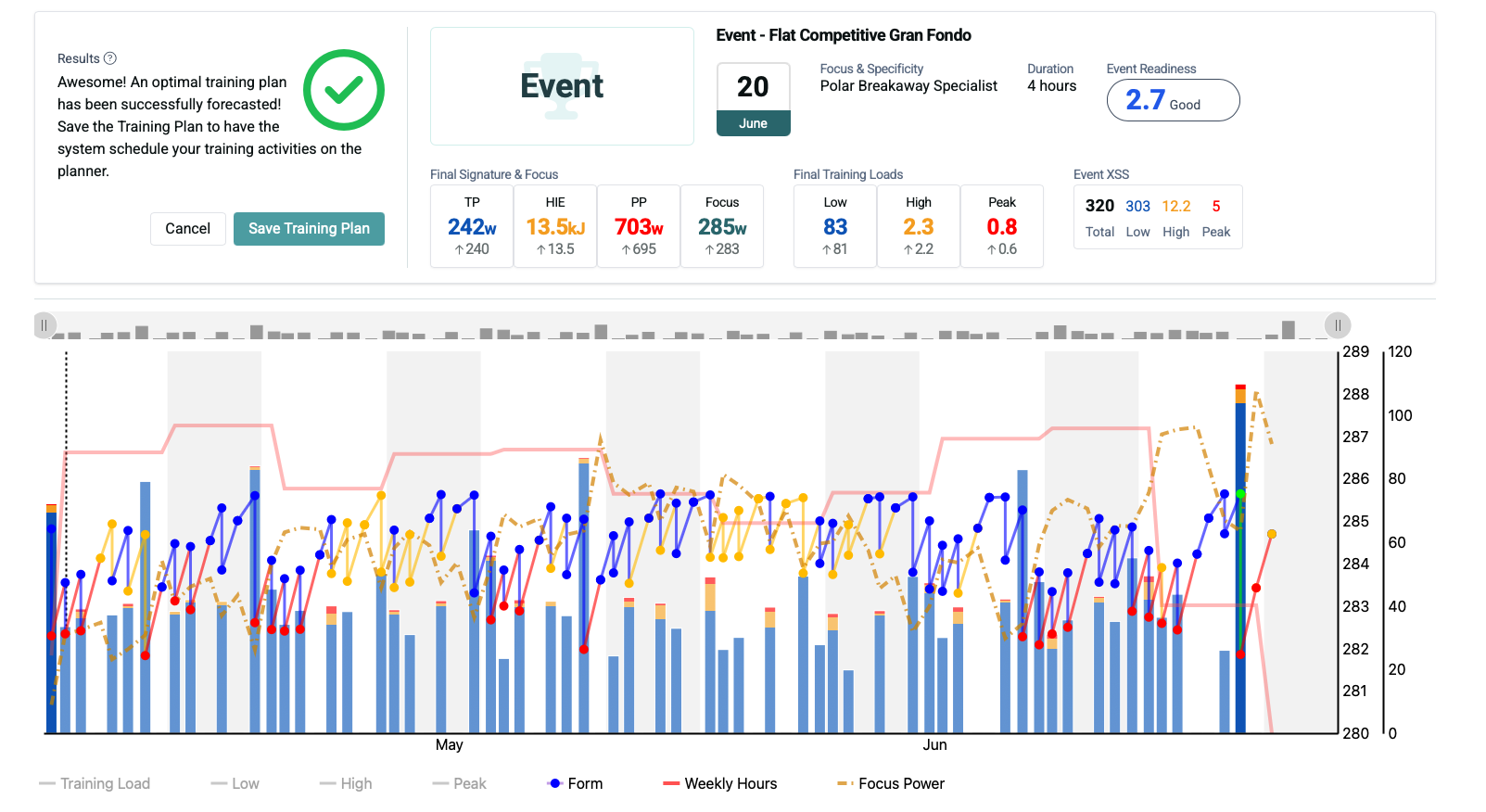
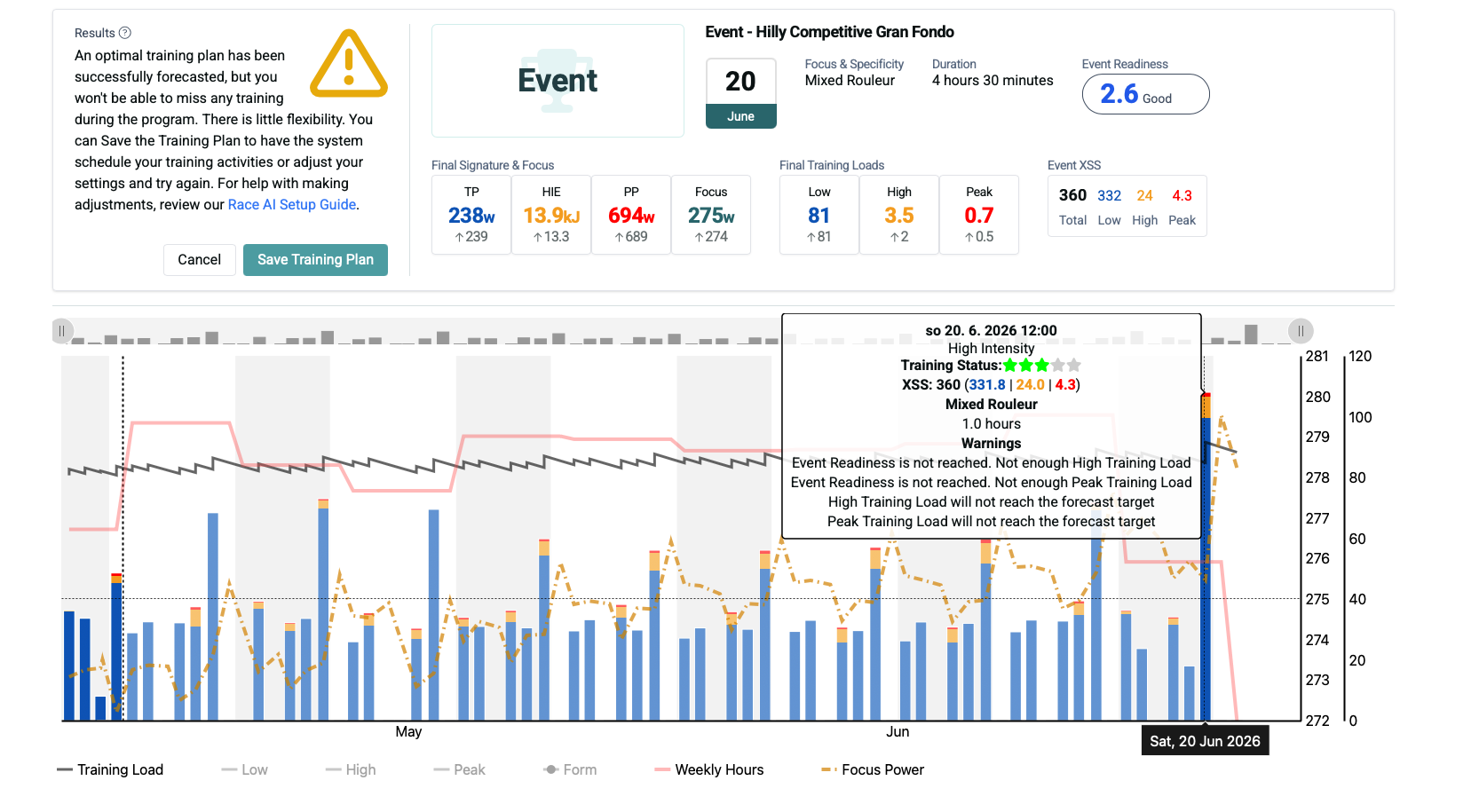
Each of the magenta outlined matchsticks on the forecast chart indicates a broken constraint. Your chart displays lots of them. It needs to be none for a successful forecast.
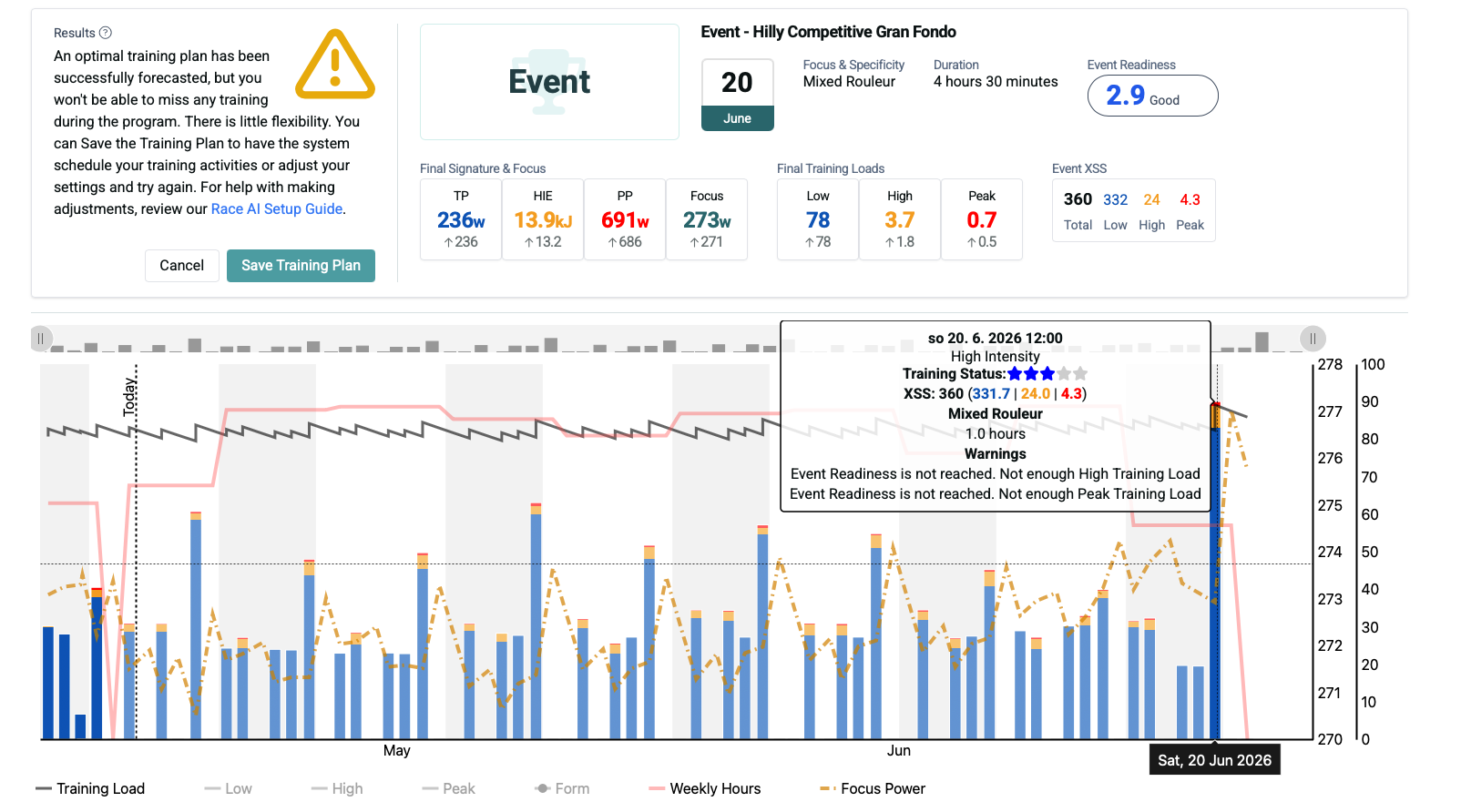
Hover over (or tap) on each of those matchsticks to display the warning text. What does it say?
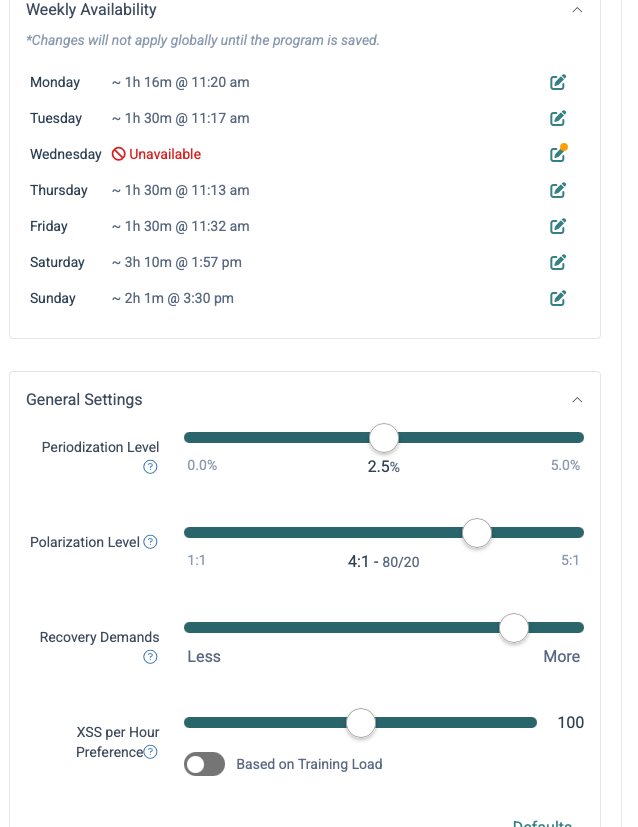
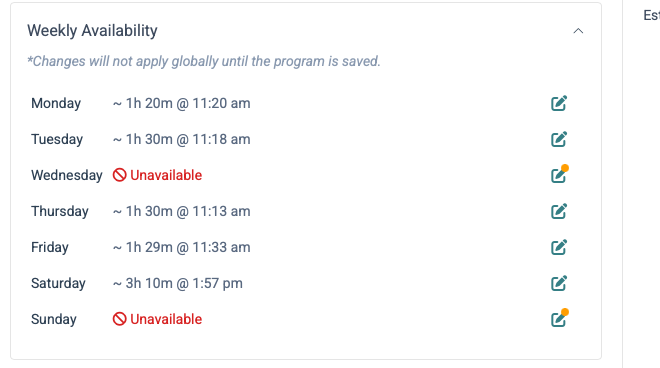
A fail-to-forecast result is likely a combination of schedule (availability), max weekly hours, and current TL, against the number of weeks until your event (10).
What happens when you set Recovery Demands to normal (mid-point), uncheck Auto-calculate Readiness and increase the value a bit (less ready), and/or try forecasting with higher max hours/week? Sometimes a minor tweak is what’s needed to pass muster.
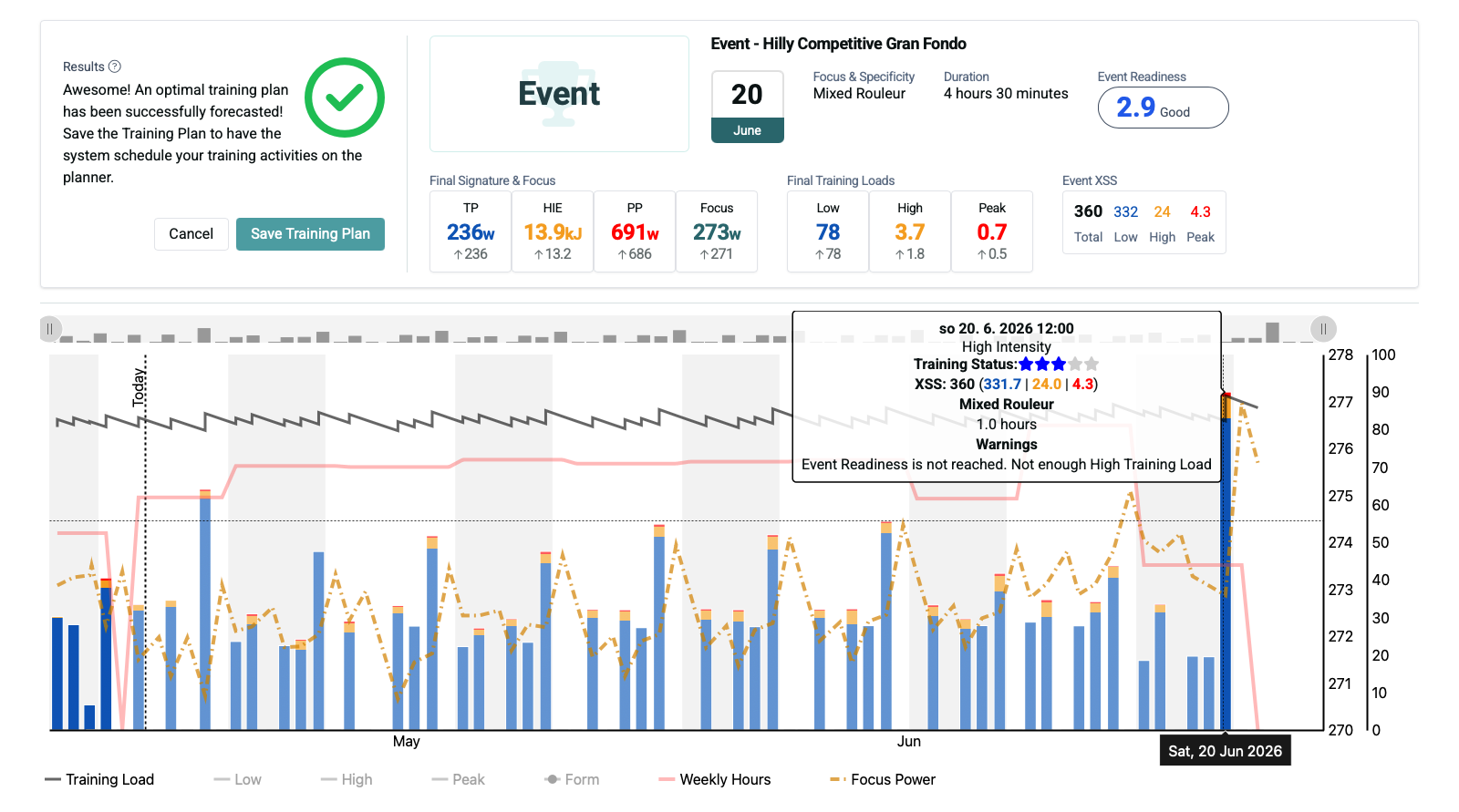
After I disabled automatic readiness and set it manually to Good, the plan could finally be generated.
However, I still find the behavior quite confusing from a user perspective.
Forecast AI initially suggests that the selected goal/readiness is achievable, but then it may either fail to generate a plan or generate one that still ends with “event readiness not reached” and “not enough high training load.”
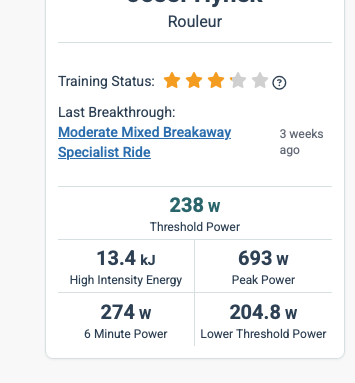
So I’m not sure how the displayed readiness should be interpreted. Does it mean that my current fitness is already in the general range required for the event, while a successful forecast still depends on building more training load?
I also have Flex enabled for training hours, so I would expect Forecast AI to have more freedom in how it distributes training across the available time.
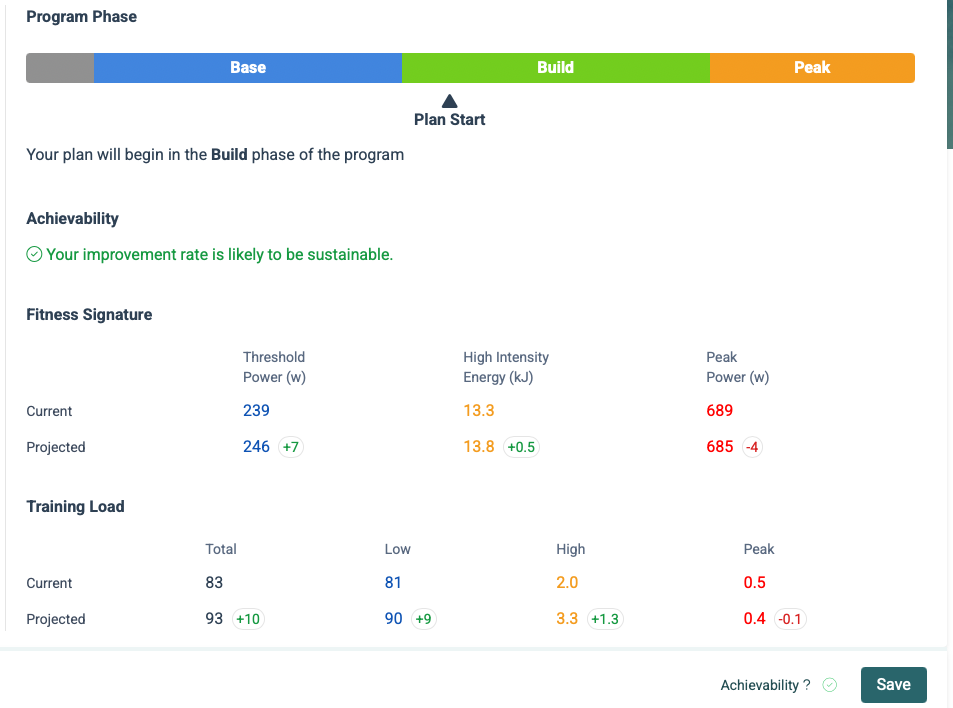
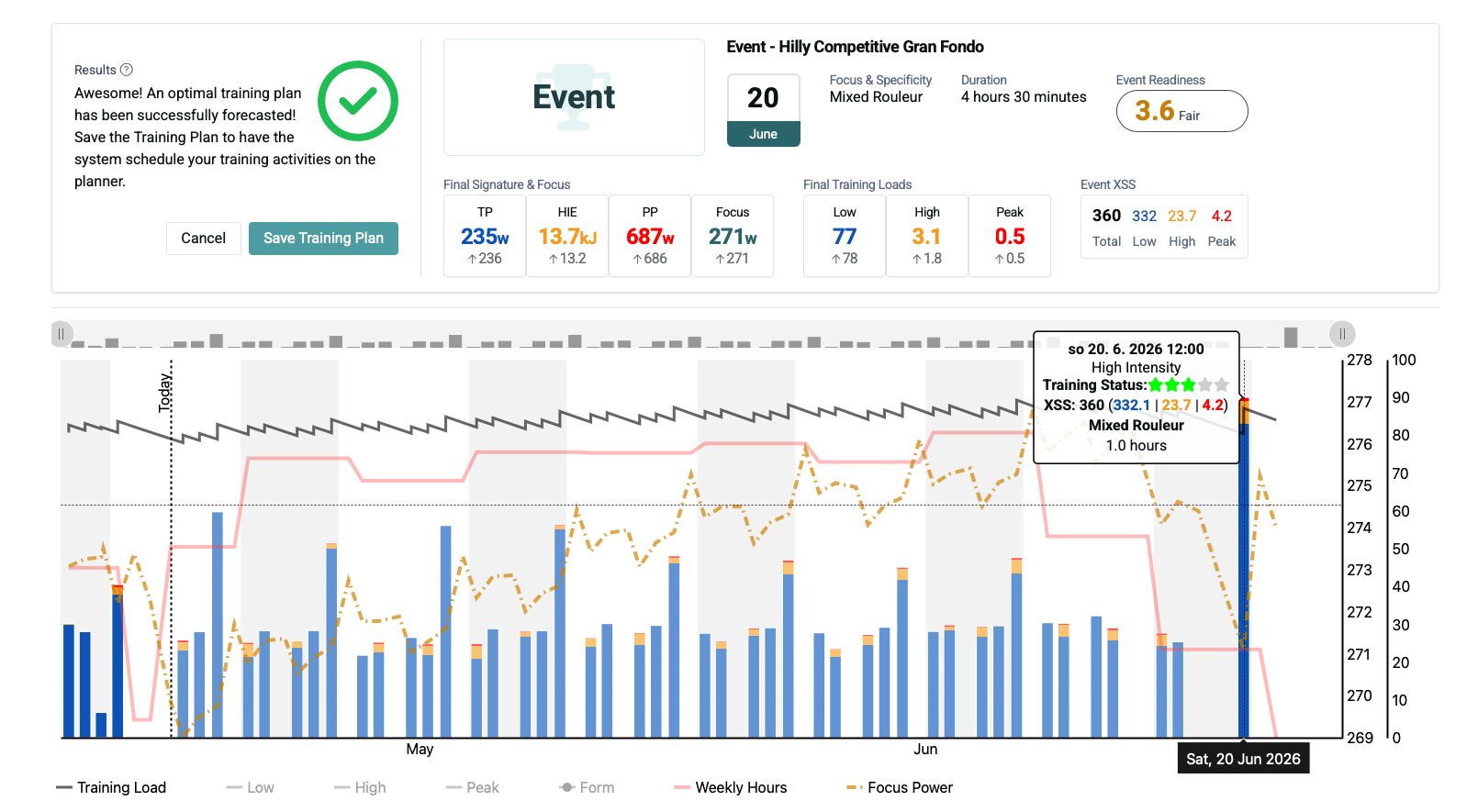
Another point that confuses me is that in some forecast scenarios the projected training loads seem to decrease during preparation. For example, I can see cases where Low and High training load are lower rather than higher by the end of the forecast. Is that expected behavior when preparing for an event?
Another question is about the expected focus for this event type.For a race of roughly 105 km with 1200 m of climbing, what focus would you normally expect to match the demands of the event?
When I choose Road Race and Hilly, Xert suggests Puncher. Is Puncher really the intended focus for this type of event? For a race like this, I would have expected the demands to align more with something like Rouleur / Breakaway Specialist / GC Specialist.
We estimate what’s possible based on your current/target training loads and the time to achieve the targeted increase. We can’t know for certain what’s possible or not until Xert actually tries to put all the training in your planner (e.g. when you run “Run Forecast AI”).
It depends on the event. If you don’t need to be prepared for a ton of sprinting, then letting your Peak Training Load decline a bit might be okay.. same with High. We do try to prevent Low training load (and Threshold Power) from declining whenever possible.
Depends on how you ride/race it… If you’re doing a lot of big sprints & attacks throughout the event, Puncheur could be a great choice. If you’re mostly sitting in and there aren’t many hard attacks that split the group, then GC Specialist might be okay.
If you’ve done the event before, you could use Race AI with your previous event and Xert will calculate the Focus/Specificity based on how you raced it last year (and you can scale the target speed up a bit, if you want).
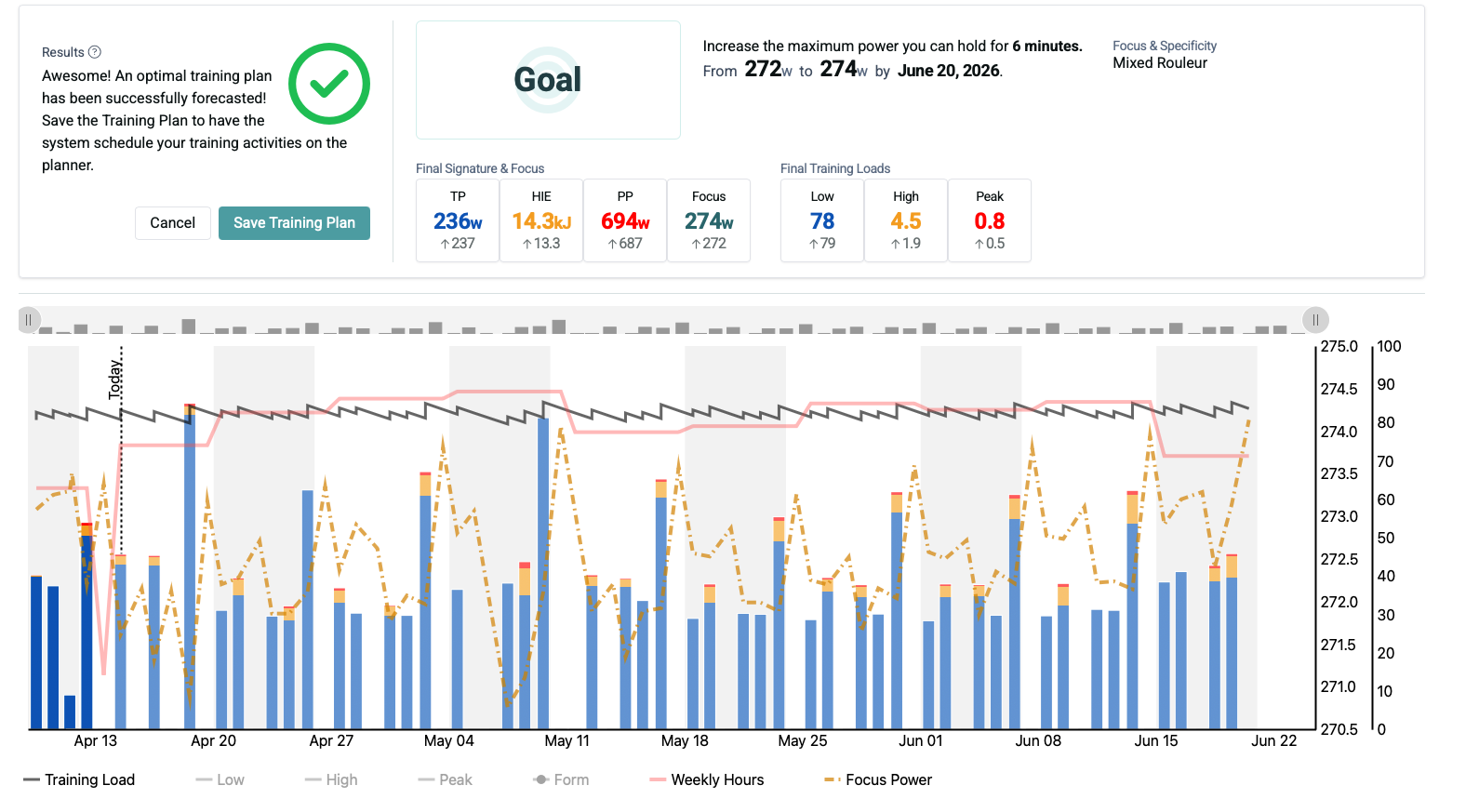
If you want to target a different Focus Duration you can experiment with an XFAI Goal and compare the results to the Event especially the delta values shown in the table views.
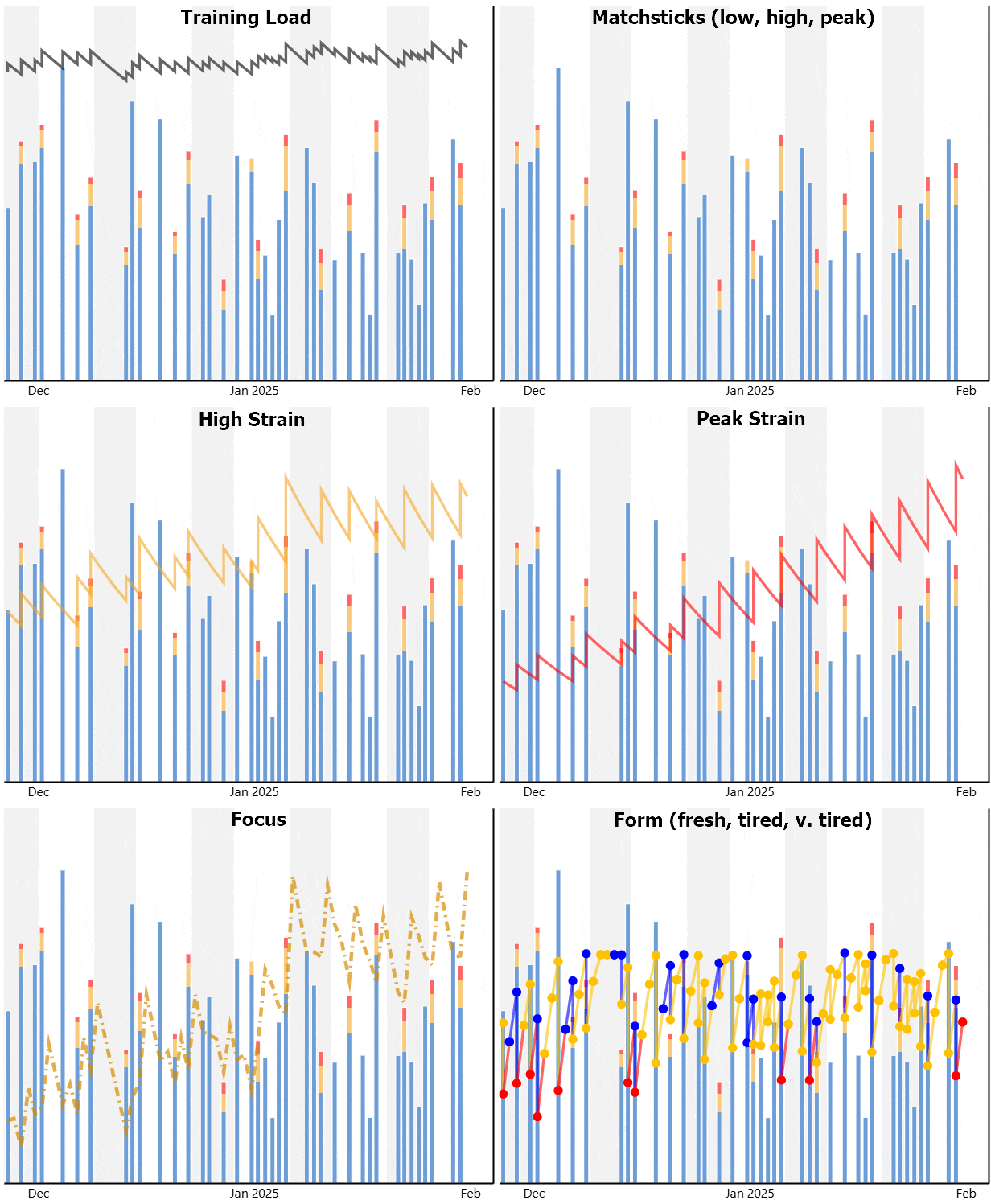
You can see this effect visually by isolating keys on the forecast chart.
Example (9 weeks, improve 4-min power):
Notice overall TL remains relatively flat, Low shows slight decline, but High and especially Peak rise significantly during the term. That rise is also indicated by the increase in red on HIT day matchsticks.
Max hours/week is a ceiling that is directly influenced by your current TL.
E.g. if your max is 11 hours and you are currently riding 10-11 hours, there isn’t much wiggle room for a progression.
In some cases, you are sufficiently trained for an event already.
If so, you can hone the Focus Duration that matters most to you by using a Goal forecast.
Related post –
thank you for the clarification, before I looked at the forecast mainly on TP and TL, because I thought that improvement mainly means an increase in TP.
I have tried playing with different settings and what I don’t understand is what is the difference between, for example, XFAI Event and XATA Base Build Peak. With XATA I get different values in the projection than with XFAI. Is it because XATA is more aggressive in this regard? These values are for IR Slow.
Operating with a blank calendar and flexible hours on XATA is a LOT different than the nuanced XFAI plan with projected LIT/HIT/Rest days.
I posted a chart outlining the differences in XATA vs XFAI here – Onboarding steps for Xert trial users and newbies - General - Xert Community Forum
With XATA BBP you’d be starting in Build phase due to the target event date.
I prefer the “freedom to ride” inherent with XATA’s day-by-day choices. Others prefer to follow a predictable schedule. YMMV
You can also try setting a Goal for Mixed Rouleur and see how those table views compare to the Event forecast. Push the watt gain slider a few clicks past green into yellow or red text warning and see if a viable plan can still be forecast.
I tried to go through the difference between goal and event and I’m even more confused
Is there any recommendation when and why to choose individual programs? For example, what is the difference between Goal and Event? Goal will guide me to a defined target (watts) and Event to manage the performance of the event for a defined time? When to choose which program, I feel that there is something missing or I haven’t been able to find documentation yet on how the individual programs work.
And what if I choose XATA Base build peak? what is its purpose? can I expect it to also prepare me for long events? 4-5h?
All program types with sufficient delta values in the table views support a progression that will prepare you for the event.
XFAI is the same methodology at work regardless of whether Goal, Event, or Race AI.
By selecting an Event type and estimated completion time you can gauge what Focus Duration target is recommended and how much training is required.
XATA BBP includes periodization running in background with a blank calendar at the ramp rate you define.
If you don’t trust the blank calendar approach and you have tendency to over train, selecting an XFAI program will provide you with a mapped out course to get you there.
I’ve already read this, but with XFAI it’s still not clear to me how to work with the plan and what to expect…e.g. what should I do if the generated plan based on my availability shows Event Readiness is not reached. Not enough Training Load. Should I choose a different approach? Is the generated plan suitable for me then? In this case I left the default values, if I set them really according to my real ones, I will have more reasons displayed - Not enough high training load, not enough peak training load.
Does this mean that my predicted values for low, high, peak will not be reached?
And also what affects the speed of improvement in XFAI? e.g. with XATA I choose Slow for IR, but how do I influence this in XFAI?
Thanks for the feedback @LurkCz , I hear you! This is an area where I’d like to improve the existing content, and/or perhaps make the setup a bit more “handheld” to help users understand what all the options are controlling.
Yes, that’s basically Xert saying that based on the event’s predicted XSS (which are assigned based on your event type, terrain, and entered duration), your High/Peak training loads are not sufficient to reach the desired Event Readiness. It doesn’t necessarily mean that you cannot do the event, it just means that the targeted readiness can’t be reached (could be due to there not being enough time to the event, and/or enough available training time). To resolve this, you could either: accept a lower event readiness for your event or consider increasing your available training time to see if Xert can help you achieve a higher readiness for your event. Also remember that the training time is estimated and that the max training time is usually only for a couple of weeks. You might find that you can find an extra couple of hours in those weeks to help achieve better readiness for your event.
You’re spot on: XATA lets you control the rate of improvement at any time by modifying your Improvement Rate.
With XFAI, you don’t control this. Low, High, & Peak ramp rates are based on your current & target Training Loads (Low, High, & Peak), based on your event readiness & the XSS demands of your race/event/goal, as well as time you have to reach those target training loads.
The less time you have until your event and/or the greater the increase in training loads, the more aggressive the improvement needs to be.
If you have a long time to reach your target training loads, a more gradual improvement might be expected.
Thank you. So, just to make sure I understand it correctly: should I set readiness according to my availability so that, after processing the forecast, I can see the last day without any warning, as shown in the attached screenshot?
I’m still experimenting with the settings, and I’m not yet sure how to work with the generated plan. For example, when my availability changes, XATA can suggest suitable workouts through the Today screen based on the updated availability. Can XFAI do something similar?
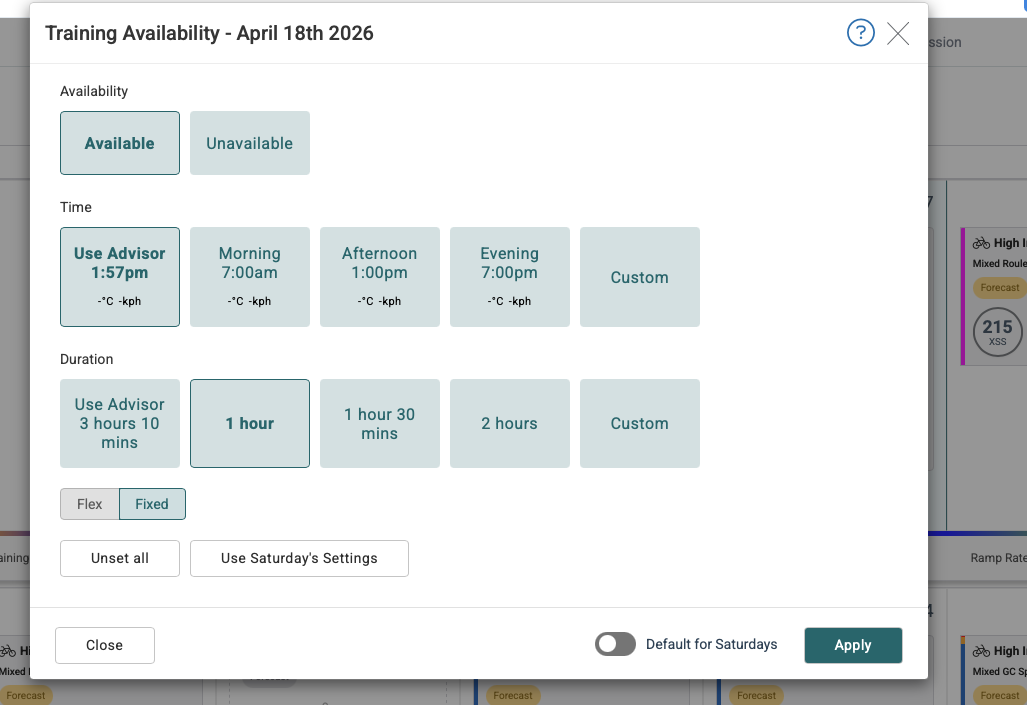
For example, if I set a different duration in the filter and lower the intensity, I see a red mark next to the workout. Does that mean I’m doing it wrong? Or is it better to change the duration directly in the plan and then recalculate the forecast? The issue is that this does not seem to change the workout type itself from high intensity to low intensity, for example when I’m fatigued.
In this respect, XATA feels much more flexible to me. On the other hand, I like that XFAI gives me a clear overview of the weekly structure, including total hours and the number of planned workouts.
Xert thinks, you will need more HIE for this event to hold your group on climbs and attacks. Xert therefore suggests to give you more punchiness (HIE) instead of pure threshold power as you will be below threshold in the flats and above on shorter climbs anyways. Looks like a good plan for that goal (almost doubling High TL while keeping TP). You will probably finish this training plan better than forecasted.
If it is an A-event for you, you should not rest, but you can taper for the last 5-7 days: same intensity, but 30-50% less volume. This will keep your power (TL), but decrease your fatigue (Recovery Load).
If your goal is to finish at your self selected pace it may be better to go polar instead of mixed specifity (more Low TL / TP, less high TL / HIE).
Green just means you hit your forecasted xss, red means you did not. As Xert is about progressive overload as main training principle Training as forecasted will not take you to the limit, but raise your limit.
Thank you everyone for your comments and for helping me better understand how the plan works
I still have one question about how I should handle changes when I need to adjust a workout on a given day, for example because I have less time available, feel fatigued, or simply need to take it easier.
I’m currently returning to training after some health issues, so I sometimes need to reduce the load. For example, I may need to replace a high-intensity session with a low-intensity one or shorten the workout duration.
With XFAI, this currently feels a bit impractical to me, unless I am missing the proper workflow. I tried shortening the available time in the planner, but the XSS did not change, even after running Adapt Forecast. As a result, I cannot then generate what seems like the correct workout through Magic Bucket.
So far, the only way I have found is to manually select a workout using the filter, pin it to the plan, and then adapt the forecast. Is that the recommended approach?
In XATA, this felt more intuitive, because on the Today screen I could simply adjust availability and fatigue, and the recommended workout would adapt automatically.
All program options are adaptive based on training performed and calculated recovery load (form freshness).
Both program types include day-to-day choices with option to Automatically Schedule WOTD (randomly select workout-of-the-day from top recommendations). Since you want more flexibility, you don’t want to enable this feature.
Both program types are flexible.
XFAI doles out HIT in proportion to your calculated status and recovery load. That means in doses you should be able to handle including sequential days on occasion.
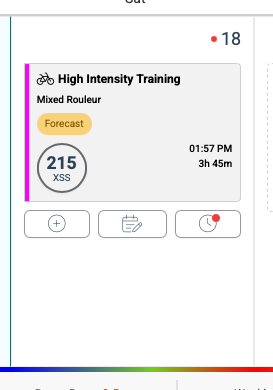
If what you do instead (over/under target, swap, insert rest) unbalances your forecast, an Adapt Forecast red dot warning will appear. Before doing so you should hover over any magenta matchsticks on your forecast chart to determine what the broken constraint is. Adapt Forecast isn’t always necessary but can be run as often as required.
XATA adapts day-by-day depending on what you decide to do (or not do). The Training Pacer needle alerts you to when you’re falling behind or getting ahead of your current ramp rate.
You can change a HIT to LIT day by overriding the XSS target as @macnuts mentions.
E.g. if you wish to ride 2 hours of LIT today at 60 XSS/hr, change target to 120,0,0.
You can swap days on a forecast which may or may not trigger the red dot warning.
You can choose to do something different using Filter to select a workout from the Today page or Planner. A Duration change is quickest from the Planner since there is dropdown.
In either case no need to run Adapt Forecast until after the completed activity is uploaded and only if the warning text indicates the plan needs to be rebalanced.
You can insert an unscheduled Rest Day by choosing that toggle from the Planner.
No need to pin anything unless you are modifying a date in the future you want to remain fixed.
No need to use the Magic Buckets workout generator unless you intend to ride a rigidly structured workout versus free riding by XMB guidelines.
XMB will use whatever XSS ratio is indicated under Daily Summary or the override values you enter there. No need to select a workout.