Hello all, I wanted to see if anyone can give some guidance on using Magic Buckets with a Zwift rides.
I’ve searched broad and wide about connecting my Garmin Edge 530 but having some issues with the Edge controlling the trainer. I connect the trainer to Zwift as controllable (all bluetooth) and Edge as Ant+ only. Start Zwift ride first then Edge device in “Free Ride” which should be the “recording mode” as per the Garmin Website yet the Edge device sometimes takes over the trainer.
The first fix that worked, which I found on Reddit, was to start the indoor ride on Garmin, back out to the “training” tab, and select “Free Ride” again. This fixed the issue.
Most resources simply tell you to “Disable controllable trainer on your Garmin.” But, THERE IS NO OPTION TO DISABLE CONTROLLABLE TRAINER ON THE 530. The ANT+ connection allows the Edge to control the trainer.
Anyone using a 530 with Magic Buckets and Zwift that can give me some guidance here?
Edit: Update with Fix
Issue: Garmin Edge 530 controlling trainer while attempting to use Magic Buckets on the Garmin while riding Zwift. Many people online advise (1) "Disable Trainer Control on Garmin Device” but no such option exist. (2) Others advise to connect the trainer as power meter only in sensor options and as a speed/cadence sensor. While you can connect the power meter in the settings it stills default to trainer control. Additionally, you do not get the option for a cadence or speed sensor pairing because the power meter gives you that info already (so don’t listen to this piece of advice).
Fix: You have to remove Wahoo Kickr Ant+ power meter from the “Indoor Training” settings.
1. Add Wahoo Kickr as an Ant+ power meter in the settings menu.
2. Go to the following screen: Training–>Indoor Training–>Sensors.
3. Remove Wahoo Kicker power meter as a trainer.
4. The Ant+ power meter will now only report data and can not control trainer.
5. Simply start the ride as an Indoor Ride and enjoy Magic Buckets on Zwift.
Are you using the trainer as your main power meter? Or do you have a separate power meter on your bike? I use Zwift as the controller and record my crank based power meter on my Garmin whilst using Magic Buckets.
If you don’t have a power meter on the bike, your trainer might show up in the sensors menu on your Garmin as a power meter (pretty much all the trainers I’ve used have this option) if so, remove the trainer on your Garmin from the sensors menu and this should give you just the power readings from the trainer without the Garmin controlling anything.
Edit: I’ve just double checked now, I have a Kickr Core and a Garmin 530. Go to menu > sensors > add sensor> power , and your trainer should show up (mines a five figure number) . Enable that and you should be good to go.
I do have a power meter and I am considered moving over to that option if I could not fix the Kicr situation.
I’ll try adding the trainer as power meter only in the sensors menu. I think I briefly tried this but it would not connect because it was coming up as bluetooth only and not Ant+ so it would not connect since I have it set up to my computer. Maybe I need to reset the process and figure it out. I should have enough bluetooth connections. I’ll give this another go on my next ride.
The annoying part is that when you do add the Kickr through the “Indoor” sensor section, something that others have recommended, it comes up as power meter (Ant+) only and it sends power readings but then it turns into trainer. Might be a bug.
Thanks for the help and for your time checking your own 530!
Thank you! I’ll give this a shot. When I connected to the trainer via the “Indoor” section, it only came up as a power meter (Ant+) but then switches randomly to a controllable trainer throughout the ride. At the point, I had to do the whole “Exit to main screen, Training, Indoor, Free Ride) to fix it.
I have dual recorded with my 830 for several months now without any issues.
I have an Indoor profile that pairs by ANT+ to power, HR, and cadence.
I start Zwift on PC, wait for BLE connections to pair, then start my 830.
For XMB rides I generally select a flattish route, but my cassette accommodates hilly routes if I want to select one.
I have never used Free Ride on the Garmin. Isn’t that for when you want to control trainer resistance?
In Free Ride, you can select three control options (Resistance, Grade, Power/ERG) to suit your needs. The default mode is “Grade” at 1% that simulates a flat road. This default is what worked for me with the trick I mentioned above and it stopped taking over my trainer. Maybe, I just need to find a way to connect the trainer as Ant+ power meter only and not through the “Training–Indoor–Sensor” route that connects it as a trainer power meter that can control it.
According to the Garmin Website, “Free Ride: Device is connected to the trainer and records trainer metrics. Used when not doing a specific workout or course.” It works as such only after starting the ride as a free ride and going back into the main menu under “Training–Indoor” and resetting it as “Free Ride.” Once you go into a sub menu during the work out, it gets out of wack again and you have to reset.
Thanks for your input. I’ll try re-connecting everything in my next ride.
What I’m suggesting is nix the Free Ride option. You don’t want any type of Trainer Control active on the Garmin.
Instead start the Indoor profile, pick a route on Zwift, and it will be like riding XMB outdoors where terrain on Zwift determines the resistance (slope %).
If I were to use the Free Ride option on Garmin I would only pair Power to Zwift, set the resistance level on the Garmin (Trainer Control active), then use gears/cadence to follow XMB guidelines. However, that requires setting a % resistance that works well for both rest and work intervals.
I much prefer selecting a flat route on Zwift for the XMB session or a long climb for the XMB intervals.
I can also use this method to knock out multiple short routes on Zwift during a single XMB workout session.
Thank you for your input. Yes, I agree but the issue with my Garmin was that when selecting an Indoor Ride it would default to controllable options and selecting Free Ride was the only fix. Based on your input, I do think I figured it out!
This is what I just did and noticed:
Paired Kickr as Ant+ power meter through the settings (sensors) menu. That still added the Kicker Power meter as a “Indoor Training” sensor and still allowed me to control the trainer (Resistance, Grade, Power). However, I went back into “Training–Indoor Training–Sensor” and removed it as a sensor. Now when I start an “Indoor Ride” through Garmin, it does not give me controllable trainer options and it is still paired as a power meter sensor. Success! I moved the spindle and had Power and Cadence measurements to Garmin. I’ll test this out on my ride tomorrow but I think I found how to use the Garmin in the same way that you did.
My take so far: To disable a “controllable trainer” for the Garmin Edge 530, you have to remove the power meter sensor as an “Indoor Training Sensor” in this menu “Training–Indoor Training–Sensor.” Such a faff with the wording when it should just be an option to toggle on/off trainer control.
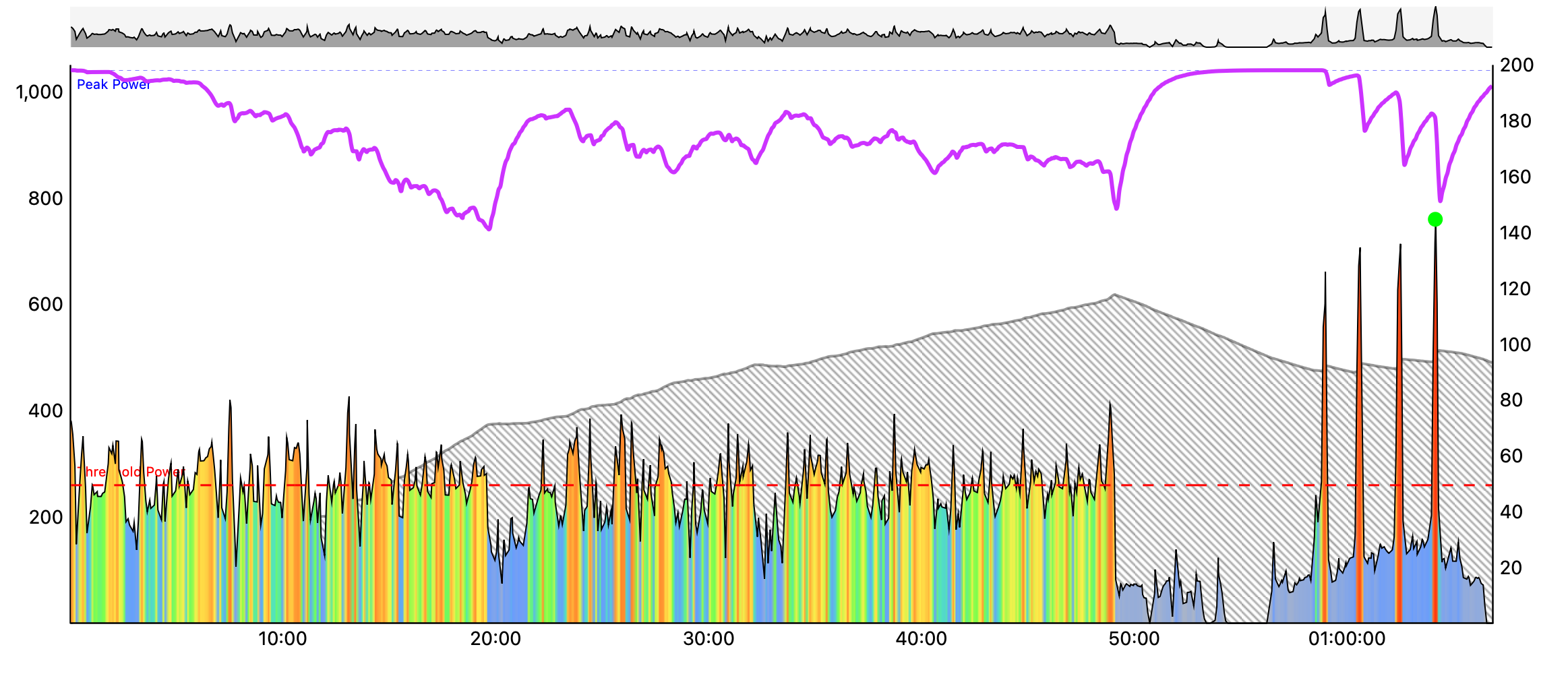
On a related note, I’ve been having loads of fun on my high intensity days this winter. Usually I swap my HIIT days to my scheduled race days in Zwift. I can then do my warmup/race and then “top up” my buckets afterwards, if needed. Most of the time, the races nearly fill all my buckets and I just have a few short sprints to wrap up my training, like this:
My setup is this:
Zwift is paired to Assioma pedals, Tacx Neo2t, Zwift Click, & HRM via BT
Garmin Edge 840 reads HR & Power from Assioma pedals via ANT+
When I finish, I typically save the ride from Zwift & discard the activity from Garmin to avoid duplicates. But we have planned tricks up our sleeve to make managing duplicate files easier soon
Yes, riding with Magic Buckets is a fun way to progress your training while using Zwift for racing, collecting drops, robo pacing, group rides, etc… My immediate thought when finding out about Magic Buckets was just that: “Cool! I can ride on Zwift and progress my character, unlock, and race without having to run a XERT workout. It’s like riding outside almost.” Would be great to see a XMB screen on Zwift but that might out of the question given the limitations on APIs and such.
Here is a suggestion to get beginner users started with XERT (I also commented this on your YouTube videos): Create videos with “Best Practices” or “Workflows” to use Xert with Zwift and/or training plans. The more examples/workflows you can find, the easier it is for people to hop on-board. I was frustrated that your video skipped a lot of “best practices” but in the comments you replied to peoples questions that should have been answered in the video (like what to do when you are done with a Zwift session and Garmin. What do you save? This was answered in the comments). Additionally, a lot of your videos are using an older version of Xert that have the “goals” tab and other selections that are not in this version further confusing me as I learned. Just some constructive criticism to make your videos a bit better.
I’m totally on board with Xert. I think Magic Buckets is the key for me because I just can’t stay consistent on structured interval training and I really think it can land big with most folks with busy lives. My biggest hurdle was wanting to go out and ride for fun but having an interval session making me think about where to go, when to start, and hope for no stop signs and lights. With XMB, I can hit all my goals on fun outside ride. On my way to check out a new route, I can hit my targets. That’s what I like so far so XMB and Zwift also adds to the experience! I’ve tried TrainerRoad (annoying outside workouts and way too prescriptive) and bought TrainingPeak plans (good but I want more flexibility).
I’m glad to hear you are working on a Zwift and Garmin XMB workaround to save the files.