I have xert connected to zwift only to get workouts into zwift. Zwift does not write back to Xert. I ride rollers and just use the garmin file.
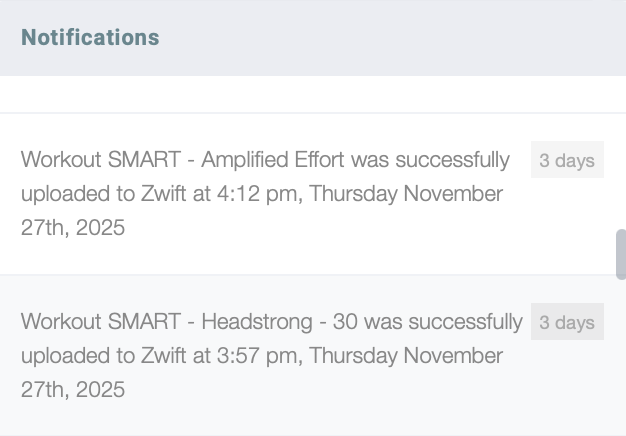
I looked at my notifications and xert is throwing workouts without me asking it to, they don’t show up in zwift, they aren’t ones I scheduled.
What is going on here? Today it uploaded a workout several times. Why?
Two settings control this:
-
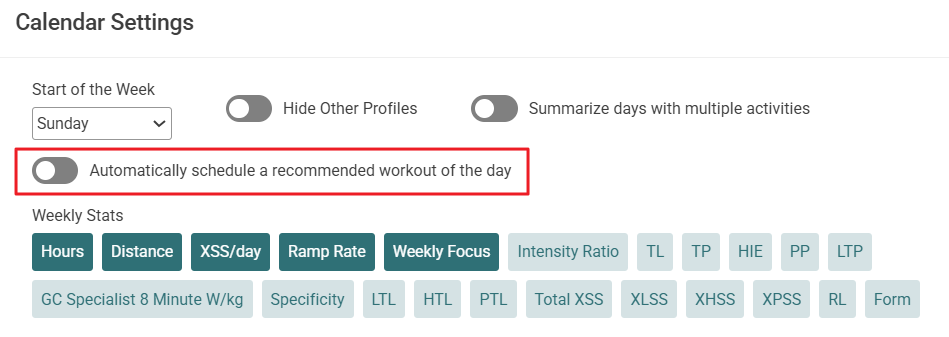
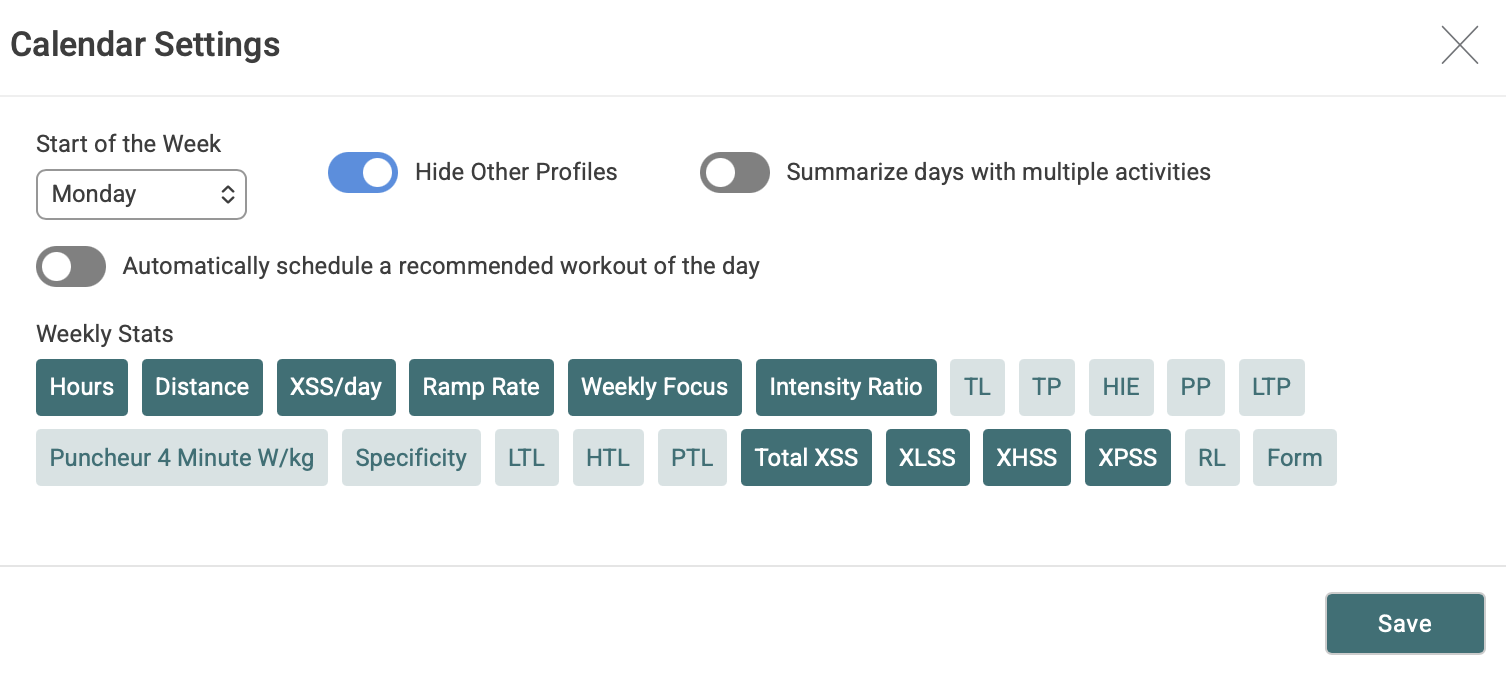
Check calendar settings: if 'Automatically schedule workout of the day (WOTD) is enabled, Xert will automatically select & schedule a workout for you, unless you’ve already scheduled one for yourself.
-
SYNC > ZWIFT: has an option to ‘Send Scheduled Workouts to Zwift’. If enabled, then all your scheduled workouts (including auto-selected WOTD’s) will be sent to Zwift automatically.
If you update your plan, availability, or recalculate some data, Xert will re-asses your training for today, update the auto-selected WOTD & send it to Zwift. Cheers!
1 Like
This is a perfect example of the barrier to entry to xert
check calendar settings
dude where?
I love this platform but cannot recommend it to ANYONE
There is nobody I know who can wade through it all
1 Like
Thinking about it, I know probably 100 serious training cyclists. How many could I say “hey check out xert”. Maybe 1 or 2? I love this stuff, but until this company takes a good hard look at itself, they will not catch anyone but the crazy. It is one esoteric settting after another. And I have been here for probably ten years!
Try this. In the “menu” thing on the left side, click Home, then My Fitness, then in the middle of the top of the page that comes up, click Planner, then on the far right look for the little gear icon which is one of the settings Scott was talking about.
I completely agree with your frustration with the user interface / presentation of an otherwise great platform. It’s like they’ve gone out of their way to make their web site look and function completely different from anything else out there and not use standard user interface practices at all. Someone is trying to reinvent the wheel or be artistic or something.
Most web-based GUI’s have objectively bad design compared to most stand-alone apps (PC, Mac, or Apple TV apps) but Xert is especially bad in this area. I think they may have hired someone new last year that is working on the Garmin apps. This person (or group) seems to be better in the UI department - they just seem to get it. Stuff has to be easy to configure and use otherwise people will run away.
There’s a reason Apple is so successful! They put the use experience first. Still waiting for Xert to offer a workout player app for Apple TV - still the best training hardware by far when it comes to user experience. Apple TV is just so crazy simple to use compared to any other option that it still blows me away how far behind PC and Mac users are. I can hop on the trainer and have Zwift running a custom workout and podcast playing in like a minute flat starting with everything powered off plus use my phone as a remote for everything including fans!
PS. It’s most likely the setting you are after is the 2nd one mentioned. For that one you again start at the weird menu thing on the far left side and click Sync, then Zwift, then toggle the **
Send Scheduled Workouts** Automatically send upcoming workouts to Zwift switch.
Planner page, calendar settings (gear icon).
Xert is one of the most documented SEO friendly platforms out there.
I can find anything I want to know in a couple clicks by typing my query into a browser search followed by “xert”.
Of course, I’m one of the crazies that likes to RTM.

Sorry but to say this to someone who has spent TONS of time.
It should be evident. You cannot expect users to do this. You just cannot. You’re not selling recipes to michelin 4 star chefs. You’re trying to sell to serious cyclists. They can’t use WKO5, intervals.icu is ok. Xert fills a spot, but can people use it? Think about people you know. Can you say you’ll get something out of it? The technology behind it is fantastic. The best! But can people use it?
1 Like
You have to spend a LOT of time here to really know your way around and just when you get things set up in a workable manner, they change it. At least most of the changes are ultimately for the better, but it still has a long way to go.
Great training guidance but needs to be repackaged by someone else. Maybe the underlying platform will get purchased by someone who knows what they’re doing in this respect.
Every time I am about to leave Xert for that reason alone, they fix, change or add something that just barely keeps me hanging on. The last time is was the Garmin ConnectIQ app for Xert. I honestly don’t know what it is called exactly but it’s one of many Xert apps for Garmin devices. It’s the one that downloads your current fitness signature from Xert and puts today’s workout recommendations in to “buckets” that you fill. I think it used to be called Magic Buckets actually. It’s become a bit cluttered lately but still legible and useable on a relatively small Garmin 540.
You’ll get faster training indoors (ideally on an AppleTV when Xert finally makes an app or at least makes the existing app work in landscape orientation), but at least the Magic Buckets app makes mountain bike “rides” more productive.
You asked where Calendar Settings are.
You access them by selecting the gear icon on the Planner page.
Or do you mean you found the settings but that didn’t resolve your issue?