Hello everyone, I’m learning how to use Xert (newbie here).
I tried the Workout Designer, but my Threshold Power is wrong. Looking at tutorials and other questions here, I saw that I can change the Threshold in the Workout Designer for a specific workout.
Now, every time I save the activity, it reverts to the wrong Threshold and doesn’t save the one I set.
Another detail: I’d like to set up my own workouts.
I see the numbers as: Daily necessary XSS Targets: 61 2 0.7
And I try to build something like:
Total — 63
Low Intensity — 60.5
High Intensity — 1.9
Peak Intensity — 0.6
Do you also do this? I ask because it’s a bit tedious—it always opens another bar, etc. Is it really that difficult?
I’m in the “threshold setting” phase and it’s hard to fill these buckets without messing up my workout with intensity spikes.
Do you have sufficient history loaded (ex. last 90 days) with enough maximal efforts for Xert to calculate your starting signature?
If you view details for your last activity on file – or last BT (breakthrough) activity – you can tweak your signature under the chart by entering values for PP, HIE, or TP. Refresh will show you how the chart analysis will be affected.
Select Save to lock the new signature and future adjustments will apply to that signature.
I uploaded over a year of activities to each profile. I had to adjust/change at least two weeks of Threshold data to lower my Threshold power.
I modified the activities where I had already set Thresholds, but I didn’t find options for “PP, HIE, or PP” to change. Would these correspond to Pmax, WPrime, or CP? I thought I could adjust the Power Curve by entering test data, but I realized that’s not the case.
I tried the first generated workout and noticed it created a session that is almost impossible for me to sustain. Holding such high power even for 20 seconds requires rest or much lower watts afterward. The calculations made it very difficult to sustain, even though the difficulty level wasn’t set high.
In the second workout, I tried Magic Buckets. My question: does it automatically read the planned workout if one exists? What if there’s no planned workout?
Is there a way to see how much Low, High, and Peak training I need for the entire week? That would help me design workouts targeting each quality separately, without having to mix different types in the same session every time.
I think (and I’m happy to be corrected) that rather than read the planned workout, it instead uses that days recommended target for each type of strain (low,high and peak) then it will give you an interval target to fill each strain’s bucket at roughly the same rate (which will usually be very similar to the recommended workouts for the day). If you go harder or longer on your intervals than initially recommended it will adjust as you fill your buckets faster and eventually it will recommended riding easy to finish off your low strain bucket after you’re done with the high and peak targets for the day. On an endurance day the display switches and all you have to really worry about is getting your low XSS, how you do that is really up to you and will depend on how you like to train and the time available, by that I mean if you’ve got loads of time, you may decide to ride easy for longer or if you’re time crunched, you can accelerate things a little by riding sweetspot/tempo but at a greater fatigue cost, it’s up to you really and for many that is the beauty of Xert, it’s giving you advice but how you interpret that and shape it to your particular needs is effectively up to you. I’m a little time crunched mid-week, so tend to ride sweetspot/tempo rather than longer endurance on the trainer before work, at the weekends I ride longer if I have an endurance workout advised.
Regarding your signature and workouts not being achieveable, it might be worth checking for any activities that have caused a large breakthrough, sometimes this can be down to a power spike or bad data, you can flag these workouts and see what effect that has on your signature values, hopefully it’ll bring it more in line with what you feel is right, if there’s nothing obvious, then I’d maybe think about contacting support, Xert works really well when your signature is accurate but it can make life very hard work if it is wrong, especially if you are just starting out with the program.
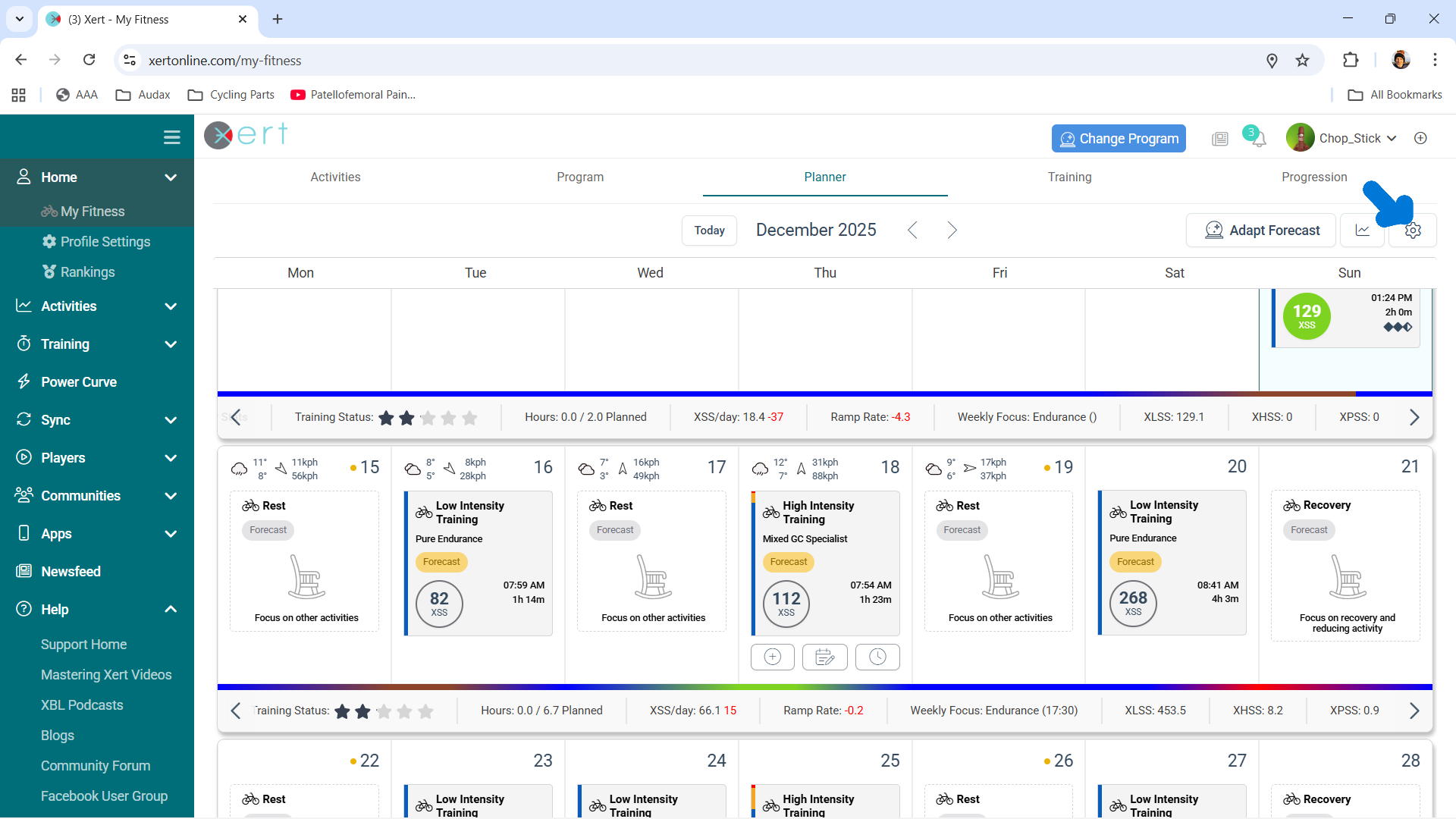
Thanks. I added these in the settings, but the values I’m getting don’t match what I planned for the week, right? For example, it shows something like:
Hours: 1.7 / 1.7 Planned
Distance: 24.2 Km
XSS/day: 14.6 / 5.8
Ramp Rate: 0.4
LTL: 9.2 +0.4
Total XSS: 102 - XLSS: 101.7, XHSS: 0.3, XPSS: 0
What I mean is: if I knew exactly how much I need of each component (Low, High, Peak), I could plan my endurance rides and others (High, Low, etc.) better. I could aim to achieve most of a single component in a dedicated session. For example, I wouldn’t need to include max efforts in my endurance ride if I knew my High and Peak targets were already met elsewhere.
I get what you are trying to achieve, in that you want to do a hard session one or two days and get your weekly high and peak boxed off and then ride endurance for your remaining workouts. I’m not 100% sure how you’d go about that, other than when your fatigue is showing as tired (yellow) then Xert will only recommend an endurance workout until you return to fresh (blue). I suppose you could always force this, by choosing workouts that make your freshness status turn yellow, add them to your planner for the next few upcoming days and it will show you how that affects things, then once you’re yellow, just ride endurance.
A lot will depend on which program you’ve selected and rider type, I’m sure there is someone who maybe has a better way to achieve what you want to do. I just go day by day, rather than plan further ahead, the reason for this approach is that Xert adjusts after every session, so say I’m prescribed an over/under type workout, quite often I might exceed the over parts and end up with more medium/high strain than intended and then I’ll get a couple of easy days, sometimes the reverse happens and I struggle to hit the recommended targets or cut a workout short and rather than riding endurance for a couple of days afterwards I’m fresh enough for a little more intensity and Xert recommends new targets for the following days.
By using this approach, I’ve found that it’s less stressful than worrying about ‘failing’ say a VO2 max workout and wondering why, as the work I’ve done still counts. I’ve tried other apps in the past and the whole pass or fail mentality is a bit bonkers.
you can design a workout based on watts, not on percentages of your TP. You can ride freely for the beginning and do some (maybe 10-20) high power short efforts (20-40 sec) and continue to push until muscle fatigue. Go on through this pain until you can not even hold your estimated TP any more. This should generate a breakthrough/fakethrough with new numbers. If there is an old breakthrough in your history that is a lot higher, flag this workout so it does not count as breakthrough any more.
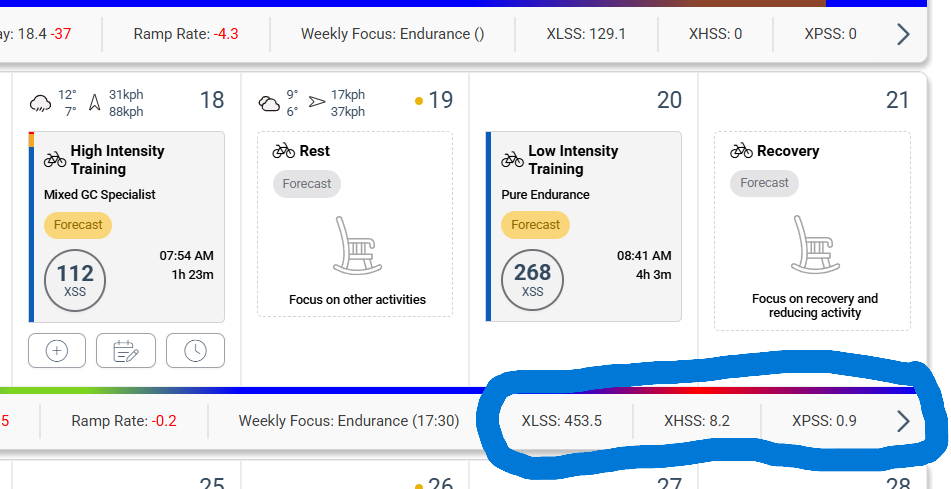
I changed the settings to view LTL/HTL/PTL — which would be Low, High, and Peak — but it shows all the values, not what is planned for the week, so I can know how much it intends to produce during the week according to the deficit and available hours.
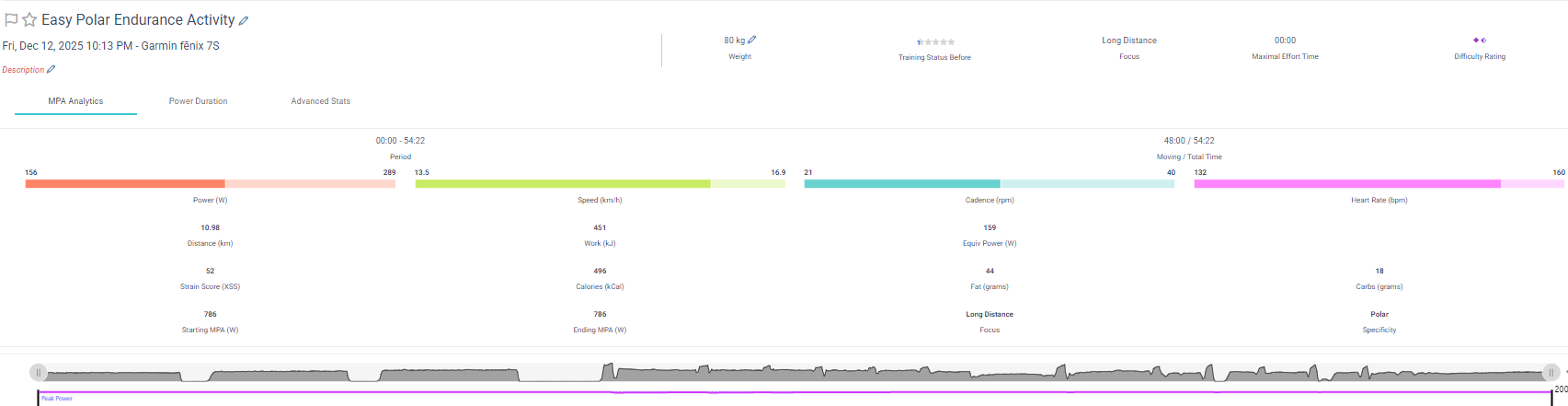
And I noticed that when I upload an activity, I don’t see these values when clicking on the activity details.
I changed several TPs to try to hit the breakthroughs and correct this.
I understand that it sees how much, but as I do other activities, it will always define them as ‘fresh,’ and I need to balance light and ‘hard’ training during the week.
Do you have any idea how I can do this?
That is, know what the values are for each week and achieve the targets during the week
If you are struggling to get your signature correct and as a result are constantly fresh after completing hard workouts, I’d reach out to support, so they can have a look at your account as it seems something is a bit off. Normally, after a hard workout, I’m yellow (tired) and then get endurance workouts recommended, if this isn’t happening for you then something is wrong. Maybe @ManofSteele could have a look for you.
Adjusting the signature in the workout designer is more to experiment with how Xert’s SMART workouts adjust to each individual athlete based on their specific signature - it is not the place to actually modify your signature.
If you have issues that are specific to your account/situation, it’s generally best to reach out directly to our support team. We do monitor the forum here, but it’s best for us to move these support queries where we can document & track that they’re fixed. Kindly send us note & summarize the issue(s) you’re running into and we can take it from there.
I think you’re overthinking things.. You don’t really have to create workouts for yourself. Xert gives you daily L/H/P targets and then gives you recommended workouts that best align with those targets every day.
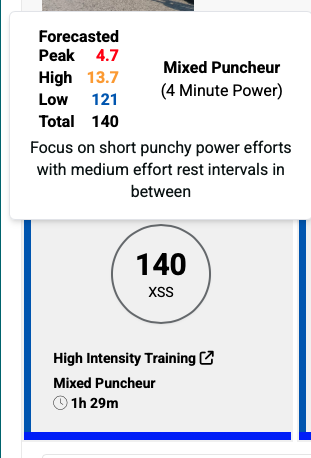
For example, today my target is 140 Total XSS ( 121 Low, 13.7 High, 4.7 Peak):
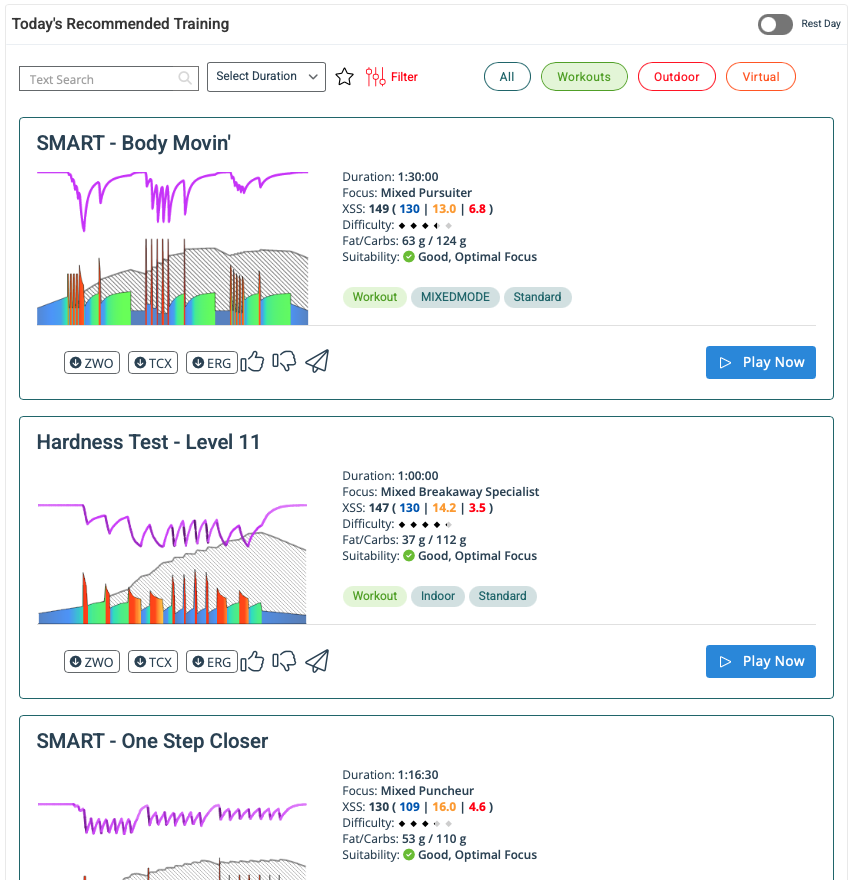
To accomplish this, I can view the recommended trainings, which shows the workouts and past outdoor or virtual rides that I’ve done that best align with those recommendations. Since I want to do a Workout today, I filter for workouts and can pick one of the ones near the top. I like the Body Moving workout, so that’s likely the workout I’ll end up doing using the Xert app:
understand. I have been following the recommended workouts and I recognize the need to identify the effort levels (low, high, peak). As I mentioned, in the recommended workouts, a session that should be an RPE 4 sometimes becomes an RPE 7-8 (I’ve already adjusted my threshold power), because I believe this is due to my profile (more anaerobic/sprinter — I genuinely need recovery after intense efforts).
Furthermore, I like to plan my week based on how I’m feeling and according to my other sports, so I schedule hard workouts for some days and easy ones for others. If I know or can estimate what I need, it becomes easier to hit those values (low, high, peak).
I tried doing this by creating the recommended workouts for the week and reviewing them. However, when I complete a workout and upload it, it doesn’t show the high, low, and peak for me to see which values I achieved — which doesn’t make sense, since for the recommended ones, if I do the workout, that information appears.
What program type and settings are you currently using?
Once your cycling profile signature is dialed in, you shouldn’t need to adjust your TP.
Changes in signature should reflect the rise and fall of TL alone with or without BTs.
Note that it is not possible to ride intervals above TP which don’t contain a portion of low, high, and peak strain.
The only bucket that can be filled on its own is the Low bucket.
Below TP is considered endurance level strain which can be strictly easy (<LTP; Z2) or include some moderate strain (tempo/sweetspot) depending on what you prefer to do.
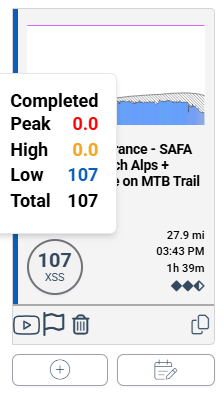
Low, high, peak values for completed activities are viewable on the Planner by tapping the XSS circle.
Thank you, I didn’t know that by clicking on the XSS these values would appear.
Do you know why it shows “Scheduled” for a workout I just finished?
As I mentioned earlier, the threshold power/FTP that was incorrect, I have already corrected my past workouts, as you instructed above, in order to fix these breakthrough workouts and make them accurate.
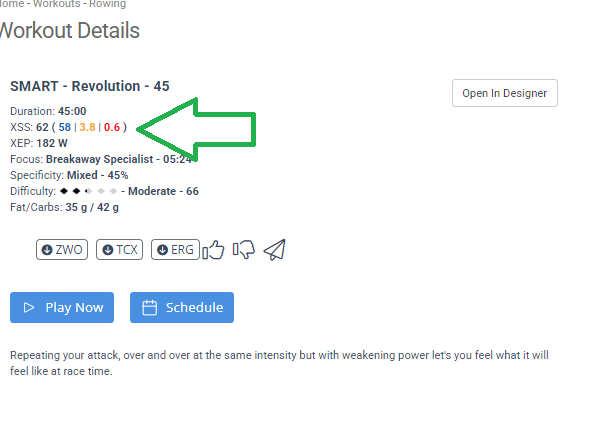
As you can see, when I choose a recommended workout, the H/L/P (High/Low/Peak) indicators appear; and as you set it up, the recommendation appears for the day.
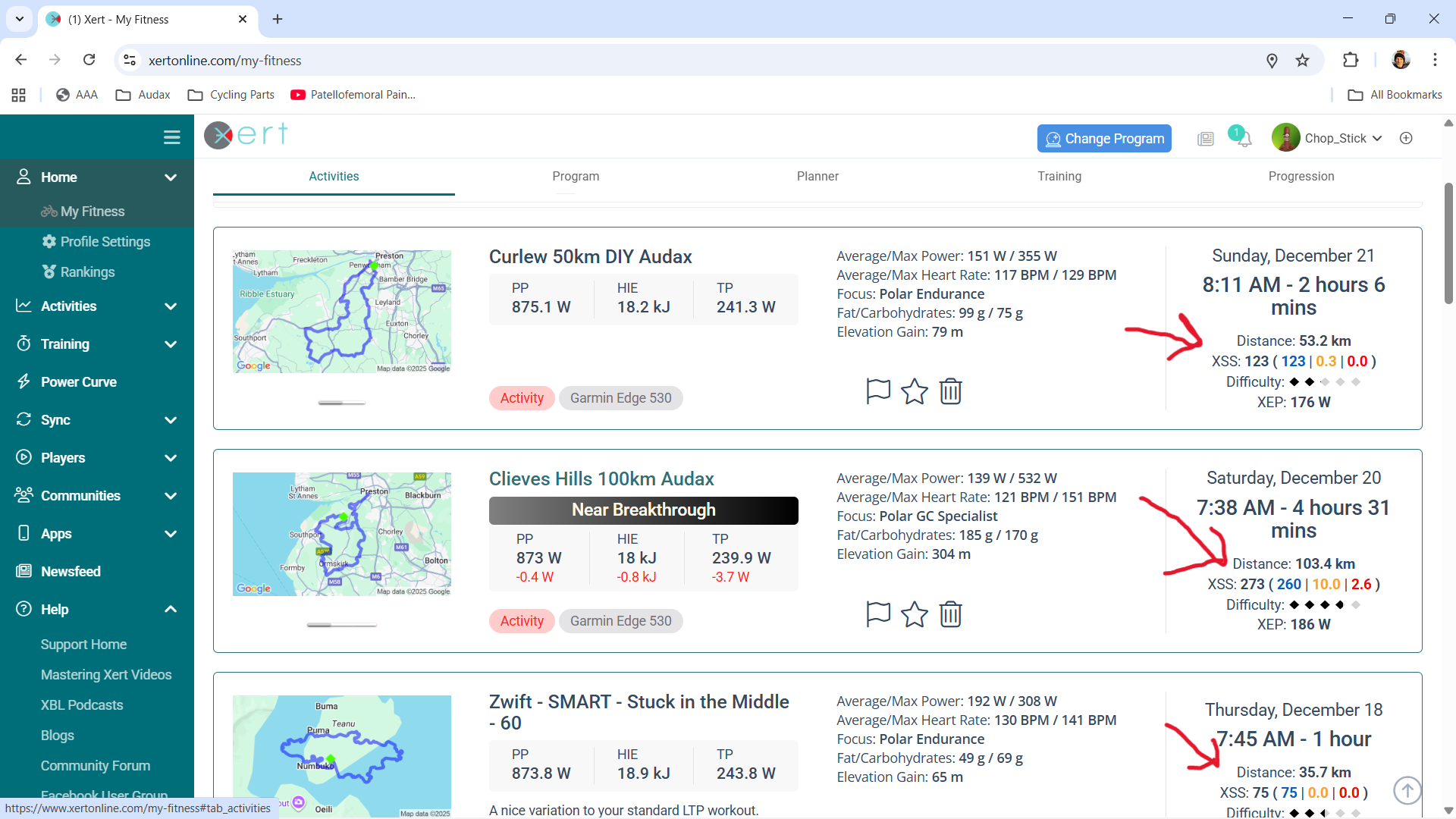
If you go to your ‘Activities’ page, you’ll see what totals you actually achieved to the right on the overview of the activity. I agree that it would be useful to see a comparison between recommended and achieved within the actual statistics page for the ride.
Likely due to the Start time of the scheduled workout on the Planner.
When you add to Planner the default Start time is the time you normally train on that day of the week.
If you start EBC within 30 minutes of that Start time Xert treats that as your selected activity.
If you instead ride well before that time any scheduled activity later in the day will remain.
For example, a Planner entry is scheduled for 2pm Start but you decide to ride at 8am.
You can manually delete the later entry or the scheduled activity is cleared after midnight each day if never completed.
 61
61  2
2  0.7
0.7