Second should be shorter as there is some work above threshold and I would read it as “do some Sweetspot/Threshold - Work”. First should be longer as I would read it as “always stay below LTP”. 66 XSSR for three hours is very hard to reach without ever going above LTP - especially outside.
The time estimates use a different method for low intensity vs. high intensity and the estimate for high intensity may look to keep difficulty down which may result in a longer time estimate. Pick a workout or generate one for more accurate time needed.
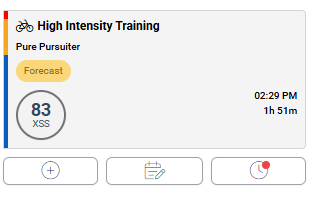
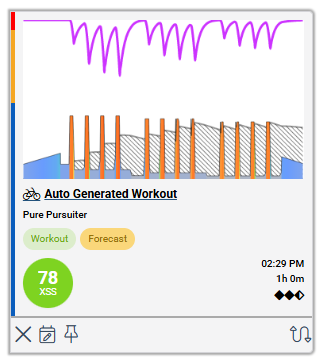
I also find this confusing. For example the Planner proscribes a High Intensity Training for 1h51m. I’m also not sure if it is even possible to create a 1h51m High Intensity Training that only generates 83 XSS.
This also causes the weekly hour estimates to be off by a wide margin. I think it also messes with the XFAI, because it will tell you you need eg. 14 hours/week to reach a certain target, while in reality the weekly volume will probably be closer to let’s say 10 hours because the actual workouts will be shorter.
Could this have somehting to do with the ‘XSS per Hour Preference’ setting? At the moment I have it set to ‘Based on Training Load’. If I change this setting, will that impact the time estimates in the Planner?
Update: I have changed my XSS per hour from Based on training load to 100, and this seems to have fixed the problem somewhat. Planned workout duration in the Planner is now closer to the actual workout time in the suggested workouts.
I still find it confusing thought that there are two different calculation methods used. Wouldn’t it make sense to have the Planner actually use the duration of the most appropriate workout?
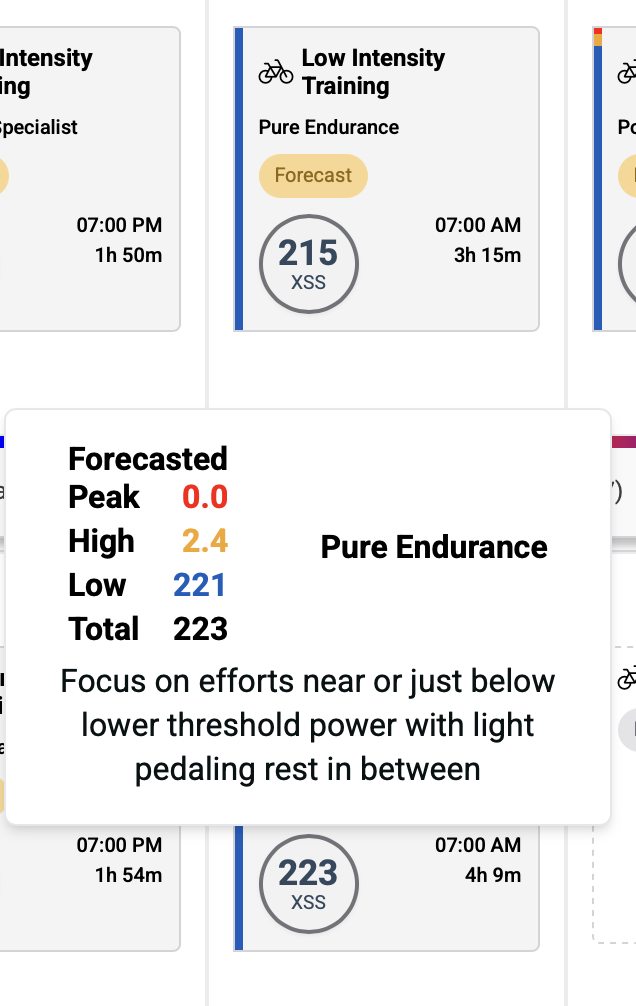
Here’s how I would read the OP’s XFAI entries –
Both values (XSS and Duration) are approximate.
E.g. approximately 215 XSS in approximately 3-1/4 hours.
It makes sense the second one is longer.
215/3.25 = 66 XSS per hour
223/4.15 = 54 XSS per hour = easier pedaling = longer time
The second one includes an allowance for some surges over TP.
Both would be rated Moderate Difficulty.
Difficulty rating –
Easy: <45-50 (1 to 1.5 diamonds)
Moderate: 50-75 (2 to 2.5 diamonds)
Difficult: 75-110 (3 to 3.5 diamonds)
Tough: 110-150 (4 to 4.5 diamonds)
Hard: >150 (5 diamonds)
It doesn’t really matter if some high/peak pts sneak in during a Pure Endurance ride outdoors unless you push the result out of endurance classification.
For example, Moderate Mixed Climber instead of Moderate Polar Endurance.
Specificity rating –
Pure – majority of time at or near the Focus intensity.
Polar – majority of time at Endurance intensity with efforts above your Focus intensity.
Mixed – mix of Endurance, Focus intensity and efforts above and below it.
Indoors it’s a cinch to match the target goal and obtain a Pure rating if you select an appropriate workout or free ride in Slope mode with or without XMB.
Outdoors you need to be cognizant of the route you take and what gear is required to ease up on any climbs.
Many outdoor endurance rides will be rated Mixed Moderate unless you deliberately ride easy on out-and-back segments on the flattest roads with as little traffic as you can find.
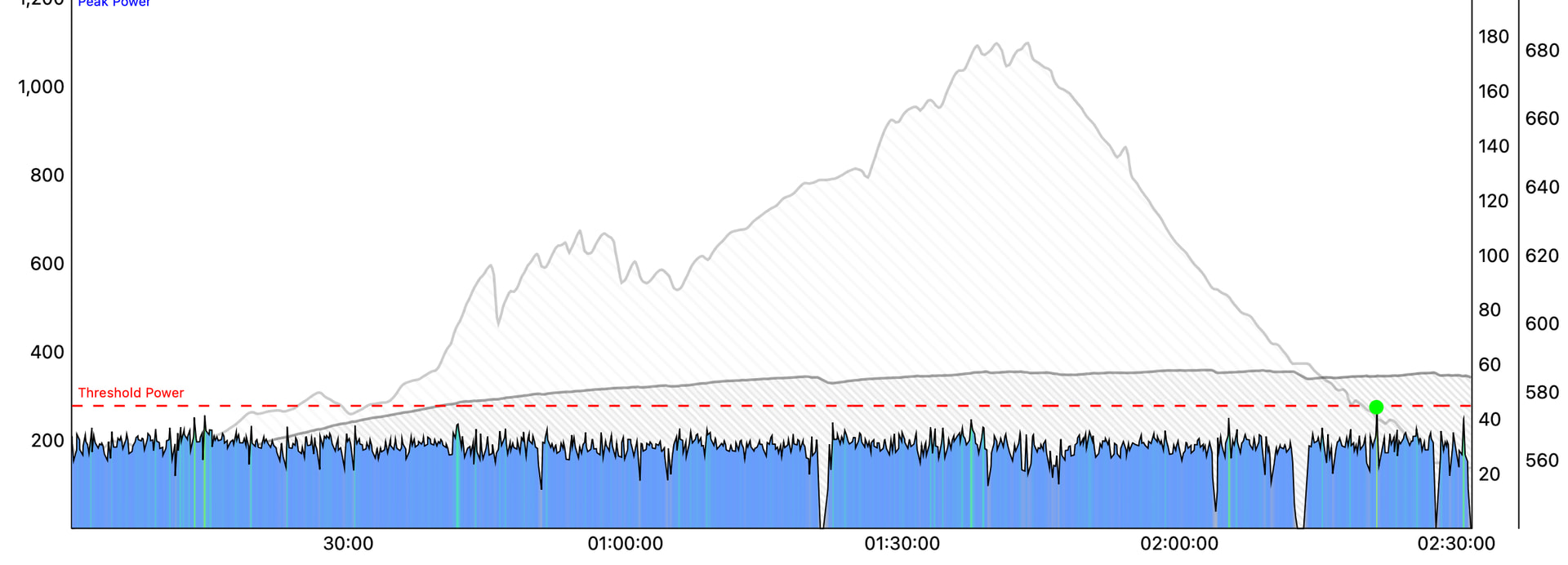
Here’s one of my Easy Polar Endurance rides accomplished on a greenway for 3+ hours –
Thanks for your answers. My issue is more about Low Intensity Rides taking quite more time than planned unless becoming tempo / sweetspot rides. This outdoor low intensity ride is more like 150 XSS in 180 min (equiv power 182W). I can understand that a lot of people do not want to ride easy on low intensity days as their threshold is too low and they are not used to polarized training and think they have to suffer each workout. If I went for equivalent power of 215W, this gradually becomes a safety issue as there is also traffic, crossroads and tempo limits (30 km/h in most villages) to consider. Plowing through villages at 40km/h (slight downhill or wind from behind) is not too nice.
edit: maybe another slider for “low intensity xss rate” might do the trick - at least for me. I don’t care if I fill my bucket(s) early, but not filling them in the time I have feels a bit off.
That’s a bit of chicken and egg if you think about it. The system starts with your availability and then assesses all the various XSS combination of values you can do within that timeframe accounting for whether you’re using total, moving or pedaling time. These also need to match into your training goals which also need to fit into your training status and recovery demands which also need to fit into your polariization goals which also need to fit into your preferred xss rates, etc. etc. A massive number of computations.
So while we could go back and then find all the various workouts and activities you could do to meet the requirements and perhaps iterate that process, this would be very time consuming and not likely to be sufficiently incrementally better in the end. How long it takes to do a set of XSS values depends on so many factors. Most users figure stuff out and adjust based on their own availabilities and desires for training anyway so added precision isn’t really needed.
The “based on training load” setting can throw things off so better to keep it set at a single value.
Yes, I have now set the XSS per hour to 100 instead of ‘Based on training load’, and both the Forecast and Planner times are now much more accurate.
Maybe it could be useful to provide the user with some sort of feedback when they choose the ‘Based on training load’ setting, because I had no idea it was this setting that was causing the weird time estimates.
It generally works perfectly well. Most users aren’t too fussed about the misalignments it may cause. Having said that, we should likely add a warning or perhaps phase the feature out altogether.