When doing a SMART workout, I expected the target watts to adjust as the workout progressed. Nothing changes at all - have I misunderstood what SMART workouts are?
Using an iphone/XERT EBC app/Wahoo KICKR. I use slope mode. ERG Mode doesn’t work/no resistance, however Auto mode works as I would expect ERG Mode to behave (strangely).
Is power smoothing disabled on your KICKR?
What is the workout name?
SMART workouts include a number of interval types not based on %TP. One type is dynamic intervals (power or duration) that can vary depending on your compliance to target. This change is automatic when you ride the workout in AUTO mode on EBC.
In Slope mode you’ll need to monitor the rainbow gauge closely and align power/target arrows to maintain compliance.
The closer you maintain target watts the least amount of change will be evident.
An easy way to see dynamic power in action is to stop pedaling in the middle of the interval then resume. Target power will rise especially as you close in on the end of the interval. In AUTO mode you will feel that increase. The opposite can occur if you consistently overshoot target watts.
Variable power intervals can also be RIBs (rest-in-between) where EBC adjusts power to ensure MPA recovery is sufficient before the next interval.
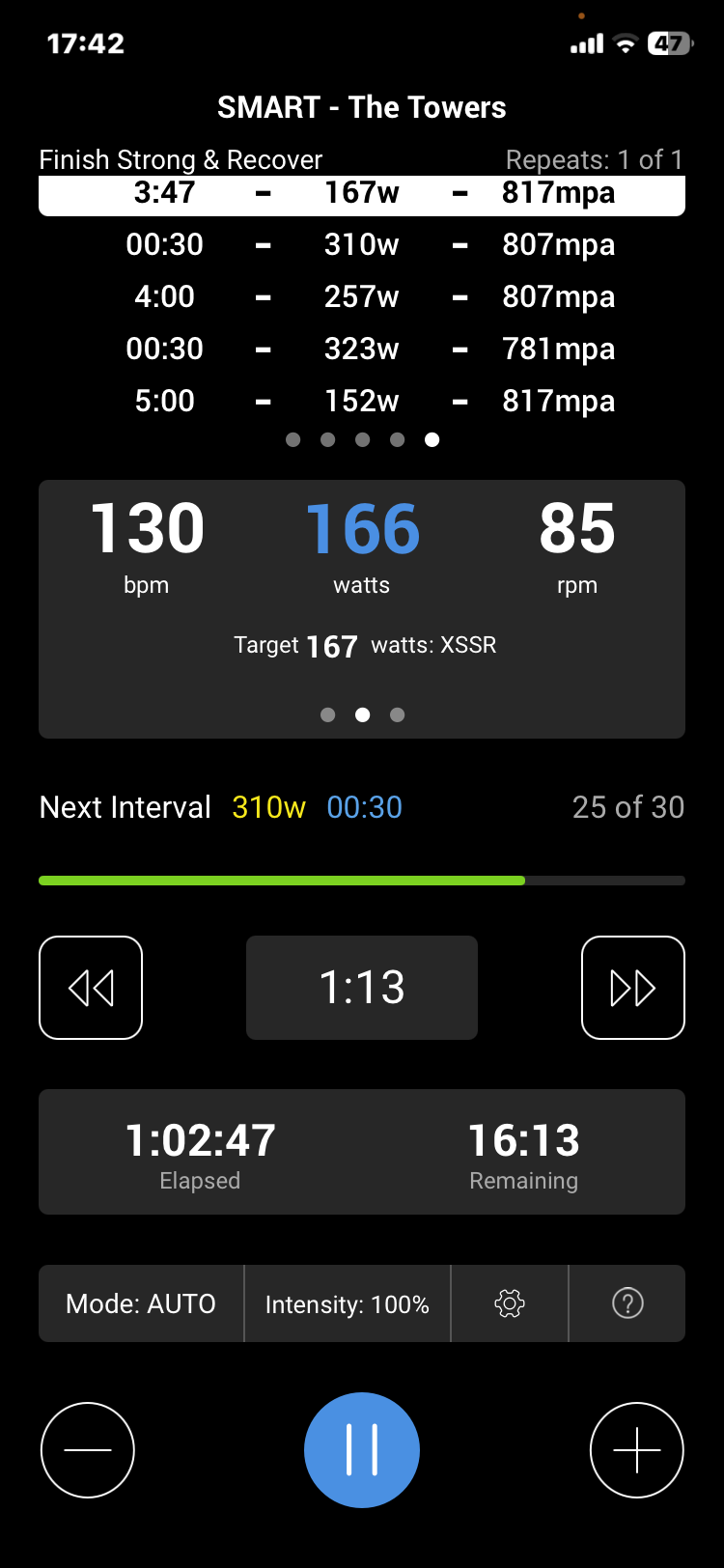
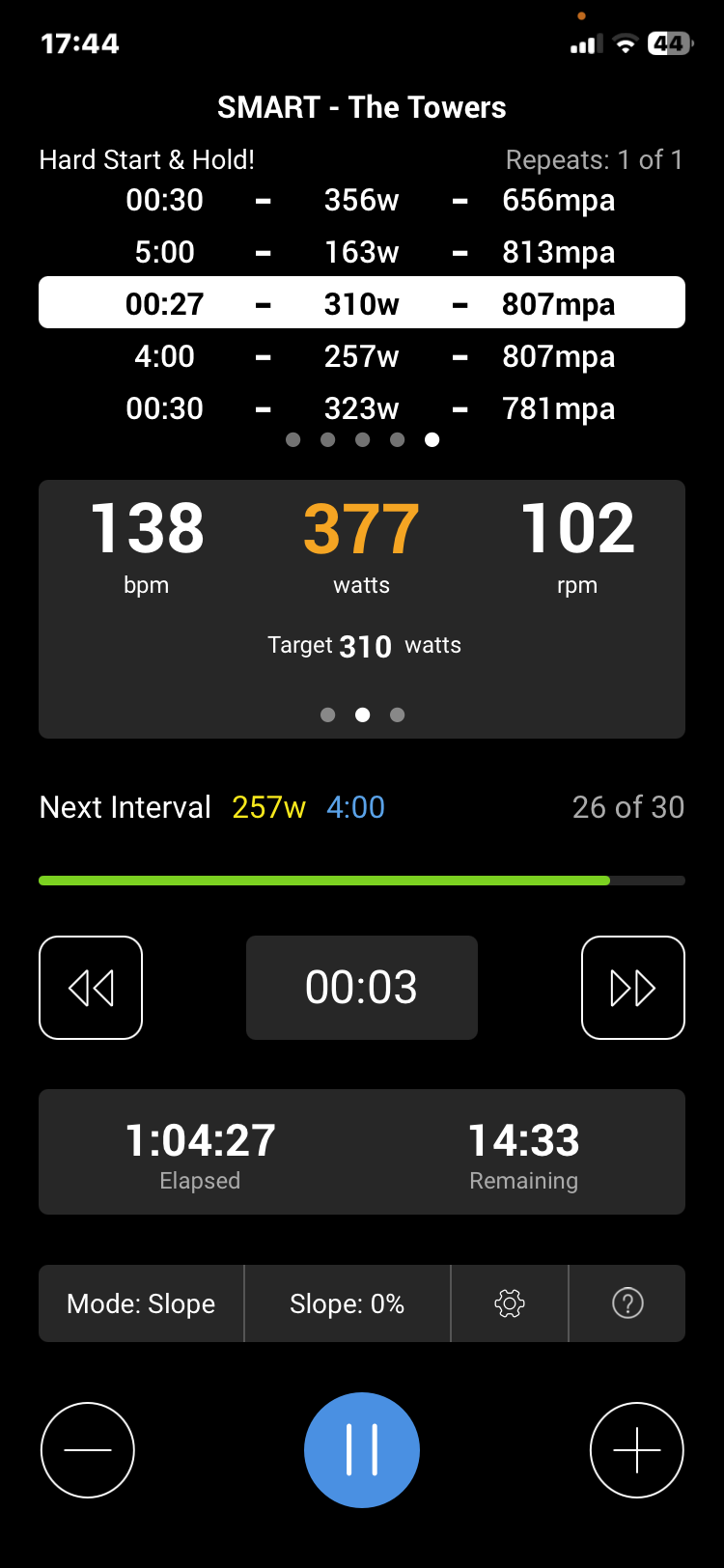
Hi, the workout completed yesterday was SMART - The Towers completed in mix of slope and auto modes. I was riding main intervals just above target watts using slope mode. Switched back to Auto for 5 minute rest/recoveries. Screenshot 2 below show I intentionally increased power on the 30 second 310w interval (riding at 377w) but that didn’t change the current or subsequent interval targets from what they were at the start. Should I being these workouts in Auto mode?
Hi @IanJackson - Hopefully I can explain! SMART workouts are SMART for 1 or 2 reasons:
They use your entire signature to calculate the targets, rather than just %FTP, meaning that the workouts will always scale to your current fitness, even as you gain (or lose) fitness. These include interval targets like Mean Maximal Power (MMP) or %Lower Threshold Power
They use your actual MPA in real-time to adjust the target power. We call these dynamic power intervals (where the power target adjusts) or dynamic duration intervals (where the duration adjusts, though this was not as popular and this has been removed from most of our default workouts). These include intervals like XSS per hour (XSSR) or Target MPA.
Not every SMART workout has the dynamic intervals. The Towers workout that you linked has both SMART intervals mentioned above. The “towers” part of the workout uses your fitness signature to set the targets:
30s at 5 MMP (your unique 5 min power)
4 min at Threshold
another 30s at 4 MMP (your unique 4 min power)
If you overshot any of those targets, there wouldn’t be any adjustment, it’ll just hold you to that pattern (with some extra fatigue & XSS from pushing harder on the one interval).
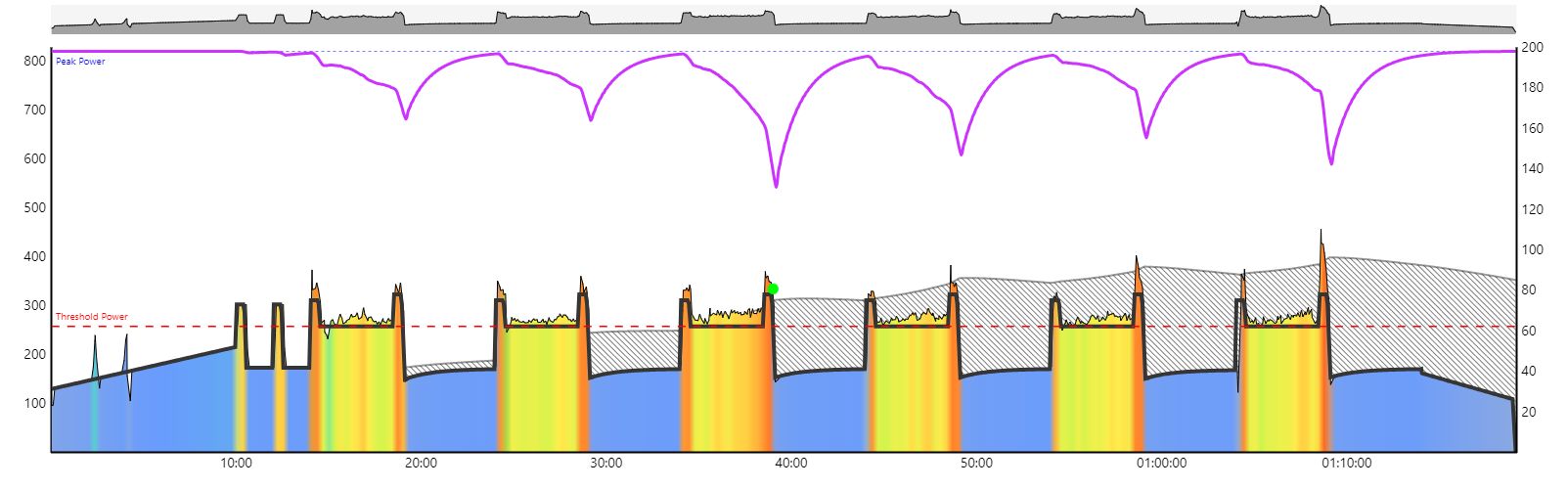
The recoveries between sets are dynamic intervals (always 60 XSS per hour) - the curved shape itself is actually just due to how your MPA recovers. These intervals will deviate from the original plan if you finished an interval more fatigued than expected. Maybe you could post your MPA chart from the workout so we can review together.
The workout bias feature scales all interval targets up linearly (e.g. if your target is 200 W and you have a +1% bias, the “new” target will be 202 W). There’s no complex math if the interval target is a XSSR interval, for example if I bias an interval that’s supposed to be 60 XSSR and I boast the workout +1%, the target doesn’t become 60.6 XSSR. We calculate the target power (in watts) and apply the bias.
Sorry… wordy response, but hopefully it helps answer your question.
ManofSteele Thanks for the full explanation, now it makes more sense. Yes would be good to get the MPA chart interpreted to make sure all is as it should be. It might make interesting reading as I mostly went well above the targets.
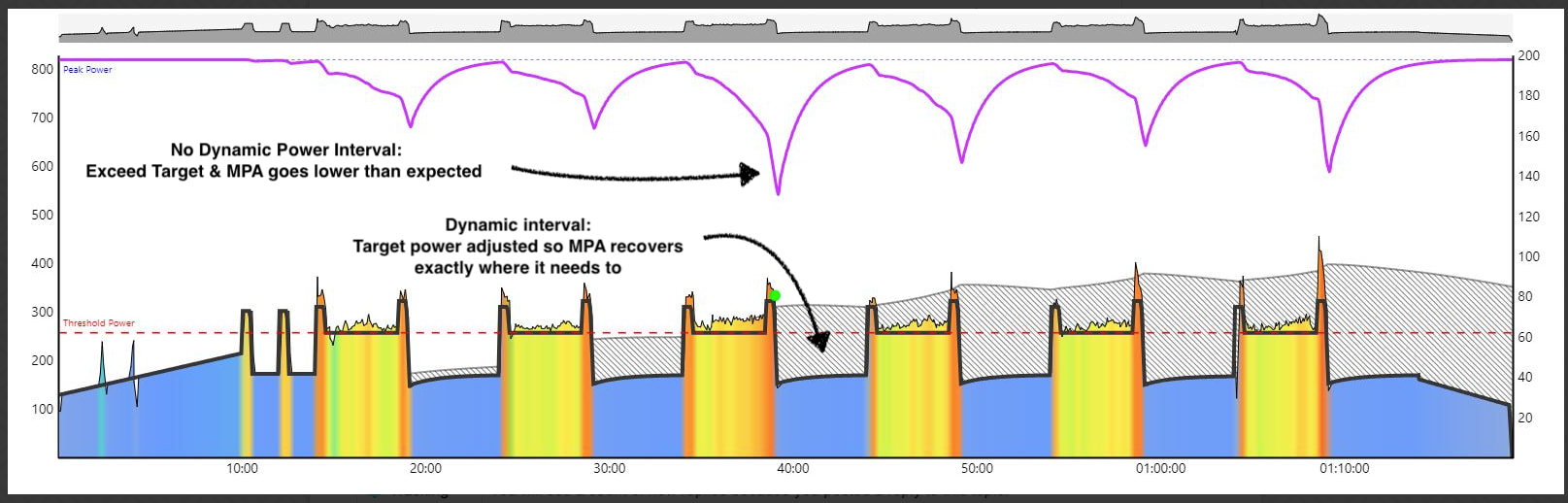
If done at 100% intensity, MPA should be the same at the end of each “Tower”. The intervals where you pushed harder, MPA came lower, since they’re not dynamic power intervals
However, notice how despite going deeper on the 3rd and final “towers”, your MPA recovered to exactly the same point at the end of each recovery interval. That’s the effect of the Dynamic Power intervals in this specific workout
Whether an interval adapts in real time or not will depend on how the interval is defined in the workout.
I think what you did for this workout is 100% fine. You pushed a bit harder during the intervals & Xert adjusted the recoveries so that you’d be adequately recovered before the next one
Normally you would ride SMART workouts in AUTO mode on EBC.
AUTO mode in Xert is ERG control.
AUTO also switches to Slope mode if an interval is defined to do that. If so, the workout will be tagged MIXEDMODE.
See: What Trainer Modes Are Available in Xert’s Workout Players? – Xert
The SMART workout you selected didn’t have any dynamic work intervals but did have dynamic RIBs (rest-in-between) as Scott describes.
Here’s some SMART workouts with curvilinear intervals for both work intervals and RIBs. SMART - Bangarang SMART - Closer 200 (Reduced)
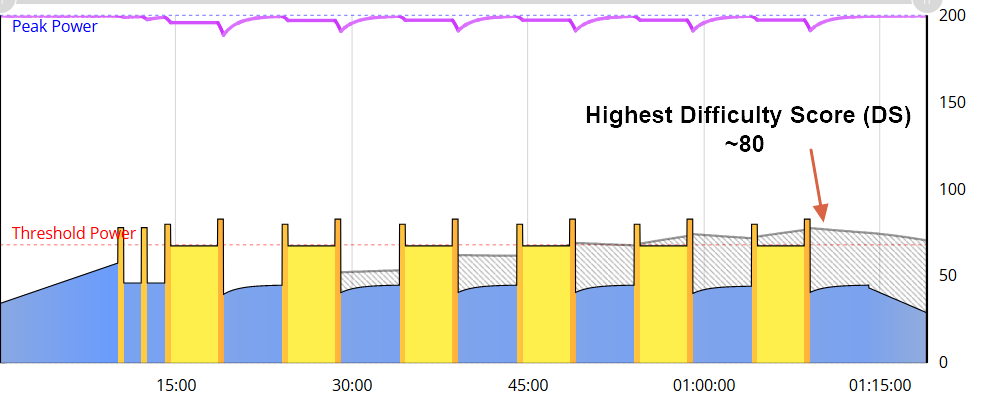
Notice how the preview chart for Two Towers shows the expected strain levels based upon your current signature.
You went above target into yellow/orange instead of hovering @ TP, so the top MPA line was drawn down further (more strain). That also raised the Difficulty level (shaded portion of chart) from 3 diamonds (~80) in the preview chart to ~3-1/2 diamonds on your completed activity (~95?). IOW more XSS per hour.
Difficulty Rating/Score –
Easy: <45-50 (1 to 1.5 diamonds)
Moderate: 50-75 (2 to 2.5 diamonds)
Difficult: 75-110 (3 to 3.5 diamonds)
Tough: 110-150 (4 to 4.5 diamonds)
Hard: >150 (5 diamonds)
Thanks @ridgerider2 , I’ve been searching out MIXEDMODE workouts since Scott and you replied. By typing ‘mixed’ in the search bar in Workouts it brings them all up. I like to use slope for work intervals as I like to push on those but like to go back to AUTO on the recoveries. So now I know I can achieve that by riding in AUTO on workouts with MIXEDMODE. As an aside it would be good on iphone EBC to be able to delete/skip some mode options. So when in AUTO the next option is SLOPE, that’s great when I hit a work interval. However to get back to AUTO I have to scroll through ERG and RESISTANCE which means I spin out momentarily as it moves between them….maybe I should increase the settings on ERG and RESISTANCE even though I’m not using them - will take a look. Thanks for all your help.
Yup. One of my pet peeves too. For iOS and Android.
I would reallly, really love a setting called Toggle AUTO/Slope (Off or On) which is available when you tap the gear icon during a workout.
If enabled the ONLY two modes would be AUTO and Slope.
If you need ERG, Resistance, Off for some reason, you’d disable the toggle.
Coupled with this function I’d like to be able to swipe to XMB pages whenever the app is in Slope mode. The workout would continue running but you could check to see what the XMB guidelines would be if you decided to finish the workout using XMB.
Currently on EBC Android you can swipe the bottom page to view buckets, but you can’t swipe the upper page to view the XMB rainbow gauge and interval guidelines.
If you want to switch to XMB you have to end the workout and continue the activity.
This actually works well if you shorted any buckets during the workout. You can make them up during an extended cooldown.
I’ve also used this method to bail on a hard workout but achieve the target goal for the day under my control using XMB.
@ridgerider2 I currently don’t have access to XMB so can’t really comment on the 2nd part of your message. However re the SLOPE/AUTO toggle that’s effectively what I get when I export a workout to other platforms except it’s ERG ON/OFF. Same effect but you lose the SMART aspect of the workout but it lets me push on the WORK intervals and not have to think too much about the RIB/recoveries. Just a single press of a button to flick back to ERG. If only more workouts had MIXEDMODE. Another suggestion to push a bit harder on WORK intervals is using the AUTO mode + button however with the ability to leave the RIB/recovery the same but to be used with caution so as not to ruin the workout design/intent.