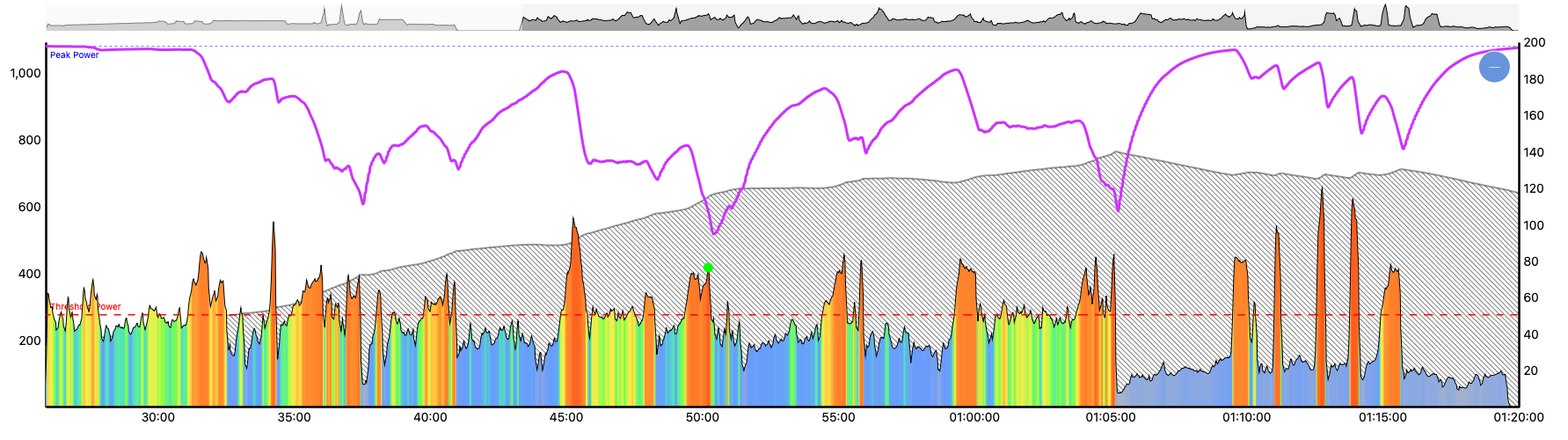
When I send a mixed-mode workout to Zwift or MyWhoosh, the intervals are displayed as a free ride. I’ve already discovered through searching that this is unavoidable, as Zwift and MyWhoosh can’t interpret slope mode. Ideally, the Xert EBC app would allow virtual shifting, but as it is, I simply disable ERG mode in Zwift or MyWhoosh.
My question is: Is there a way to adjust the transmitted data so that a power target is displayed?
Unfortunately, there doesn’t seem to be a solution here. Virtual shifting should be implementable, though. BikeControl, the QZ app, icTrainer, and Rouvy all support virtual shifting with the Zwift Cog and Zwift Play Buttons, so the code/APIs must be accessible.
Until there’s a solution, I’ll just use the Magic Buttons or choose workouts without Mixed Mode.
Hi Harry, thank for posting. I can provide some comments from our perspective.
It’s a bit unfortunate that Zwift cannot display the power target for the free ride intervals in their UI. They know the target, as it’s properly colour-coded based on the power target zone.. When doing these workouts in our app, we show you both the Interval Target & specify that it’s done in SLOPE mode.
For now, you could consider sending non-Mixed Mode workouts or using Magic-Buckets generated workouts (or even better the Magic Buckets real-time feature for Garmin/Xert EBC/Karoo).
Alternatively, if you really want to do these workouts, you could create a personal copy of the Mixed Mode workout & remove the ‘slope’ sections. If you go this route, I would recommend disabling ERG control in Zwift and using your virtual gears to follow along the workout… the whole reason we have these workouts is because they contain intervals that aren’t well-suited for ERG mode.
Yes and no. It would be best if Zwift would simply establish virtual shifting as an open standard, like FTMS for smart trainers. Sure there are other apps that have “hacked” it to work, but IMO, this is suboptimal. Given the massive range of devices, apps, etc., it’s far better for all hardware & software developers to operate on an open standard for maximum compatibility.
I say this as someone that also uses Zwift click on my Tacx trainer (though I did leave the physical cassette on in case I wish to use Mixed Mode workouts with EBC from time to time).
Ok, thank you very much for the quick feedback. I drive with Magic buckets free rides at the moment and over the summer almost exclusively outside. Unless it’s bad weather. The magic buckets are just brilliant for that. I don’t think it’s that good for indoor rides, I prefer to look at a screen and have everything there. Since I also have an iPhone, I have to run the buckets over my Garmin and Ithat’s not that great. That’s why indoor mostly do workouts. And I don’t think the indication “free ride” is so good. I want to see the power target.
But thanks for the hint that I can adjust the workouts, I will do that then.
That’s exactly how I’ve done my training all winter! My trainer/power meter is all paired to Zwift and then I monitor Magic Buckets on my Garmin (connected to my Power Meter). Zwift races have been really good for filling my buckets on High Intensity days, but I will “top up” with a few hard intervals after the race, if needed.
I’ll probably do the same. True, the advantage is that you can also make free rides indoors, especially for races.
Although I just canceled Zwift and will be using MyWhoosh over the summer. I don’t want to pay that much for 3-4 indoor rides a month. And there aren’t that many races.
 My trainer/power meter is all paired to Zwift and then I monitor Magic Buckets on my Garmin (connected to my Power Meter). Zwift races have been really good for filling my buckets on High Intensity days, but I will “top up” with a few hard intervals after the race, if needed.