To clarify the OP screenshot shows the standard EBC rainbow gauge on Android when performing a structured workout.
The Magic Buckets gauge only displays when you don’t select a workout in which case a similar gauge is shown on Endurance days (but no indicator) –
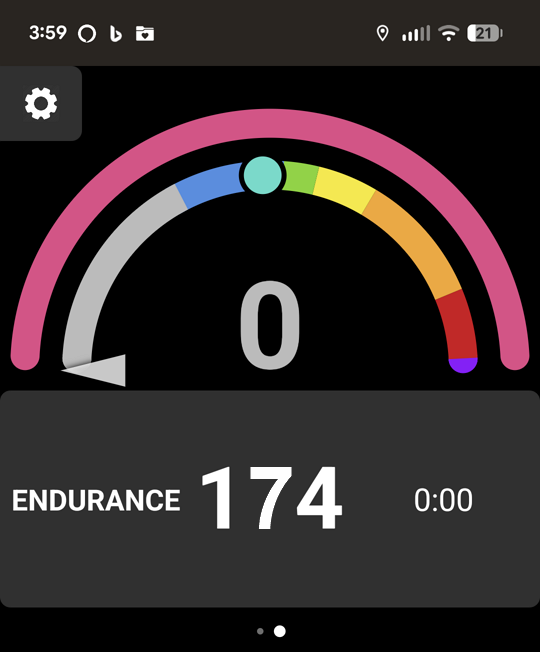
Or an enhanced gauge with a Challenge Level ladder is displayed on HIT days –
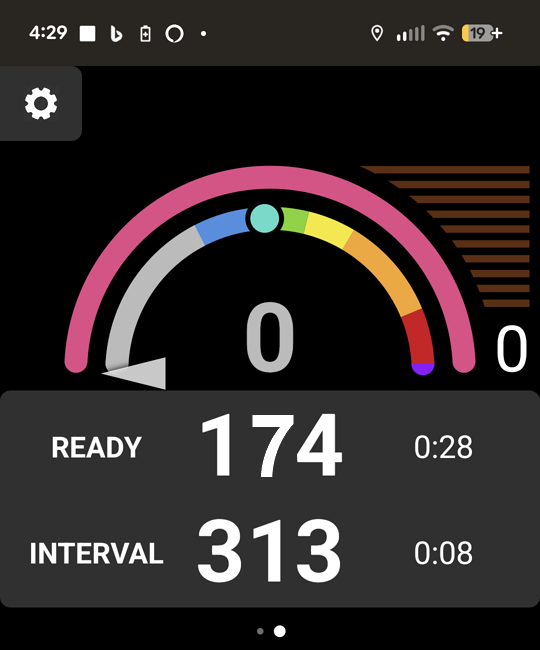
If you really want to see the MPA drawdown in action, try going for a BT on a HIT day.
You’ll understand what it means to go “DEEP PURPLE”. 
Here are the steps –
- Start EBC Android in Indoor mode with no workout selected.
- Warmup as long as you want to be ready to do some hard intervals.
- Ride first couple intervals to CL2.
- Ride next couple intervals to CL4 or as high as you’re comfortable going.
- Continue pushing up the CL ladder until you reach CL10.
Watch the rainbow gauge as you approach CL10.
Don’t wait for full recoveries between intervals. Go for the next interval as soon as CL drops by two clicks. E.g. when you get to CL8, start to recover, but go again as soon as CL gauge drops to CL6. - When you reach CL10 hold on as long as possible and watch what the gauges do.

- Since it’s a HIT day check the buckets while you’re recovering and see what’s left to fill – assuming you’re up for it.