Free Ride Magic Buckets on EBC Indoors with Session Player

Note: Don’t forget to answer the poll at the end. :smiley:

I don’t want to fork out $ for Zwift or Rouvy when all I want to do most days indoors is watch something new while I ride for 1-2 hours.
Even if I had Zwift to participate on ZRL, I wouldn’t want to be limited to 3D world or pay for Rouvy when all I’m interested in is some scenery to pass the time especially on Z2 days.
Here’s my feature suggestion on how to make that happen with only a Xert subscription and minimal code changes by the powers that be. :wink:

  1. Bike The World (BTW) video of the day. Same video all day long auto-selected by XO from a sequential master list of hundreds available routes. There is always a new and different route to ride every day of the week. You would never ride the same route during a year if the master list includes 365 entries.

  2. XO recognizes when you start EBC set to Indoor without any workout selected and treats the session as an XMB free ride.

  3. You monitor the phone app XMB page views to see buckets filling and the Challenge Level gauge.

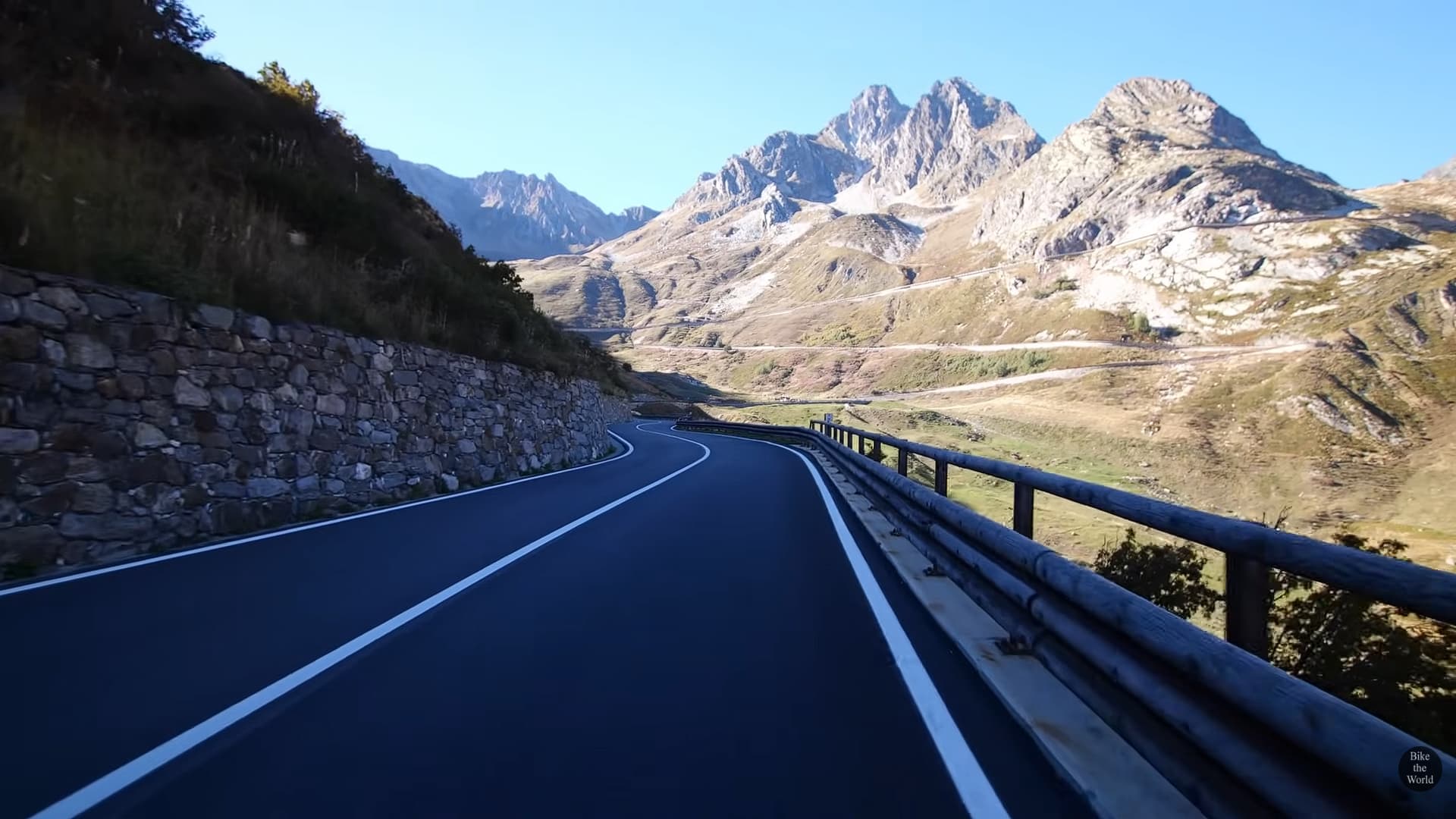
  4. When you go to the Session Player on XO it launches in full-screen overlay mode with rainbow gauge at bottom center as though that’s your head unit riding outdoors. No other screen elements are shown. The gauge will overlay the road surface in front of you so you are immersed in the BTW video.
    The video of the day starts and loops continuously if your XMB free ride is longer than the length of the video. No harm in riding a couple laps if need be. :wink:

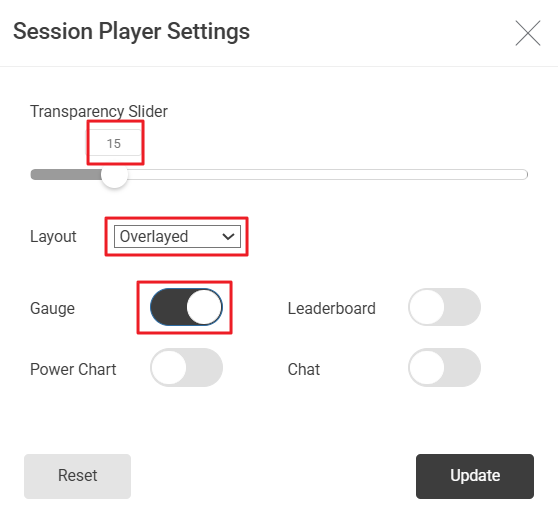
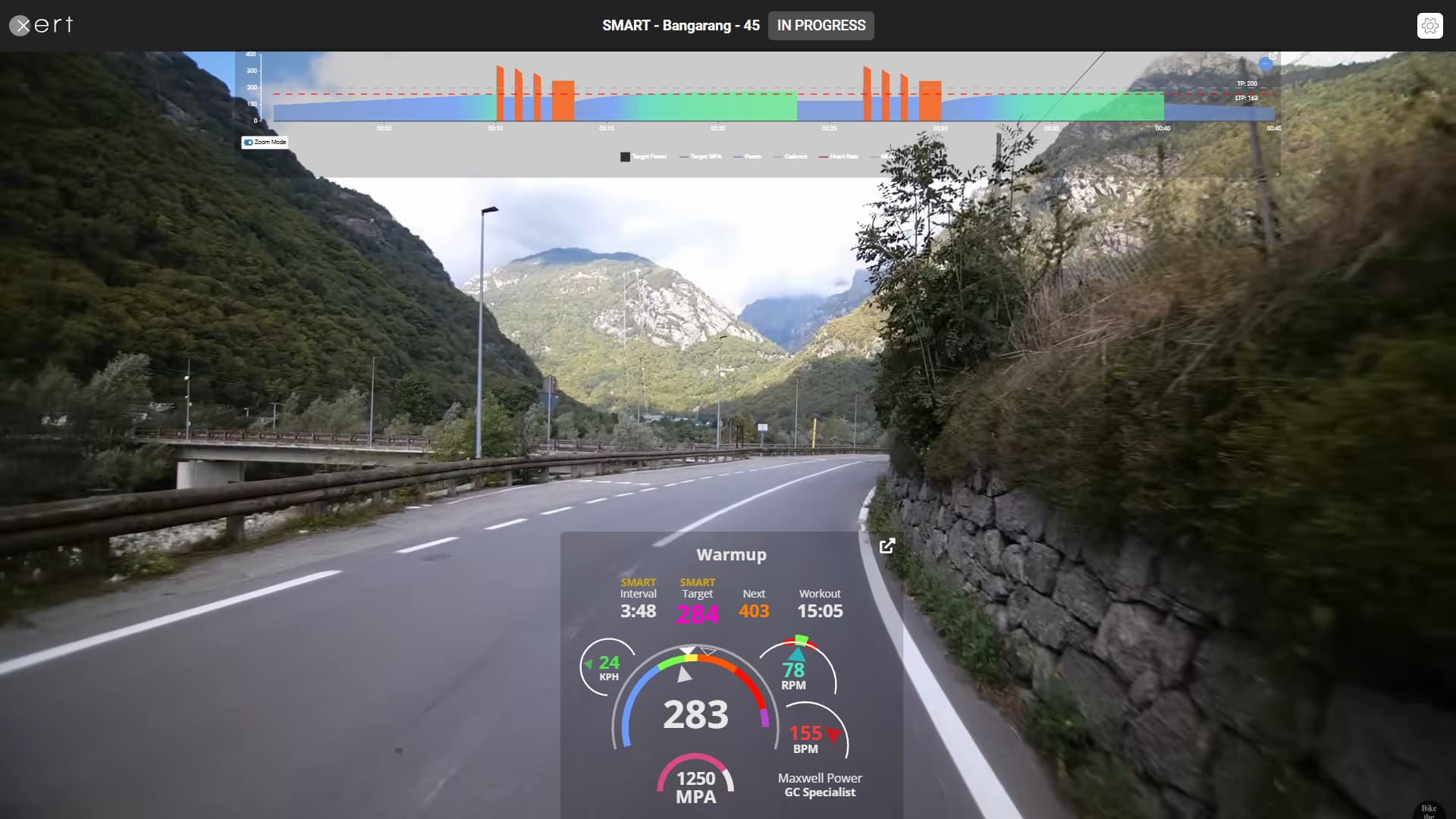
Session Player example (overlay mode; transparency = 15%):
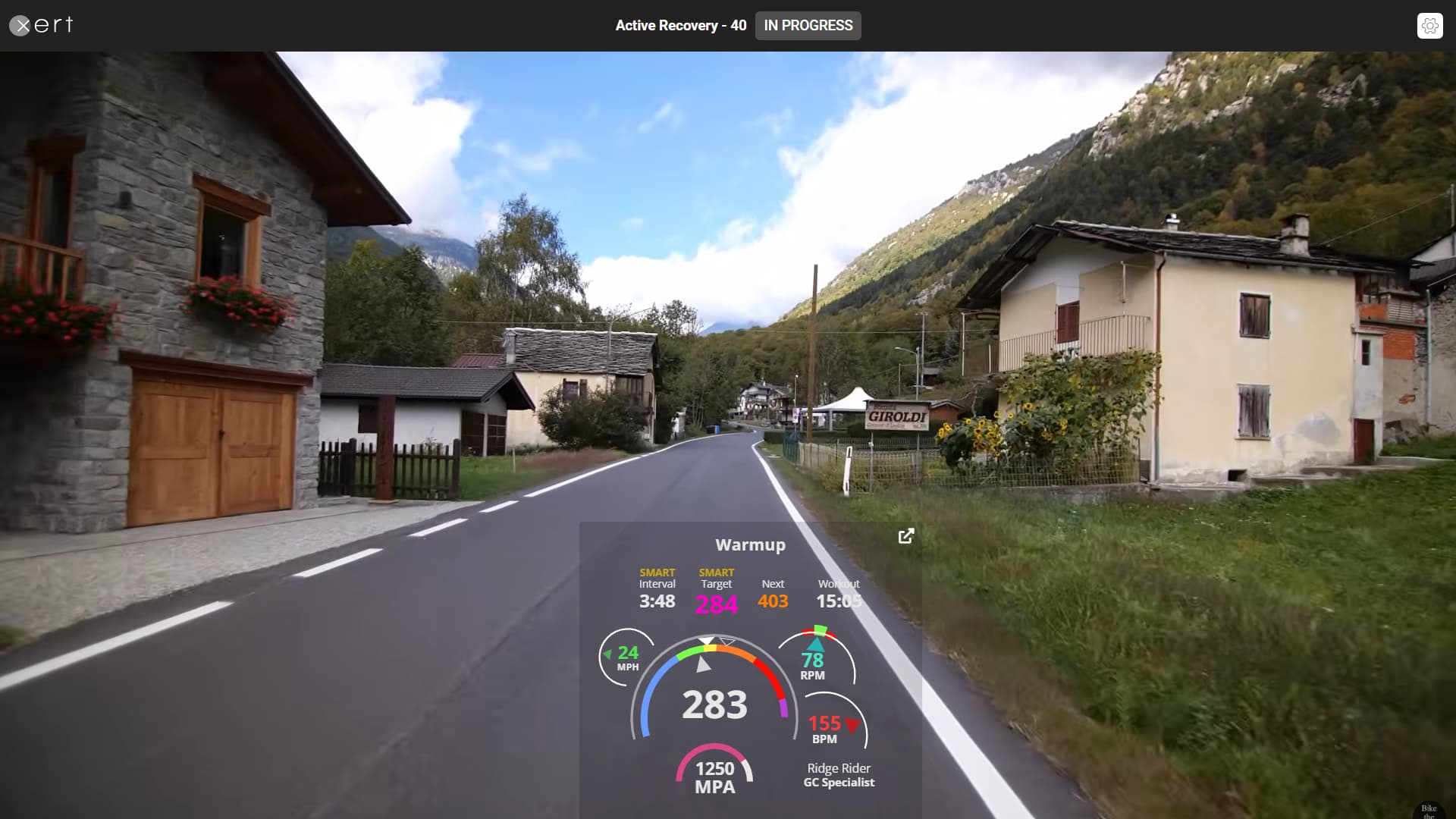
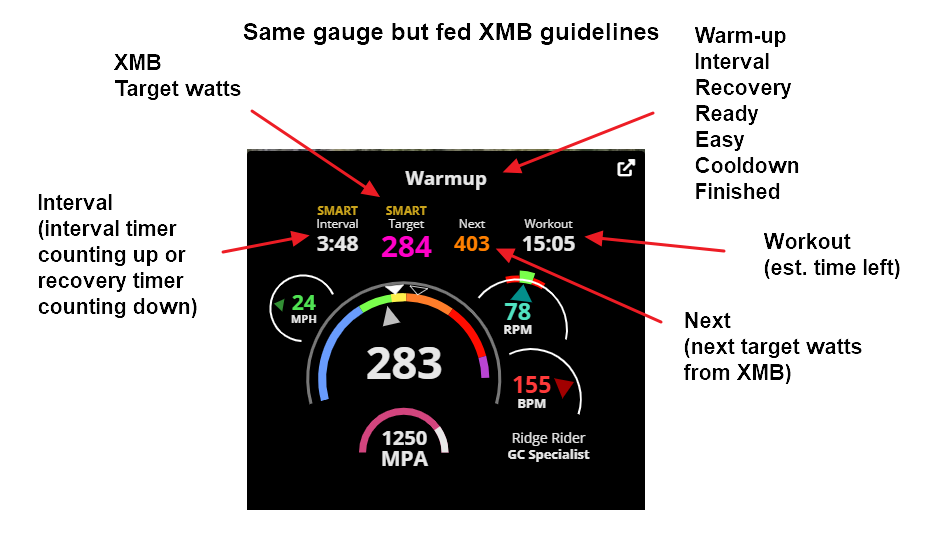
  1. The Rainbow gauge operates as it does now. Only changes required is how the XMB guidelines are passed from EBC to XO. No need for buckets or Challenge Level gauge as that’s displayed on the phone app.

Session Player rainbow gauge:
XMB for iOS is under development so this feature would work with either phone app.
You could literally roll out of bed, jump on trainer, start EBC, select Session Player on laptop or tablet, and be free riding somewhere in the world folllowing XMB guidelines to complete your training for the day.

Would you use this feature if XMB worked this way indoors?

  • Yes
  • No
  • On occassion
0 voters

I know it’s not possible for web browser windows, but it’d be nice if the pop-out session player UI elements (gauges, interval structure, numbers) all had transparent backgrounds so they could be placed on top of another window without blocking the content.

I’d settle for the session player allowing me to freely browse YouTube from my account and choose any video to watch for a session instead of the same Bike the World routes on repeat. I do like the BtW videos as workout content, but there’s not enough variety IMO.

I don’t have hardware for XMB, so can’t comment on that specifically.

(Sorry, a bit off topic but kind of related.)

YT could potentially work too if there were a way to enter a URL or browse to one under Settings (gear icon).

The idea I have in mind would never repeat a Bike the World video as there would be hundreds of different routes in the master list.
You might ride a couple “laps” when your workout is 2 hours and the video-of-the-day (VOTD) is 1 hour long, but you’d be riding a different course every day.

By variety do you mean you want more events or races besides viewing solo routes around the world?
Xert could also add URLs of interest to the master list on occasion or allow crowdsourcing VOTD suggestions, or simply let you over-ride the VOTD entry as above for Youtube.
In either case you’d always be watching something different whenever you want to ride indoors with the Session Player.

I seem to get the same 2 or 3 BikeTheWorld videos from the Xert player, even if I try to select a different one. There are 278 videos on the BikeTheWorld YouTube channel. I don’t know how many are in the “Xert video library” or how they are integrated into the player. Perhaps it’s something to do with trying to match the workout duration, or maybe there’s a licensing / partnership agreement that determines available or suggested content.

I generally don’t have a problem with a ride video looping to cover a single workout session, but if it’s the same video I just saw 2 days prior, that means I end up watching it 4 times a week. That’s a bit much for me. I definitely support having more content available. I also don’t want to have to scroll through a list of videos to try and choose one I haven’t seen recently.

Sometimes I just use the EBC app without the player and watch other content, but it’s less than ideal for me. I can watch a movie or other video for simpler repetitive endurance type workouts, but for more intense workouts with variety in intervals, splitting my attention between two screens usually leads to me missing something on one of them or getting surprised by a power change.

I don’t like the EBC app’s display as much as the player because I can’t see all the info I want on a single screen. I much prefer the player’s UI with the gauges where I can see: power, HR, cadence, interval time remaining, next interval metrics all in the same place without having to tap or click something. I also like the player’s workout timeline UI to again easily see at a glance where I am in the workout and what’s coming up next. On a monitor I can use either zoom or no zoom on the timeline and still see enough info. On the EBC app, often the zoom is not very useful because it just shows a solid block, while un-zoomed is too dense.

On the EBC app, I constantly need to interact with the app’s UI to be able to see all the information I want:

  1. tap to zoom in / zoom out on the workout timeline
  2. swipe left and right to toggle between being able to see HR, cadence, & MPA data, and alternately the interval time and total time remaining.
    I’d rather focus on the workout itself than trying to interact with a UI.

I much prefer the session player’s info panels displayed as a HUD around or as an overlay on some type of video content.

Being able to watch some races would be pretty fun, but the variety aspect for me is more about not repeating the same videos during the week’s workouts, or being able to select my own non-cycling content and still use the session player UI / overlay.

Sorry, a bit tangential there but I agree on somehow getting more variety of content. I did enjoy doing Xert workouts in Rouvy, but also don’t want to pay for multiple platforms at the same time.

1 Like

Yep, that’s one of the features I’m proposing. No need to try and match BTW video runtime to workout duration. Just surprise us with a new “movie” to watch (and loop) every day we want to train indoors.
278 possibilities watched sequentially starting on Jan1 would mean you wouldn’t see the same route again until Oct 6th. I probably wouldn’t remember going there although it may be vaguely familiar. :thinking:

I came up with a way for Garmin users to test my idea if you are interested in trying it.
The missing element is XMB telemetry from EBC (or the Connect IQ app) to the Session Player. But for testing purposes you can monitor XMB on your Garmin and pretend it works that way! :smiley:

BONUS: You’ll gain access to 50+ workouts with different videos you can ride/watch whenever you like whether using XMB to free ride or EBC in AUTO mode.

Requirements:

  • EBC running on your phone (iOS or Android)
  • Garmin device running XMB
  • Session Player running on your PC/laptop/tablet
  • Access to my test sessions that include videos you likely haven’t seen before.

Instructions are the same for Windows or Mac. I suggest using Chrome browser on a Mac.

Prep (you only need to do this once) –

  1. Run Session Player on your desktop/laptop/tablet and select Settings gear icon in upper right. Configure to match this –
  2. Select Update then drag the rainbow gauge where you’d like it to appear. I suggest bottom center to emulate a head unit. This way the display only overlays the road directly in front of you.
  3. Press F11 on Windows browser to switch to full screen mode and verify the rainbow gauge is where you want it. You’ll likely want to drag it lower.
  4. Close the Session Player tab. Your settings will be saved and ready for future sessions.
  5. Go to Communities, My Clubs, Join a Club, and select RR’s Daily Dose of LSD. Or click HERE to immediately join.

You are ready to test an XMB free ride indoors.

  1. Go to Training, Sessions, select Community in dropdown, locate an XMB entry and select Play Now (not Schedule).
    For testing purposes, I created a number of LIT and HIT entries from 30 to 180 minutes long. Pick one that suits your requirement for the day. XMB will fetch the XSS target of that session’s workout.
  2. Start EBC on your phone and select your session. Also be ready to start an Indoor recording on your Garmin device.
  3. As soon as the session starts on EBC start an Indoor recording on your Garmin and swipe to display XMB.
  4. On EBC tap AUTO and switch to Slope mode. You can now ignore the workout intervals running on EBC. Instead, monitor and follow XMB guidelines on your Garmin to complete your free ride session.
    (There are a several ways to implement XMB guidelines during a free ride, but that’s best discussed in a separate topic.)
  5. Run the Session Player on your desktop/laptop/tablet to view the video. Or refresh the browser page if the Session Player does not reflect your selection.

Now imagine the XMB guidelines on your Garmin are being broadcast to the rainbow gauge on the Session Player (as my mockup in original post shows). IOW you could just watch the Session Player screen. For this test simulation you’ll watch the video while glancing at XMB on your Garmin.

  1. When ready to end the workout, stop the recording on EBC and Discard it. End the Garmin recording and Save it.

Notes:

  • I created a number of entries to test XMB Endurance and HIT Intervals at various Focus Durations. If you have YT videos you’d like included in the club entries, PM me and I’ll add them. For example, a 60-minute GC Specialist workout with video link of your choice. They don’t have to be Bike the World videos.
  • These workouts will appear on recommended lists when suitable for the day if you select one from the Planner. Tap the Sessions button and make sure Start Time in upper left is a few minutes from now before you Select & Save. If you join early you’ll be in warm-up mode. When the workout starts change AUTO to Slope if you’ll be using XMB.
  • You can quickly locate XMB workouts from the Training page by entering “xmb” into the text search box.
  • My original club entries were all endurance focused (LSD). You can ride those workouts with EBC in AUTO mode if you prefer or follow the XMB procedure.
  • If circle/dot icons appear on the Session Player you can clear them by placing the cursor over title bar or rainbow gauge. This trick only works if you have a mouse/touchpad to control the cursor.
  • In my testing the video will loop until the workout ends on EBC. That means you can ride as long as you want if you don’t mind lapping the course. Since you’re ignoring the structured workout running on EBC your XMB session can be shorter or longer. Use < on EBC to skip back before cooldown ends to extend a session or > to jump forward.
  • If this feature were fully implemented by Xert the only requirement would be start EBC on your phone or an indoor recording on your Garmin. IOW jump on your trainer and start riding. No need to select a workout. There’d be a different course to watch every day. Daily XSS target determines LIT or HIT specs for your XMB free ride – just like it works outdoors.
  • No power chart is needed since XMB dynamically defines target intervals as you fill the buckets. However, if you want to ride a SMART workout normally using EBC in AUTO mode you can enable the power chart under Session Player Settings. I suggest locating the chart at top of the screen as below.

2 Likes

All that overlay stuff is WAY too complex to set up and use for any remotely ordinary person. Why not just make a genuine AppleTV app for these features? There is no better platform for indoor training than AppleTV. Be ahead of the curve for once in user interface. If you build it they will come…

1 Like

Agreed. Should be simple and my proposed feature-add would support hop-on-and-ride.
An Apple TV app would be cool, combining EBC and Session Player into one.
That means supporting three platforms since you can’t port iOS code to tvOS. Maybe someday.
They could call it EBC+. :smiley: (For some reason Apple recently dropped the +.)

Hey! You should change your screen name to Brian “Apple TV” Hamilton. :grin:

1 Like

I rode one of my long XMB Endurance sessions the other day called South Harris Loop (Scotland). That’s 3 hours of rocky coastline in the Outer Hebrides. A bit monotonous but more interesting during the last hour. Count sheep or dwellings if you get bored. :slight_smile:
This time I elected not to dual record with my Garmin and rode with EBC Android mostly in AUTO (ERG control). During cooldown I switched to Slope and rode a bit more.

I added a 75-minute endurance session called SAFA Brian: Pros In Spain for something different to watch. I get tired of all the climbs. Scenic but I want to pretend I’m going fast sometimes.
I’ll likely add a couple of SAFA B’s descent madness videos. No coasting allowed. :wink:

Here’s a tip on finding XMB entries quickly once you’ve joined my club.
From the Training page search for “xmb” and use the dropdown to select a Duration.
Ride as is under EBC AUTO control or switch to Slope and free ride with or without XMB.

This basically makes it a non-starter for me. I’ve messed with the Session Player stuff in the past using a PC once and also an old laptop and it just was 100% not worth the trouble. Once you go Apple TV, you don’t go back.

I know I push Apple TV a lot but with good reason. I have a lot of friends with indoor trainers and using various platforms (mostly Zwift by a very large margin but increasingly Training Peaks Virtual). The one thing they have in common is that the smallest things completely destroy their setup and very few of them are able to get it going again without help from a nerd, often me. The few that I’ve shown the Apple TV setup to are blown away with how fast and simple it is. Ironically, most haven’t bought one because they have PTSD from all the other tech that is so BAD!

I expect the next version of Apple TV, due very soon, will change more minds. I’ve seen so many friends finally get fed up with the various Android solutions and buy Apple smartphones. What phone you use is sort of the clincher because using your phone for a remote just makes so much sense and simplifies everything immensely. The new Apple TV should improve the graphics quality to the point most just won’t care.

PS. The bluetooth limitations myth may still take a while to dispel but maybe the new Apple TV will address that formally as well. The myth is that Apple TV only supports 2 bluetooth connections - I use 3 but 4 work fine as well. There are indeed limitations but I don’t think most users would have any problem as a result.

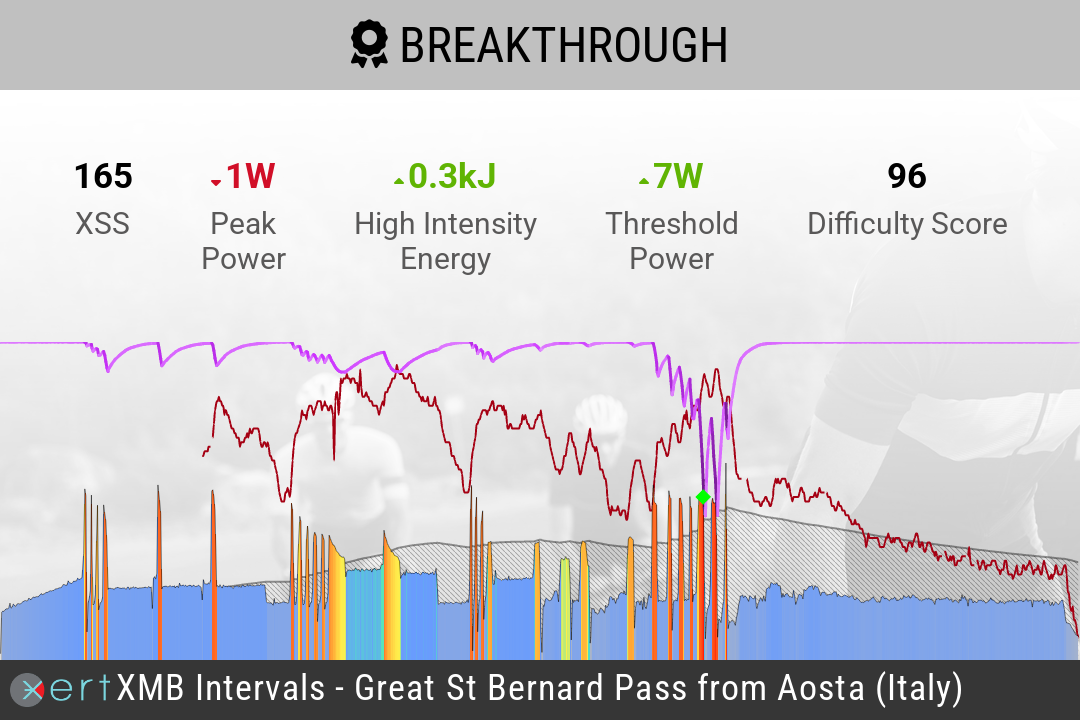
I rode one of my XMB club sessions recently called XMB Intervals - Great St Bernard Pass from Aosta (Italy).
What a beautiful climb. If anyone rides this session, make sure you’re in Slope mode during cooldown so the video continues to play all the way to the end (about 15 minutes past the workout). Otherwise, you won’t reach the top. :slight_smile:

Watch off to your left for a surprise companion when you meet sheep crossing the road.
The video is paired to SMART - Radar Love so be prepared for some action if you plan to ride the workout under ERG control the whole way. I didn’t.

Here’s how I started the dual recording –
First, I visited the Training page on my laptop, typed in XMB under text search, entry showed up at top since 2 hours is my usual duration. Otherwise, I would have set Duration filter to 1.5 to 2 hours.
Selected Play Now then tapped > to view Session Player.
Ran iOS EBC on an old iPhone I often use for indoor sessions.
The session name wasn’t listed (like EBC Android works) but the associated workout was the first entry (Radar Love - 120).
I started the workout on EBC and at same time began a recording on my Garmin 830 and swiped to the XMB screen.

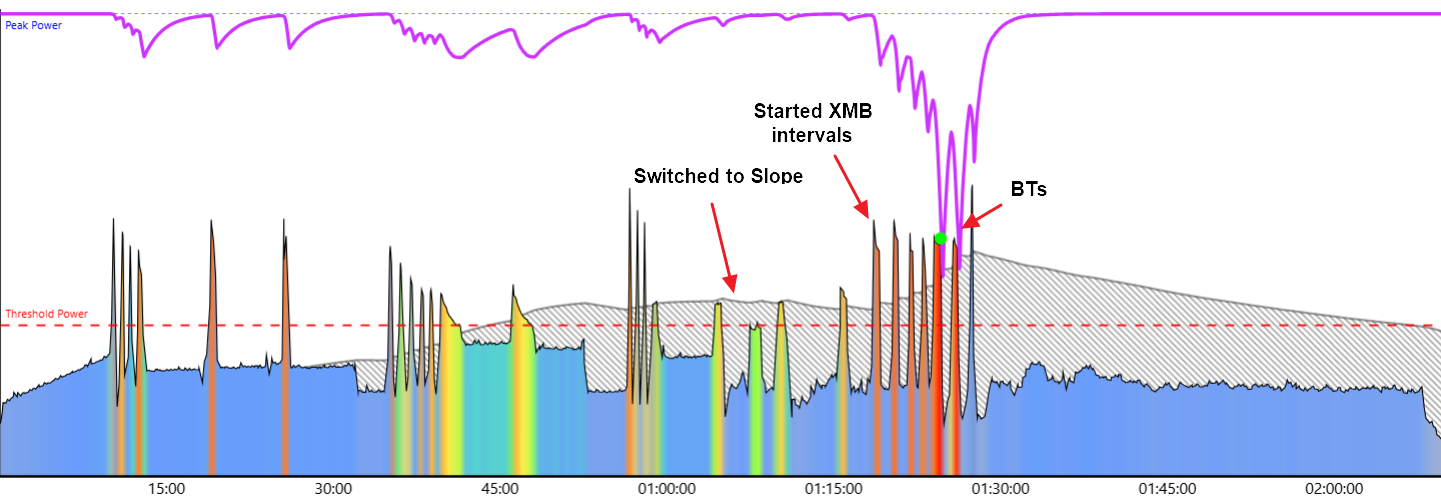
Got halfway into the workout and decided I didn’t want to ride any more tempo rest intervals so switched to Slope on EBC and started to follow XMB guidelines on my Garmin to fill the buckets.
During the first half of the workout on EBC I noticed Challenge Level (CL) on XMB had reached 8 during the main set so I decided to see how much harder CL10 would be performing XMB micro-intervals.
After several intervals I saw “BT in 30 secs @ X watts”. I waited until the following interval to go for CL10. Once I reached CL10 I kept pedaling for as long as I could (counting breaths). That triggered a BT badge.
When I recovered from that effort I decided to try again and got a second BT.
At that point the High bucket was filled, and I only needed one short high watt interval to fill Peak. Then I took it easy for around 35 minutes to fill remaining Low bucket points.


You’ll notice these workouts get saved under the name I assigned to the session.
This is on purpose since labeling it Radar Love wouldn’t be appropriate when XMB is involved. When you use XMB the goal is to fill the buckets in whatever manner you choose. The workout title doesn’t matter. It’s XSS points at the target Focus Duration that count.
Plus, you can go for a BT any time XMB pushes you in that direction. :laughing: