I have a Forecast AI plan targetting a tyrip to the alps in June. I created the plan about 5 days ago and I am fairly certain it had workouts scheduled yesterday and the day before that i missed (not a great start!)
I was planning on doing some catching up today but it is still showing today as a rest day.
The iOS EBC app is showing a deficit but I cannot see on the web portal how to see what i missed.
I’m also pretty new on the Xert platform, but i can share what i do when i miss a scheduled workout: I simply plan a new one. even it’s a rest day.
Simply go to My fitness > Plannner and click the + sign to seach & plan a workout!
not sure about that to be honest… but you can see your daily XSS target on the ‘Today’ page. Based on that you can filter the workouts. I usually also pick my workout type based on how i feel.
The iOS EBC app predates XFAI so you should ignore the XATA Training Pacer and deficit/surplus info displayed. The next version of iOS EBC will resolve this issue.
For XFAI plans visit the Today and Planner pages on XO.
An XFAI plan is not cast in stone. It is less flexible than XATA, but you can swap days or override the daily recommended LIT/HIT/Rest entry on occasion as @dc_be suggests.
If that change-in-plan sufficiently affects the weekly XSS in the forecast, the Adapt Forecast warning dot will appear. First you should investigate why by hovering over (or tapping) any magenta outlined matchsticks on the forecast chart. If benign (ex. availability issue) you may decide to ignore the broken constraint. Otherwise Adapt Forecast will take a look at the week ahead and rebalance the plan to keep you on track. As you approach your target date the ability to drift off-course narrows.
With a target date in June there is plenty of wiggle room for you to miss a day, swap days, join an impromptu group ride, rider longer than scheduled, etc.
The way I like to describe it is there are “Many roads to Rome” until you reach city limits.
You can take detours when necessary, but you should endeavor to stick-to-the-plan as best you can and Adapt Forecast if necessary.
Adapt Forecast can actually reshuffle the hand you’ve been dealt for this week.
Try it (even without a warning dot) and watch what happens. How much the week changes depends on how restrictive your Availability is defined and how close to the target date you are.
BTW Deficit/surplus on a XATA program does not carry over from one week to the next. The needle gauge represents a weighted moving average XSS in a rolling 7-day window tied to a fixed ramp rate you’ve set.
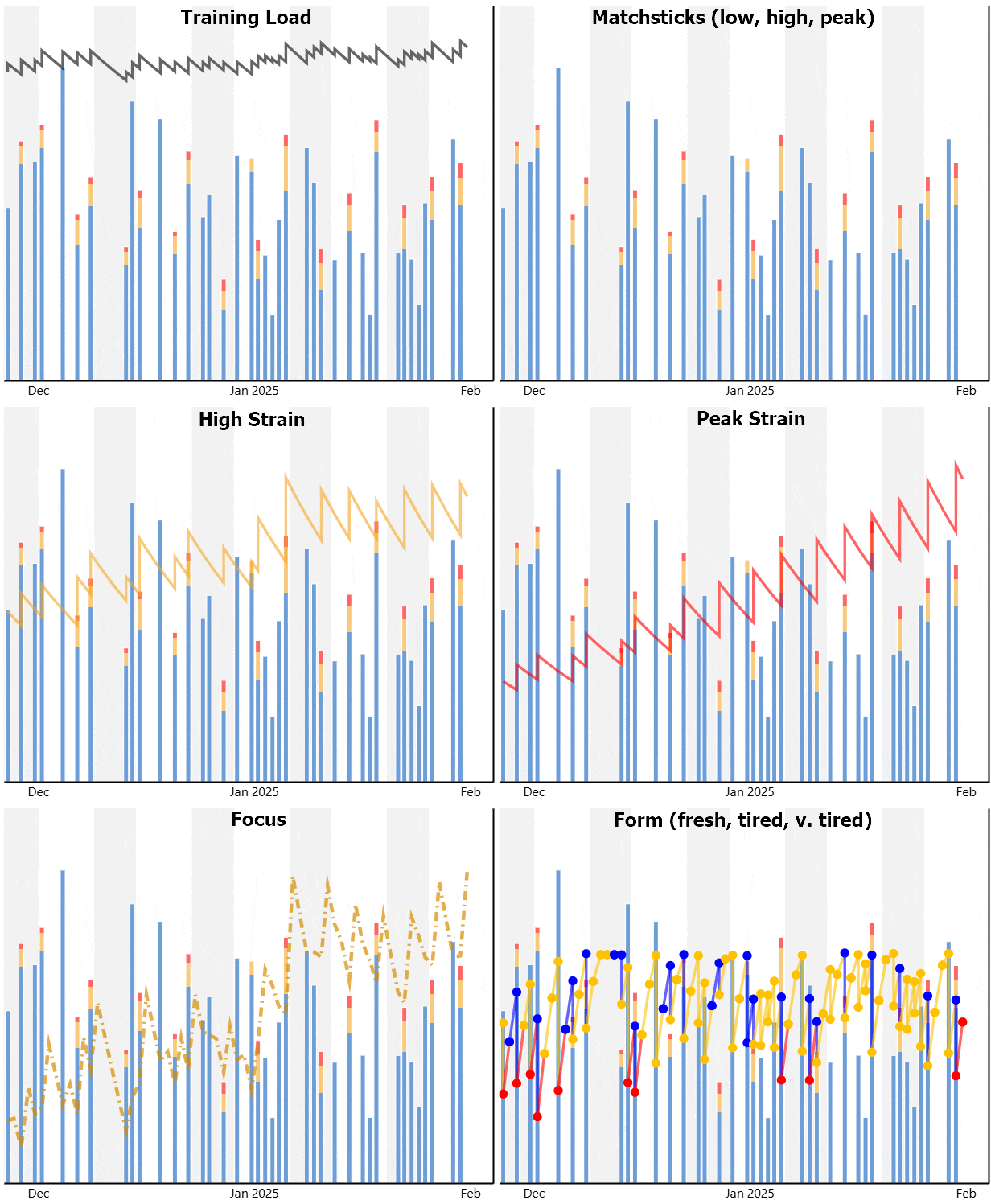
XFAI plans are more nuanced than that. This is best examined by viewing the forecast chart and selecting one key at a time. Here’s an example 60-day Goal chart.
Notice the trend lines in low/high/peak strain over the term of the plan plus the variability in weekly hours.
In this example, the overall TL line shows a minimal rise, but high and especially peak strain rise significantly. That coincides with the target goal to improve 4-min power. YMMV