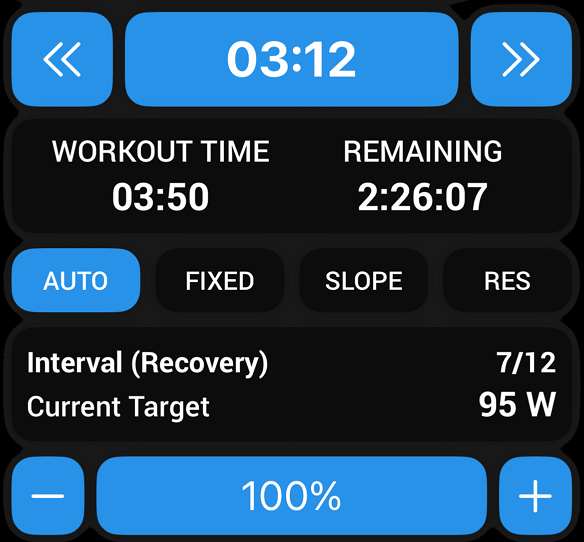
It would be very helpful to me if the EBC app had buttons to control the slope when playing a workout that has sections in slope mode. In slope mode, the intensity buttons control just the displayed value of the target power but don’t actually have any effect on the workout.
I have an older bicycle mounted on my Wahoo Kikr that has only one functional gear. In ERG mode this is not a problem. In slope mode, however, this is no way for me to change my power output (other than changing cadence). I imagine that as the new Zwift single cog systems become more popular, others would also benefit this.
If you tap AUTO the EBC app switches to SLOPE mode where you can control % slope in .5 increments with a corresponding cadence range to match.
You’ll quickly determine what % works best with your trainer for intended watt targets and the gear combo you prefer. One functional gear will work fine.
If you haven’t ridden many workouts in Slope mode before I suggest you try that for a week.
I like it so much I now do most workouts in Slope mode. Or I start and end in AUTO mode so only warm-up and cooldown are under ERG control.
SMART intervals work fine too. The difference is you more closely monitor the rainbow gauge and power chart to stay on target.
LIT workouts are especially easy in Slope mode as you can leave the slope % fixed and vary cadence enough to change power output. Similar to a Z2 ride outdoors.
For an alternative LIT workout select one of the Free Ride workouts (45 min to 2 hours) and simply ride as you please hovering around LTP while you watch whatever you want on the big screen.
The only downside is changing from AUTO to SLOPE isn’t a toggle. I wish they would add that function in the next EBC update. Currently you have to tap 4 times to return to AUTO passing through ERG, Resistance, and Off. If it were a toggle option I think more users would try Slope mode which is what some coaches prefer their athletes ride indoors. There are additional benefits besides no spiral-of-death incidents or transition delays.
Ah, brilliant, thank you for pointing that out - you basically just gifted me a working cassette. This winter will be much better with both erg and slope modes available.
Bringing this old thread back from the dead to ask if there’s a way to quickly switch between two slopes for intervals? I’ve come to the realization that I prefer doing intervals in slope mode. For longer intervals I don’t mind tapping the + or - button a bunch of times, but for 30/15 or 40/20 intervals I don’t have the capacity to switch this fast, so it would help if there was an option to set two slopes, and just hit a button to switch between the two of them.
That should be coming to Android EBC in the next update as it has been added to iOS Beta.
Here’s in early implementation that has been tweaked a bit in the latest Beta build.
For 30/15s don’t you leave it in Slope mode for the entire set?
As mentioned above I ride some portion of all indoor workouts in Slope mode.
I get more out of it that way, can exceed targets when able, and switch to XMB if I’m having trouble completing the workout intervals.
Right, I leave it in slope mode the entire time. It’s the changing of slope percentage that takes too much time for me, when going from 2,5% to 6%. Might take me the whole 15 seconds to go back and forth. But while riding today I realized, I should be able to create a workout that fits my needs with only slope %, and in case my power improves I just up the %.
I see what you mean now.
Would the % toggle function resolve resistance changes for those using Virtual Shifting in combination with the Cog?
I don’t have experience with either so I’m not clear what the limitations are when you change to Slope mode and don’t have a cassette to manage resistance when slope is a fixed %.
With a cassette I’m shifting two or three shifts up/down depending on the target watts for the interval. Or shifting even higher if I’m going to stand up during the interval.
Are you on a smart trainer or smart bike with gears so you can just shift to adjust your power output? Alternatively, you could make your workout using the workout designer to automatically switch between the slope settings that you want for those intervals.
It would be best to avoid any further complexity to the current UI.
I’m on a smart trainer, and could theoretically shift gears, just not something I like to do indoors.
I’ve now created a test workout for myself, and will see how that goes. Do I need to set both, power and slope, or is it enough to just set slope if I know what power I want to pedal at?
Could’ve done that before I asked my question, just hadn’t thought about that.
Yeah, I would recommend inputting the target that you’re aiming for. That way the estimated XSS for the activity will likely be closer to what you end up getting & is consistent with how we’ve created all of our indoor mixed mode workouts. Obviously, the final XSS that you actually achieve will vary depending on how you actually perform during your workout.
Pro tip: rather than using %FTP, try defining the interval using MMP/Mean Max Power so that the intervals scale up & down with your fitness signature as a whole, rather than just using simple %FTP intervals.
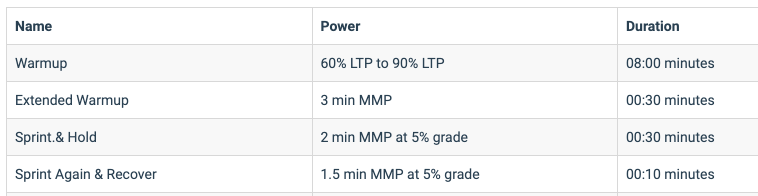
You’re exactly right! You can set the target however you’d like (MMP, Target MPA, etc.) AND specify that it should be done at a specific grade.Then, when you’re doing the workout, Xert will automatically switch the trainer into SLOPE mode at the pre-determined slope setting.
Here’s an example of how it’s used in one of our workouts, if you want to check it out in the designer (here):