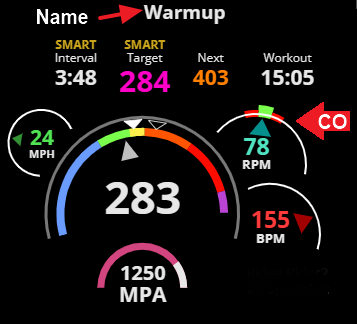
I am a new user and I am trying to customize a workout. I want to set a specific cadence target of 100 rpm for my high-intensity intervals.
However, when I select an interval in the Workout Designer, I cannot see the ‘Cadence’ input field in the ‘Interval Properties’ sidebar on the right. I’ve tried looking under the ‘Target’ and ‘Intensity’ sections, but the cadence option seems to be missing or hidden.
Could you please guide me on how to make this field appear so I can see the target on the Xert EBC app during my session?
Closest function for doing that would be to include “100 rpm” in the Name field for the interval.
That name doesn’t appear on the EBC app but does appear on the Remote or Session Player while executing the workout on your phone.
In addition, you’ll see the Cadence Optimizer (CO) gauge which shows your preferred cadence at torque. That means you can deliberately target a cadence or ride above or below your natural cadence during any interval, work or rest portion, on any workout.
This assumes you have a desktop/laptop/tablet to view the Remote or Session Player as EBC runs on your phone.
If you only want to run the workout on your phone, you can swipe to a page view on EBC that displays cadence and monitor rpm.
The consensus is mixed as to whether cadence drills are beneficial.
I primarily use the CO gauge to spin up to suggested rpm before a hard interval starts or as a reminder to spin down during RIBs (rest-in-between). I’ll also check it if I’m dragging at the end of a hard set. I.e. spin up if you want it to feel easier.
Cadence along with a CO bar are also displayed on Xert Magic Buckets (XMB) if you have a Garmin head unit when riding outdoors.
Hello,
thank you for your reply. It's a real shame that we can't integrate a cadence into EBC, and especially that the cadence we entered can't be displayed on the main EBC page rather than a secondary page; that would be much easier to integrate. I think incorporating a specific cadence into a workout makes perfect sense. For example, doing VO2max intervals at an increased cadence to raise the heart rate to the VO2max range without generating significant muscle fatigue at high power outputs and a low cadence.