XSS is shown under XO, Activities, Table or under Planner tab, Weekly Stats
XATA is based on a rolling seven days using a weighted moving average.
No need to worry about a day’s deficit/surplus as the figure evens out over the seven days. Your goal is to keep the pacer needle between 11am-1pm to stay on target.
I had an XSS Training Surplus of X yesterday but today I have a big deficit of Y. What’s going on? – Xert (baronbiosys.com)
Forgot to ask if you had seen this thread already (lots of newbie tips there) –
Beginner questions - Support - Xert Community Forum (xertonline.com)
That 14 watt jump in TP explains the lower XSS value generated for the activity.
Had your updated signature been in effect when you started that workout each of those red spikes would been harder and the threshold level 2x15’s would have accumulated more strain as @wescaine mentions.
One of the unique features of Xert is you can view your current fitness signature applied to a workout by opening the workout in Workout Designer. Note the MPA and Difficulty lines below when I open ‘SMART - Galvanize’ with my current signature. This is the predicted outcome which may differ from actual results depending how well I perform the workout and whether a signature adjustment is warranted (BT event occurs during activity).
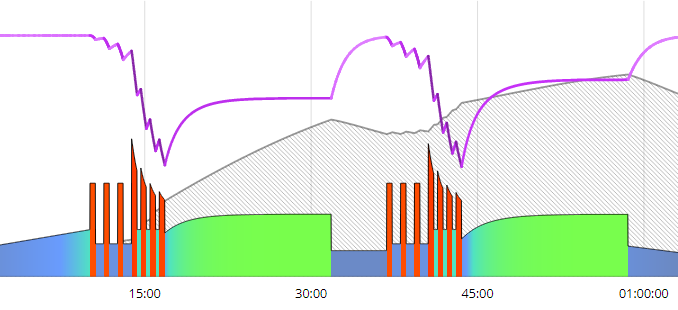
Compare this to the Difficulty measured in your activity with the updated signature.
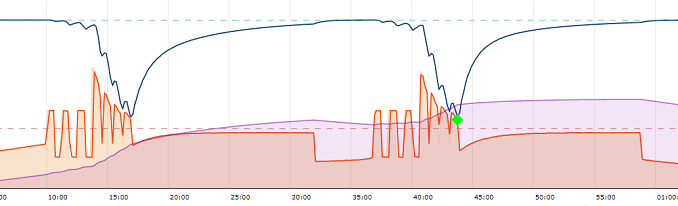
The Difficulty line in particular indicates where XSS accumulates more as you continue to perform while fatigued.
Reference –
Xert Strain Score – Xert (baronbiosys.com)
Difficulty Score – Xert (baronbiosys.com)